
Compare Items on Amazon with Popgot Easily

Key Takeaways
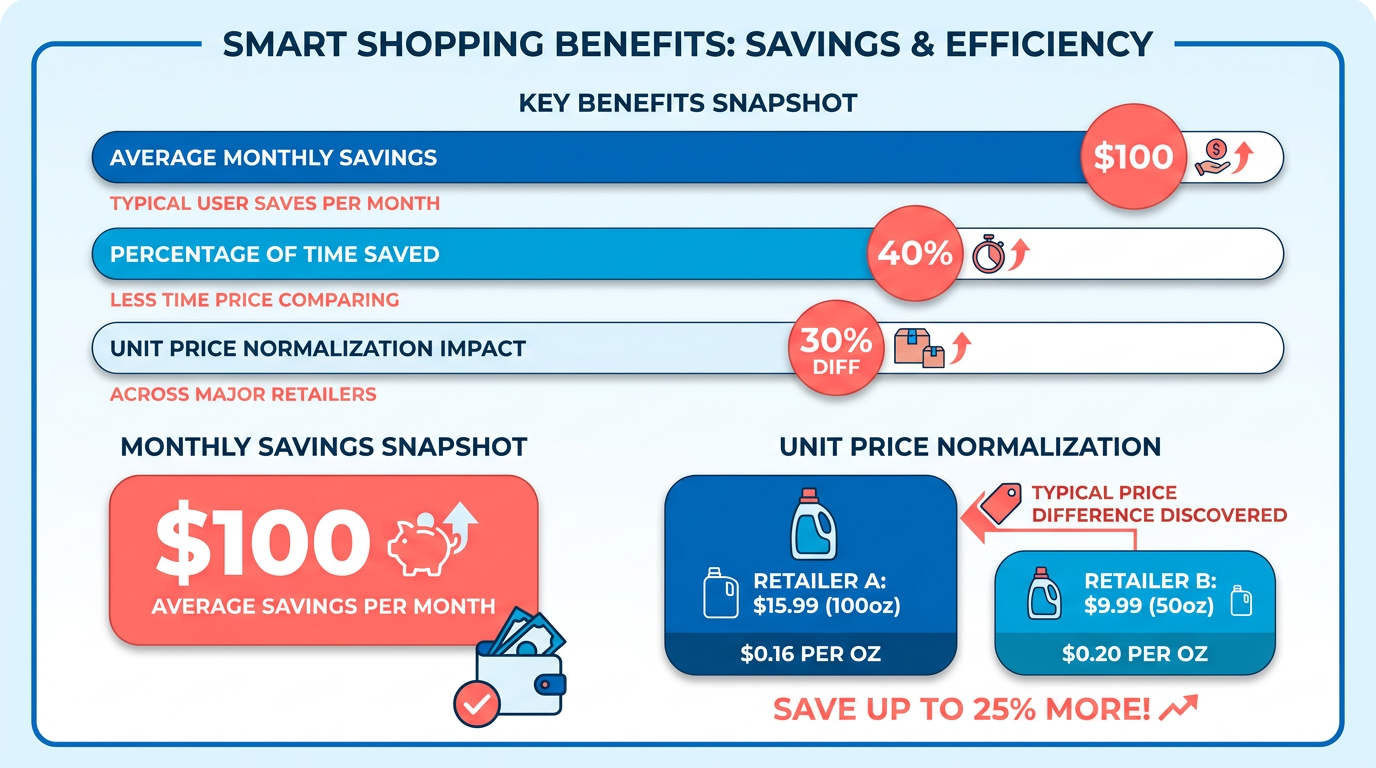
- Use Popgot to save approximately $100 monthly by comparing unit prices across Amazon, Costco, and Walmart.
- Popgot normalizes product listings and filters by criteria like ingredients using AI for faster, targeted shopping.
- The app’s barcode scanner enables global price comparisons on Amazon sites within seconds, with 10,000+ downloads.
- Health-conscious buyers can exclude non-compliant products instantly, such as non-keto-friendly groceries.
- Popgot’s 4.0-star rating reflects its intuitive design and measurable cost savings for daily essentials.
- Unit price normalization (per ounce, pound, sheet) helps identify the cheapest options consistently.
- Users praise Popgot for reducing decision fatigue and simplifying complex shopping tasks efficiently.
Why Comparing Items on Amazon with Popgot Matters
Why Comparing Items on Amazon with Popgot Matters.
Using AI-powered tools like Popgot transforms how shoppers find deals, saving time and money while reducing decision fatigue. According to Popgot’s data, users can save approximately $100 per month by comparing unit prices across major retailers like Amazon, Costco, and Walmart. This tool isn’t just about price-it normalizes product listings, filters by criteria like ingredients, and uses AI to simplify complex shopping tasks. For example, a health-conscious buyer searching for keto-friendly groceries can use Popgot’s AI to exclude non-compliant products instantly, avoiding the frustration of sifting through irrelevant options. As mentioned in the Maximizing Savings with Popgot's Comparison Tools section, this unit price normalization helps identify the cheapest options for daily essentials.
Real-World Impact of Using Popgot for Amazon Comparisons
What makes Popgot stand out? Its ability to cut through the noise of inconsistent pricing and product descriptions. With over 10,000 downloads and a 4.0-star rating, the app’s barcode scanner lets users compare prices across Amazon sites globally in seconds. This is particularly valuable for busy professionals who need quick, accurate comparisons without sacrificing quality. One user shared, “I like this idea a lot-feels like there’s a lot of room to grow here”, highlighting how Popgot’s intuitive design addresses real-world pain points.
Cost savings are measurable: by normalizing unit prices (per ounce, pound, or sheet), Popgot helps shoppers identify the cheapest options for daily essentials like shampoo or cleaning supplies. For instance, a parent buying bulk items for a family of five might find a 20% discount on a 32-ounce shampoo bottle compared to smaller variants. Over time, these small savings add up, directly reducing monthly grocery bills. Building on concepts from the Setting Up Popgot for Amazon Comparison section, this functionality is accessible to users who configure their preferences to prioritize value.
Solving Common Shopping Challenges with AI
Traditional shopping tools often fail to address specific needs, like dietary restrictions or brand preferences. Popgot’s lightweight AI model solves this by scanning product descriptions and filtering based on user-defined criteria. A keto shopper, for example, can set filters to exclude products with added sugars or artificial ingredients. This level of customization isn’t just convenient-it ensures shoppers avoid trial-and-error purchases, reducing waste and frustration. As mentioned in the Using Popgot for Amazon Product Verification section, this AI-driven filtering extends to verifying product details like ingredients and compliance with dietary standards.
Another challenge Popgot tackles is cross-border price discrepancies. Amazon’s UK and US sites often list the same product at different prices, but manually checking both is time-consuming. Popgot automates this process, instantly comparing prices and genuine reviews across regions. Sellers benefit too, using the tool to spot lucrative markets where their products might be undervalued.
Who Benefits Most from Popgot?
While everyone can save money with Popgot, certain groups see disproportionate benefits. Health-conscious consumers appreciate the AI’s ability to filter products by nutritional content, while busy professionals value the time saved from manual comparisons. Parents, students, and budget shoppers also benefit: one case study showed a user slashing their back-to-school supply costs by 30% using Popgot’s unit price comparisons [Slash Your Back To School Bill].
Even casual shoppers can use Popgot for everyday wins. Consider searching for “affordable shampoo” and seeing not just the cheapest option, but the best value per ounce. Or finding keto-friendly snacks without scrolling through dozens of products labeled “low-fat” but loaded with hidden carbs. These scenarios illustrate how Popgot turns complex searches into simple, accurate decisions. By addressing these needs, Popgot isn’t just a price comparison tool-it’s a personalized shopping assistant. As one developer noted, “God tier filtering. Do you mind sharing how you integrated AI into the filter system?”, underscoring the tool’s technical strengths. Whether you’re optimizing a grocery list or exploring Amazon’s global marketplace, Popgot’s blend of AI and user-centric design makes shopping smarter, faster, and more transparent.
Setting Up Popgot for Amazon Comparison
Setting up Popgot for Amazon comparisons begins with creating an account and configuring preferences to match your shopping habits. The process is designed to streamline product searches while ensuring the AI-driven filters align with your priorities-whether you’re comparing prices, features, or customer ratings. By installing the browser extension and customizing settings, you can turn Amazon into a dynamic comparison platform. Below, each step is broken down with actionable guidance.
How Do I Create a Popgot Account?
Visit Popgot’s official website and click Sign Up. Enter your email address and a secure password to create an account. After verification, you’ll be directed to a preferences setup page. Here, select categories you frequently shop for (e.g., electronics, books, or household items) and set a default budget range. These preferences help the AI prioritize relevant products during comparisons. Once saved, your account is ready for integration with Amazon.
How Do I Install the Popgot Browser Extension?
Open the Chrome Web Store and search for Popgot to locate the extension. Click Add to Chrome to install it-this grants seamless access to Popgot’s features while browsing Amazon. After installation, click the Popgot icon in your browser toolbar; it will prompt you to log in with your newly created account. Once authenticated, the extension activates automatically when visiting Amazon. You’ll see a small comparison panel on product pages, allowing you to toggle between items for side-by-side evaluations.
How Do I Configure AI-Driven Filters for Accurate Comparisons?
Popgot’s AI filters refine search results by prioritizing products that meet your criteria. To set these up, click the Popgot panel on an Amazon search results page. Toggle options like Price Range, Customer Rating, and Prime Eligibility to narrow options. For example, if you’re comparing smartphones, set a minimum 4.5-star rating and enable the Compare by Features toggle to highlight technical specs. The AI learns from your interactions over time, so manually adjusting filters during searches improves its accuracy. For deeper customization, access the Settings menu in the Popgot dashboard to define saved preferences for recurring categories. Building on concepts from the Comparing Prices and Features with Popgot section, these filters streamline evaluations by focusing on key metrics like performance and value.
What Are Popgot’s Customizable Search Filters and How Do I Use Them?
Beyond AI filters, Popgot offers manual search refinements. On Amazon product pages, click the Popgot panel to access options like Brand, Size, Color, and Shipping Speed. These filters work alongside the AI to eliminate irrelevant options. For instance, when comparing running shoes, you can set a brand filter for Nike and Adidas while sorting by price. The tool also allows you to save favorite filters under Custom Templates, ideal for frequent purchases like groceries or electronics. To apply a template, simply select it from the dropdown menu in the Popgot panel before initiating a search. As mentioned in the Using Popgot for Amazon Product Verification section, these filters enhance precision by aligning with your specific product requirements.
How Can I Optimize Popgot Settings for My Shopping Needs?
Tailoring Popgot’s settings ensures it adapts to your unique priorities. In the Dashboard, adjust notification preferences to receive alerts for price drops or new product launches. Enable the Compare Multiple Items feature to evaluate up to five products simultaneously-this is especially useful for gift shopping or bulk purchases. For frequent Amazon shoppers, activate the Auto-Compare mode, which automatically suggests similar items when browsing. To test these settings, try comparing laptops using the blog post Slash Your Back To School Bill as a reference for budget-friendly strategies.
By combining account preferences, browser integration, and AI-driven customization, Popgot transforms Amazon into a comparison-centric platform. Start with small searches to refine filters, then scale up to complex comparisons as you grow familiar with the tool. The Costco Isn’t Always Cheaper guide also offers insights on using Popgot for cross-retailer evaluations, though Amazon remains its core focus.
Using Popgot for Amazon Product Verification
Using Popgot for Amazon product verification helps you confirm product details like ingredients, dosages, and brand compliance with AI-powered precision. The tool simplifies shopping by normalizing product listings and identifying discrepancies that could signal counterfeit items or misleading claims. Below, we break down how to use Popgot’s capabilities effectively.
How Does Popgot’s AI Agent Verify Product Specifications?
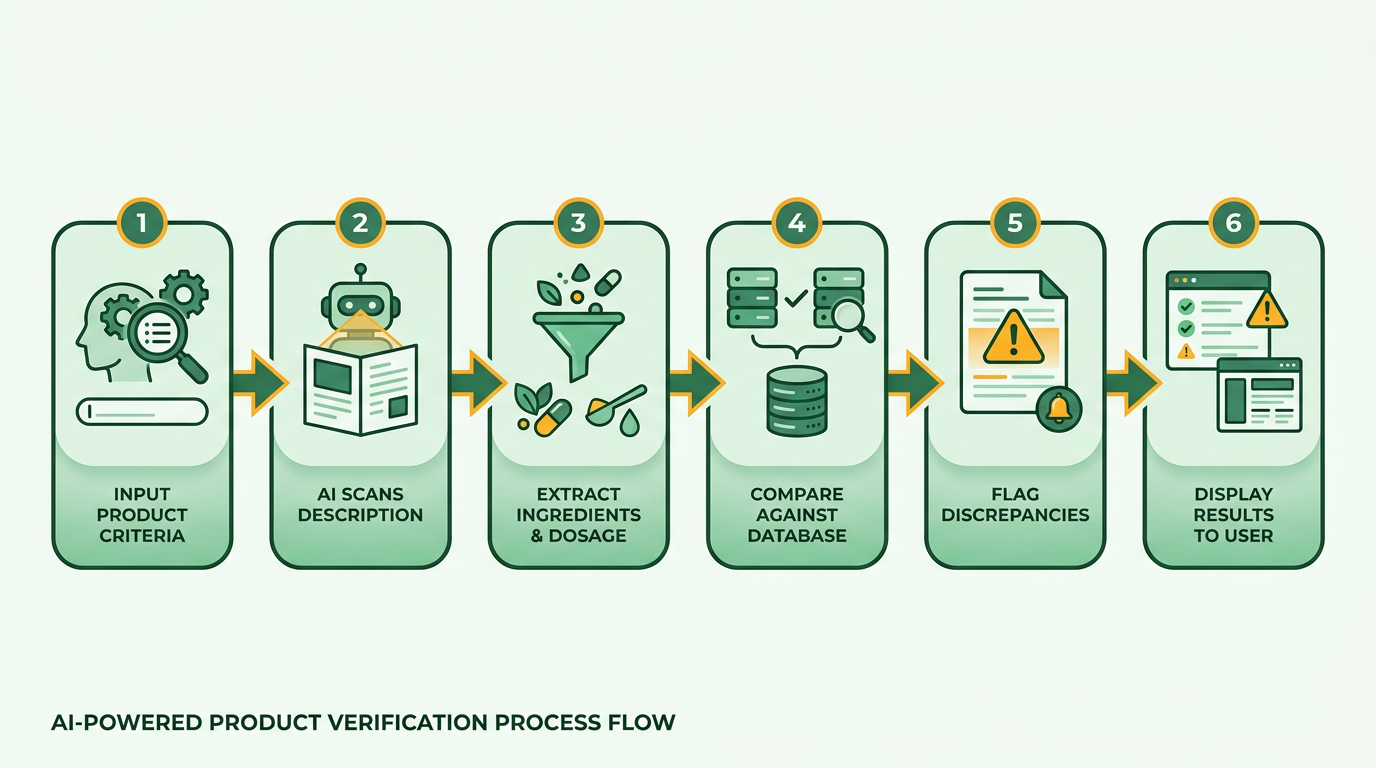
Popgot’s AI agent scans product descriptions, ingredient lists, and brand claims to verify accuracy. It cross-references this data against retailer databases and standardized formats to ensure consistency. For example, if you’re comparing two supplements with similar labels, Popgot’s AI can flag differences in dosages or additives that might not be obvious at first glance. This process relies on a lightweight AI model trained to parse text and detect anomalies in non-perishable items like vitamins, cleaning products, or household goods.
A user testimonial highlights this: “I like this idea a lot. feels like there’s a lot of room to grow here” . This feedback underscores how the tool’s automation streamlines what would otherwise be a manual, time-consuming task.
What’s Involved in Popgot’s Product Verification Process?
The verification process starts by normalizing product listings across Amazon and other retailers. Popgot standardizes descriptions, packaging sizes, and pricing to make comparisons straightforward. Here’s how it works step-by-step:
- Input your criteria: Filter products by ingredients (e.g., gluten-free, vegan), brand compliance (e.g., certified organic), or unit prices (e.g., $ per ounce).
- AI analysis: The tool scans listings for matching specs and highlights discrepancies. For instance, it might identify a product labeled “100% natural” that contains synthetic additives. As mentioned in the Comparing Prices and Features with Popgot section, this normalization is key to accurate cross-market comparisons.
- Validation: Popgot cross-checks data against trusted sources, ensuring accuracy before presenting results.
This approach not only saves time but also reduces errors. Users report saving approximately $100 per month by using unit price comparisons , making it a cost-effective solution for everyday shoppers.
How Can Popgot Help Detect Counterfeit Products?
By verifying brand compliance and product specifications, Popgot indirectly helps identify counterfeit items. Authentic products from trusted brands often have standardized ingredient lists and packaging details. If a listing deviates significantly from these norms-like a “well-known brand” selling a product with inconsistent dosages-Popgot flags it for further review. While the tool doesn’t directly scan for fake reviews, its focus on factual accuracy makes it easier to avoid products with misleading claims.
For example, if you’re shopping for a specific skincare brand, Popgot’s AI can confirm whether a product’s active ingredients match the brand’s official formulation. This reduces the risk of purchasing knockoffs that mimic authentic packaging but use inferior ingredients.
Tips for Maximizing Popgot’s Verification Features
To get the most out of Popgot, follow these strategies:
- Set precise filters: Use the AI agent’s ingredient and brand compliance tools to narrow results. For instance, search for “organic” or “certified gluten-free” products to avoid hidden allergens. Building on concepts from the Setting Up Popgot for Amazon Comparison section, configuring these filters during setup can enhance efficiency.
- Compare unit prices: Tap the unit price tracker to find the cheapest option per ounce or pound, ensuring you’re not paying extra for larger, overpriced packages. As mentioned in the Maximizing Savings with Popgot's Comparison Tools section, this feature is optimized for saving money on bulk purchases.
- use the blog for insights: Check out Popgot’s blog for tips on saving money during major shopping events like back-to-school sales.
Remember, Popgot is currently limited to non-perishable items , so it’s ideal for groceries, household goods, and personal care products. For perishables, consider cross-referencing with local store promotions.
Real-World Examples of Popgot in Action
consider you’re buying a multivitamin on Amazon. Two listings appear similar, but one is $10 cheaper. Popgot’s AI agent reveals that the cheaper option has lower vitamin D3 dosages and includes an unlisted preservative. This insight helps you choose the product that meets your health needs without compromising quality.
Another scenario: You’re comparing laundry detergents. Popgot shows that a “budget brand” labeled as “eco-friendly” actually contains phosphates, whereas a pricier alternative matches your eco-criteria. By normalizing product specs, Popgot turns overwhelming choices into clear, data-driven decisions.
By integrating AI-driven verification into your shopping routine, Popgot empowers you to make informed choices. Its focus on accuracy and transparency ensures you avoid overpaying or purchasing products that don’t meet your standards.
Comparing Prices and Features with Popgot
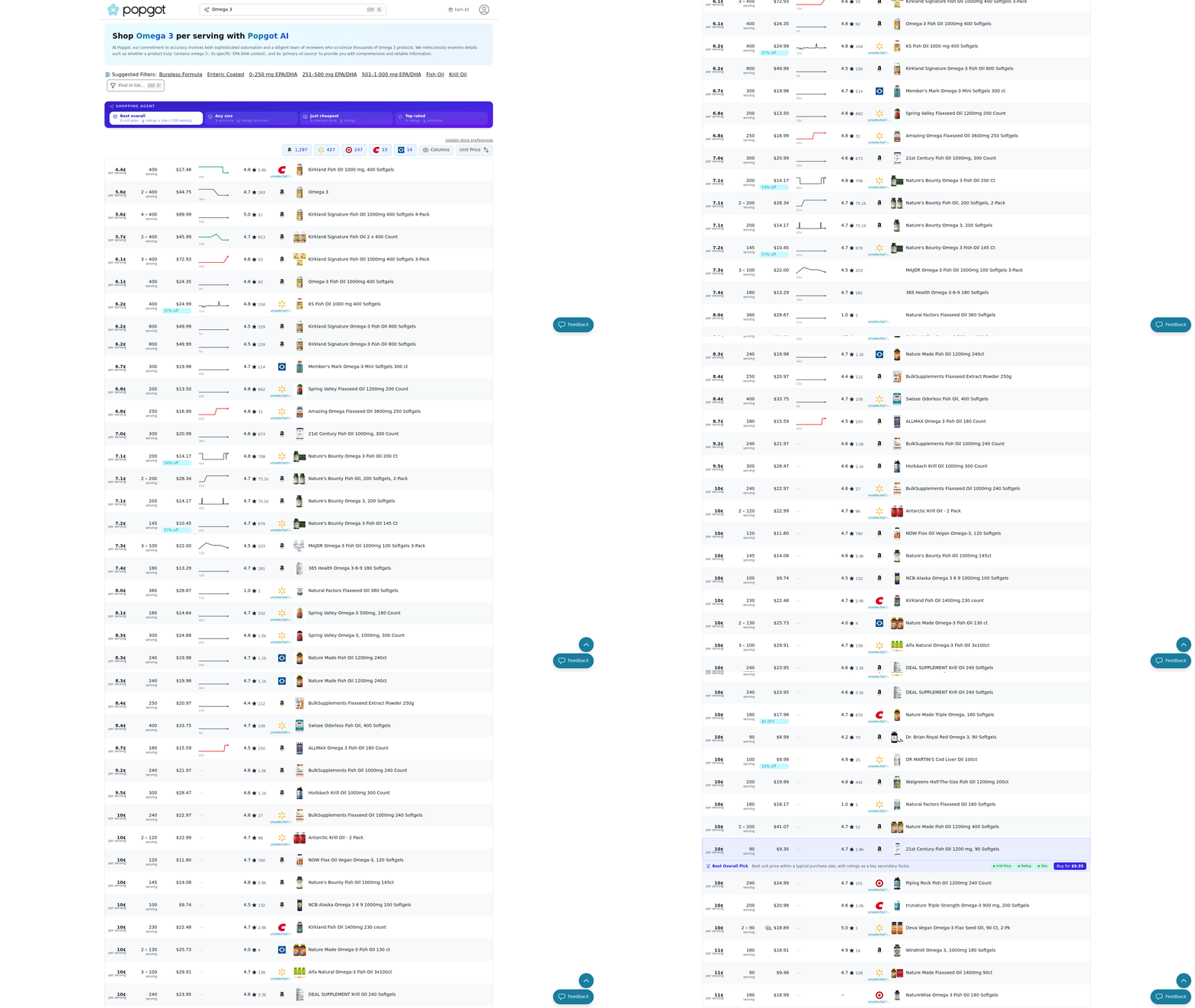
Popgot simplifies comparing prices and features on Amazon by combining unit pricing analysis, AI-powered filtering, and instant cross-market comparisons. Whether you're a buyer seeking the best deals or a seller optimizing product listings, the tool streamlines decision-making with data-driven insights. As mentioned in the Setting Up Popgot for Amazon Comparison section, configuring preferences ensures the app aligns with your shopping habits, enhancing its utility for price and feature comparisons. Let’s break down how to use it effectively.
How to Use Popgot for Cross-Amazon Seller Price Comparisons
To compare prices across Amazon sellers, start by scanning a product’s barcode using Popgot’s instant price comparison feature. This tool pulls pricing data from Amazon sites worldwide, including the US, UK, and other regions, and displays results in seconds. For example, if you’re buying a popular kitchen gadget, Popgot might show that the same product costs $29.99 on Amazon US but $24.99 on Amazon UK. The app also highlights genuine customer reviews and ratings for each listing, helping you avoid overpriced or poorly reviewed options. According to user testimonials, this feature saves time and ensures you never miss a better deal.
Unit pricing calculations are another cornerstone of Popgot’s functionality. Building on concepts from the Maximizing Savings with Popgot's Comparison Tools section, the tool shows the cost per ounce, pound, or sheet-normalizing products with different packaging sizes. For instance, a 32-ounce bottle of laundry detergent priced at $6.99 becomes $0.218 per ounce, while a 40-ounce rival at $7.99 drops to $0.198 per ounce. This clarity helps you identify the true best value, even when products are sold in varying quantities. This approach is especially helpful for shoppers comparing bulk purchases or different package sizes, ensuring cost-effectiveness across varying quantities.
How to Compare Product Features with Popgot
Beyond price, Popgot excels at analyzing product features like ingredients, nutritional content, and brand compliance. As detailed in the Using Popgot for Amazon Product Verification section, the app’s lightweight AI model reads product descriptions and filters results based on your criteria. For example, if you’re looking for a gluten-free protein powder, you can set filters to exclude any product containing wheat or barley. The tool then lists only compliant options, saving you from manually scanning labels. This feature is particularly useful for shoppers with dietary restrictions or brand preferences. As one user noted, “I like this idea a lot-feels like there’s a lot of room to grow here.”.
For sellers, Popgot’s feature comparison extends to sales data and market trends. By inputting an ASIN or product URL, the app identifies similar products and displays their sales rankings, pricing strategies, and customer feedback. This lets you analyze competitors’ strengths and weaknesses. Suppose you’re selling a wireless earbuds model with a 4.5-star rating. Popgot might reveal that a comparable product with a 4.8-star rating sells for 10% less, prompting you to adjust your pricing or highlight unique selling points like battery life or noise cancellation.
Tips for Finding the Best Deals and Discounts
To maximize savings, use Popgot’s barcode scanner to compare prices in real time while shopping online or in-store. For Amazon purchases, scan a product to see if it’s cheaper elsewhere or if sellers offer discounts. The app also tracks historical price changes, alerting you when a product drops below a set threshold. For example, if you’re eyeing a smartwatch priced at $149, you can set a price alert to notify you when it dips below $130.
For sellers, another tip is to use Popgot’s global price comparison to identify lucrative markets. If a product is undervalued on Amazon Canada compared to Amazon Germany, you might adjust your listings to capitalize on the price discrepancy. The tool’s ability to access genuine ratings and reviews ensures you’re making decisions based on real customer behavior, not guesswork.
Real-World Examples of Popgot in Action
Consider a scenario where a parent needs to buy organic baby food. By filtering for “organic” and “no added sugars,” Popgot narrows down thousands of products to a few compliant options. Unit pricing then reveals that a 4-ounce jar at $2.99 (74.75 cents per ounce) is cheaper than a 5-ounce jar at $3.49 (69.8 cents per ounce), despite the smaller size. This level of detail ensures the best value for daily essentials.
For sellers, consider a small business launching a new line of eco-friendly notebooks. Using Popgot, they compare competitors’ pricing, sales rankings, and customer reviews. They find that top-performing products emphasize “tree-free paper” and “carbon-neutral shipping” in their titles. By incorporating these keywords into their own listings, they boost visibility and sales. As an e-commerce expert explains, “Understanding market demand is crucial for making informed business decisions.” Popgot turns this insight into actionable steps.
By integrating AI-driven filtering, unit pricing, and global market data, Popgot transforms how users shop and sell on Amazon. Whether you’re comparing a single item or analyzing entire product lines, the tool’s focus on transparency and efficiency makes it a standout choice for savvy shoppers and sellers alike.
Maximizing Savings with Popgot's Comparison Tools
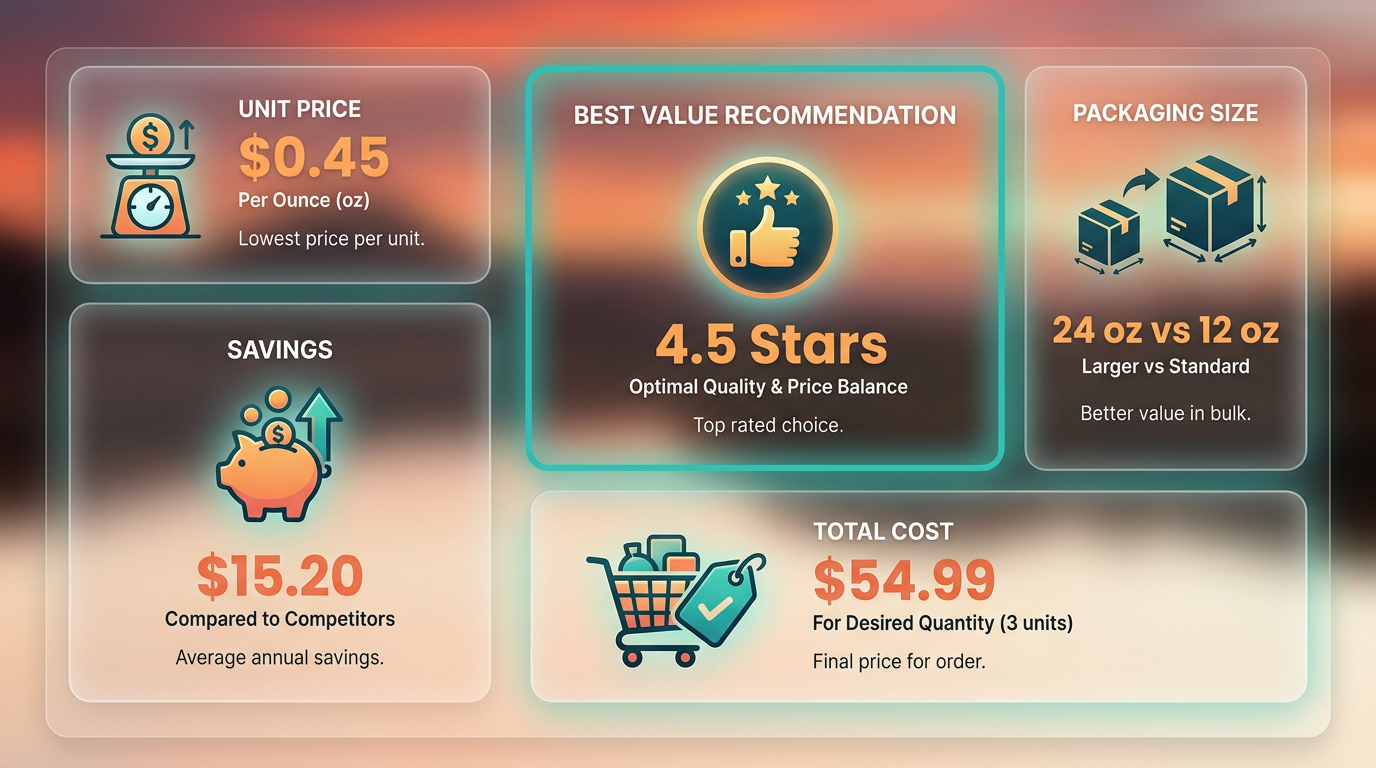
Maximizing savings with Popgot’s comparison tools starts by using its unit price normalization feature. By calculating costs per ounce, pound, or sheet across retailers like Costco, Walmart, and Amazon, the tool cuts through misleading packaging and bulk discounts to show the true value of products. For example, a 24-pack of paper towels might seem cheaper at one store, but Popgot reveals a local market sells individual rolls at a lower per-sheet cost. Users who consistently use this feature save an average of $100 per month on groceries alone. Building on concepts from the Setting Up Popgot for Amazon Comparison section, this feature works seamlessly once preferences are configured for your shopping habits.
How Do Popgot’s Comparison Charts Help You Find the Best Deals?
Popgot’s comparison charts simplify shopping by aligning products with identical features but different pricing. Consider comparing a 16-ounce bottle of shampoo at Target for $5.99 versus a 12-ounce Walmart version for $4.49. The tool calculates the cost per ounce and highlights the better value. As mentioned in the Comparing Prices and Features with Popgot section, this method extends beyond unit pricing to include sales rankings and customer ratings. This works for non-perishables like snacks, cleaning supplies, and household essentials. Users can even export charts to share with family or compare bulk deals during sales.
Strategies for Combining Popgot with Other Tools
For deeper savings, pair Popgot with browser extensions that block ads or highlight cashback deals. Use its unit price data alongside budgeting apps to track monthly spending on essentials. Building on concepts from the Comparing Prices and Features with Popgot section, this approach use unit pricing analysis and AI-driven filters to refine spending habits. While Popgot focuses on price and quality metrics, generic automation tools can apply coupons or alert you to stock-up opportunities during sales cycles.
By integrating these strategies, shoppers turn Popgot into a daily savings habit. The tool’s strength lies in its ability to normalize complex data-whether it’s unit costs, AI-driven filters, or cross-border price checks-making smart decisions effortless. As one user noted, “It feels like having a personal shopper who knows every sale happening online.” Start using it today to transform how you shop.
Troubleshooting Common Issues with Popgot on Amazon
If you encounter issues while using Popgot on Amazon, start by identifying common problems and applying targeted fixes. Below are structured solutions to resolve conflicts, contact support effectively, and optimize your workflow with workarounds to ensure seamless comparisons.
How Do Browser Extension Conflicts Affect Popgot?
Browser extensions can interfere with Popgot’s functionality, causing it to stop working during product comparisons. To troubleshoot, disable other extensions temporarily and test Popgot again. For example, ad blockers or security tools might prevent Popgot from loading price data correctly.
- Chrome/Edge: Go to
chrome://extensions/, toggle off non-essential tools, and refresh the Amazon page. - Firefox: Visit
about:addons, disable extensions like privacy shields or shopping tools, then reload.
If Popgot works after disabling extensions, re-enable them one by one to identify the culprit. A user reported that turning off a “Price Tracker” extension restored Popgot’s ability to compare items instantly. Building on concepts from the Setting Up Popgot for Amazon Comparison section, ensure Popgot is properly installed and configured before testing..
What If Popgot Fails to Load on Amazon?
A non-responsive Popgot interface often stems from browser or cache issues. Clear your browser’s cache and cookies, then restart the browser. For persistent problems, try the web version of Popgot at popgot.com instead of the browser extension.
- Clear Cache:
- Chrome:
Settings > Privacy > Clear Browsing Data(select cache and cookies). - Firefox:
Settings > Privacy & Security > Clear Data.
- Use Incognito Mode: Test Popgot in a private window to rule out local data conflicts.
If the issue persists, check Popgot’s support page for updates. For instance, a recent update fixed compatibility issues with Amazon’s new UI layout. Building on concepts from the Comparing Prices and Features with Popgot section, the web version allows you to search by ASIN and compare across retailers..
How Can You Contact Popgot Support?
Popgot offers direct support through its website and email. When reaching out, include:
- A screenshot of the error.
- Steps to reproduce the issue.
- Your browser version and device type.
- Support Form: Fill out the contact form at popgot.com.
- Email: Send detailed queries to [email protected].
A user successfully resolved a login error by submitting a support ticket with their device details and a bug report. Popgot’s team acknowledged the issue within 24 hours and provided a temporary workaround. As mentioned in the Setting Up Popgot for Amazon Comparison section, ensure your browser is compatible and up-to-date when submitting support requests..
What Workarounds Exist for Persistent Issues?
If the browser extension is unresponsive, switch to the web version of Popgot. Log in via popgot.com, search for products by ASIN, and compare prices across Amazon and other retailers. This method bypasses browser-specific conflicts entirely.
For users facing frequent crashes:
- Update the Extension: Visit the Chrome Web Store or Firefox Add-ons page to ensure you have the latest version.
- Use a Different Browser: Test Popgot in Chrome if you’re using Firefox, or vice versa.
A real-world example involved a user who switched to the web version after the Chrome extension stopped syncing data. By using the web tool, they continued comparing items without interruption..
What Best Practices Prevent Future Issues?
To avoid disruptions:
- Keep Popgot Updated: Enable auto-updates for the browser extension.
- Use Compatible Browsers: Popgot is optimized for Chrome and Firefox.
- Avoid Multiple Accounts: Log in with one account to prevent sync errors.
Regularly test Popgot on Amazon’s product comparison page. If problems arise, provide feedback via the “Feedback” button in the extension. A user reported that submitting feedback about a missing feature led to its inclusion in Popgot’s next update.
By following these steps, you can resolve common issues and maintain a smooth experience when comparing Amazon products with Popgot. For further guidance, explore Popgot’s blog for troubleshooting tips and updates.
References
[1] I'm working on Popgot (https://popgot.com), a tool that tracks unit ... - https://news.ycombinator.com/item?id=43821480
[2] Instant Price Comparison – Apps on Google Play - https://play.google.com/store/apps/details?id=com.rucksack.pricecomparisonforamazonsellers&hl=en_AU
[3] I built a price comparison tool that compares prices across Amazon ... - https://www.reddit.com/r/SideProject/comments/1j1m83u/i_built_a_price_comparison_tool_that_compares/
[4] Amazon Product Comparison - 4Seller - https://www.4seller.com/en-US/tools-v2/productComparison.html
[5] Amazon product comparison with Compara AI - Chrome Web Store - https://chromewebstore.google.com/detail/amazon-product-comparison/ahfdnloajhdjnmhmjmopcpbgmfajfeek?hl=en
Frequently Asked Questions
1. How much can users save with Popgot?
Users can save approximately $100 monthly by comparing unit prices across Amazon, Costco, and Walmart. The app normalizes prices per ounce, pound, or sheet to identify the cheapest options for daily essentials like shampoo or cleaning supplies.
2. Can Popgot filter products by dietary needs?
Popgot allows users to exclude non-compliant products instantly, such as non-keto-friendly groceries. Health-conscious buyers can refine searches using AI filters to avoid irrelevant items and streamline shopping decisions.
3. How does Popgot compare prices globally?
The app’s barcode scanner compares prices across Amazon sites worldwide in seconds. It normalizes listings by unit price, enabling quick comparisons of identical products sold in different regions or platforms.
4. Is Popgot free to use?
Popgot is available for free with 10,000+ downloads and a 4.0-star rating. The app offers core features like unit price normalization and AI filters at no cost, though premium features may require a subscription.
5. How does Popgot reduce decision fatigue?
Popgot simplifies shopping by automating price comparisons, filtering non-compliant products, and displaying unit prices. This reduces the time spent analyzing options, especially for bulk or health-conscious purchases.
6. What retailers does Popgot support?
Popgot compares items on Amazon, Costco, and Walmart. Its AI normalizes listings across these platforms, ensuring consistent unit price comparisons for everyday goods like groceries or household supplies.
7. How accurate is Popgot’s unit price normalization?
Popgot calculates unit prices per ounce, pound, or sheet to ensure fair comparisons. This method has proven effective in identifying the cheapest options, with users reporting measurable savings on recurring purchases.