
How to Run a PS5 Cost Comparison Across 8 Stores With Popgot

Key Takeaways
- The PS5 Slim disc model swings a full $100 across retailers, from $549 at Amazon to $650 at GameStop.
- Those gaps exist because each store sets its own margins, runs its own promotions, and bundles consoles differently on any given day.
- The digital edition shows the same spread, with one retailer asking $600 while others sit lower.
- A "free game" bundle can hide the real console price. It isn't always cheaper than a bare console somewhere else.
- First-time buyers and patient shoppers gain the most from a side-by-side check.
- Scanning eight stores at once catches the gaps instantly instead of leaving you to guess.
Why a $100 swing on the same console is normal now
PS5 prices are the highest they've ever been, and the gap between retailers is wider than most people expect. Scan the current listings and the PlayStation 5 Slim disc model runs $650 at GameStop, $549 at Amazon, and $550 at both Target and Best Buy. Same console. A $100 swing.
Skip the comparison and you risk eating that whole margin. The digital edition tells the same story, one retailer at $600 while others list lower. Check eight stores together and the gaps surface on their own.
Why the same console costs $100 more down the street
Each retailer sets its own margins, runs separate promotions, and bundles the console its own way. So the same Slim can cost $100 more at one store than another on a Tuesday afternoon. Bundles muddy it further, because a "deal" with a free game isn't automatically cheaper than the bare console elsewhere.
The frustration is real. In a recent r/PlayStationUK thread, one shopper wrote, "Honestly I feel cheated. The fact that I didn't buy a ps5 for years, and now that I'm ready to buy, the prices have increase sharply."
Bundles are their own trap. As another Reddit user said about a Fortnite pack, "I also have no idea what a Fortnite bundle is because that's a free game." Free content padding a listing pulls your eye away from the number that matters.
Who actually saves by comparing
First-time buyers and patient shoppers get the most out of a side-by-side check. If you've put off the purchase for years, like several people in that thread, you're walking into a market where the wrong store costs you a clean $100.
The problem is doing it by hand. Eight browser tabs, shipping math, bundle decoding... there goes your evening. Pulling every price into one view kills that friction.
You also get a straight read on whether a sale is genuine. When Amazon's $549 sits next to GameStop's $650 on one screen, the "deal" labels stop working on you. That single comparison earns its keep.
Setting up a PS5 search
Type PS5 into the search bar, then narrow by model. The lineup splits into a few distinct versions, each at a different price, so naming the exact one keeps you from comparing apples to oranges.
The models you'll search for:
- PlayStation 5 Console: the standard edition, listed at $499.99 on GameStop.
- PS5 Slim Disc Edition: the physical-disc version at $649.99 at the same retailer.
- PS5 Slim Digital Edition 1TB: download-only, no disc drive.
Picking filters and stores
Set the search to scan 8 major retailers at once, then layer on filters for model, condition, and bundle type. One screen, every price, no tab juggling.
Filter by condition first. The drop-down usually splits listings into new, used, and manufacturer-refurbished, so you can isolate exactly what you're willing to buy. One seller in r/PlayStationUK listed a boxed Slim 1TB Disc edition at £319.99 in immaculate shape with next-day delivery and a 12-month warranty. That's the kind of gap a condition filter surfaces fast.
Then decide whether you want a bundle. Some listings pair the console with games or extra controllers. Filtering by bundle type separates those packed deals from the standalone console, so you don't pay extra for software or accessories you didn't want.
Filters in action
A shopper hunting the standard PS5 sets the model to PlayStation 5 Console, condition to new, and runs all 8 stores. The $499.99 GameStop price drops in next to the rest instantly.
Skip that step, grab the Slim disc model at $649.99 thinking it's the only option, and you've spent $150 more than the standard edition you actually wanted. Filtering by model first is what catches the mistake before checkout.
Filtering down to the console you actually want
Filters turn a basic price scan into a targeted hunt. Once the eight-store search is running, the right filters strip out the listings wasting your time and surface the cheapest version of the exact console you want.
Tuning filters for a clean read
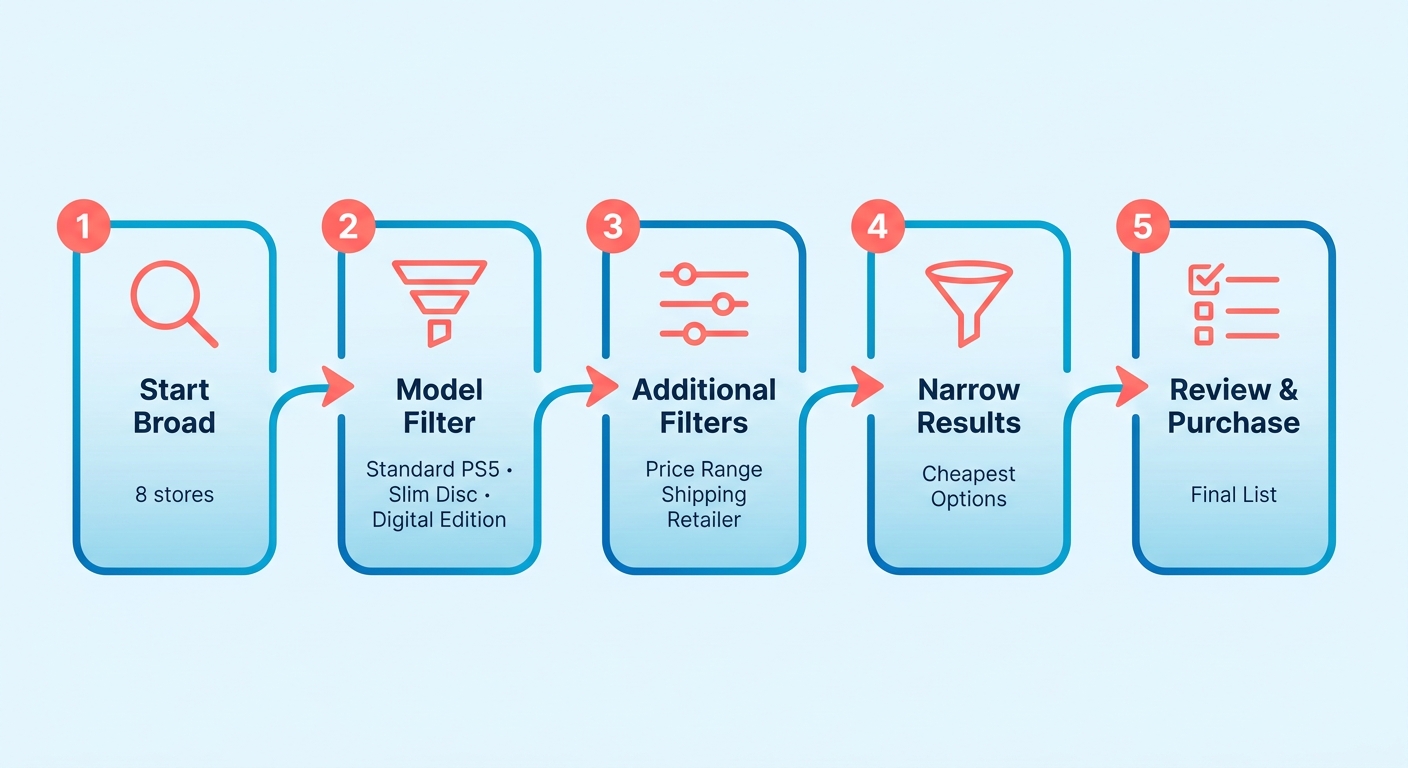
Start broad, then tighten. Set the model filter first so the standard PS5, the Slim disc, and the digital edition stop competing in one list. Each is a different product at a different price, and mixing them buries the deal you care about.
Layer condition next. New units sit at the retail price you'll see everywhere, but the secondhand market tells a different story. Refurbished and open-box listings often land 20–30% below sticker, and certified units from a retailer's own outlet usually still carry a limited warranty. Those gaps are easy to miss when new and used stock blur together.
If a warranty matters to you, keep that filter on. If you only care about the lowest number, drop it and let everything compete.
Habits that get you the lowest price
Sort by price, then check the listing matches your model. A cheap result is useless if it's the digital edition when you wanted the disc drive. Comparing eight stores at once catches mismatched listings before they trick you into the wrong machine.
A few habits sharpen the search:
- Confirm the exact model before you compare. The standard console and the Slim sit at different price points.
- Check whether the bundle inflates the total. A pack with digital add-ons or in-game currency can ring up higher than a bare console, even when those extras hold little resale value.
- Re-run the search now and then. Promotions shift, so a deal that's gone today may show up next week.
Run these every time and you stop overpaying out of habit. The setup is minimal, and the savings on one console cover the effort.
Reading past the sticker price into the box
A sticker price never tells the whole story. Two listings at the same dollar amount can hold wildly different value once you account for what's in the box. One bundles a download code or a spare controller. The other ships bare.
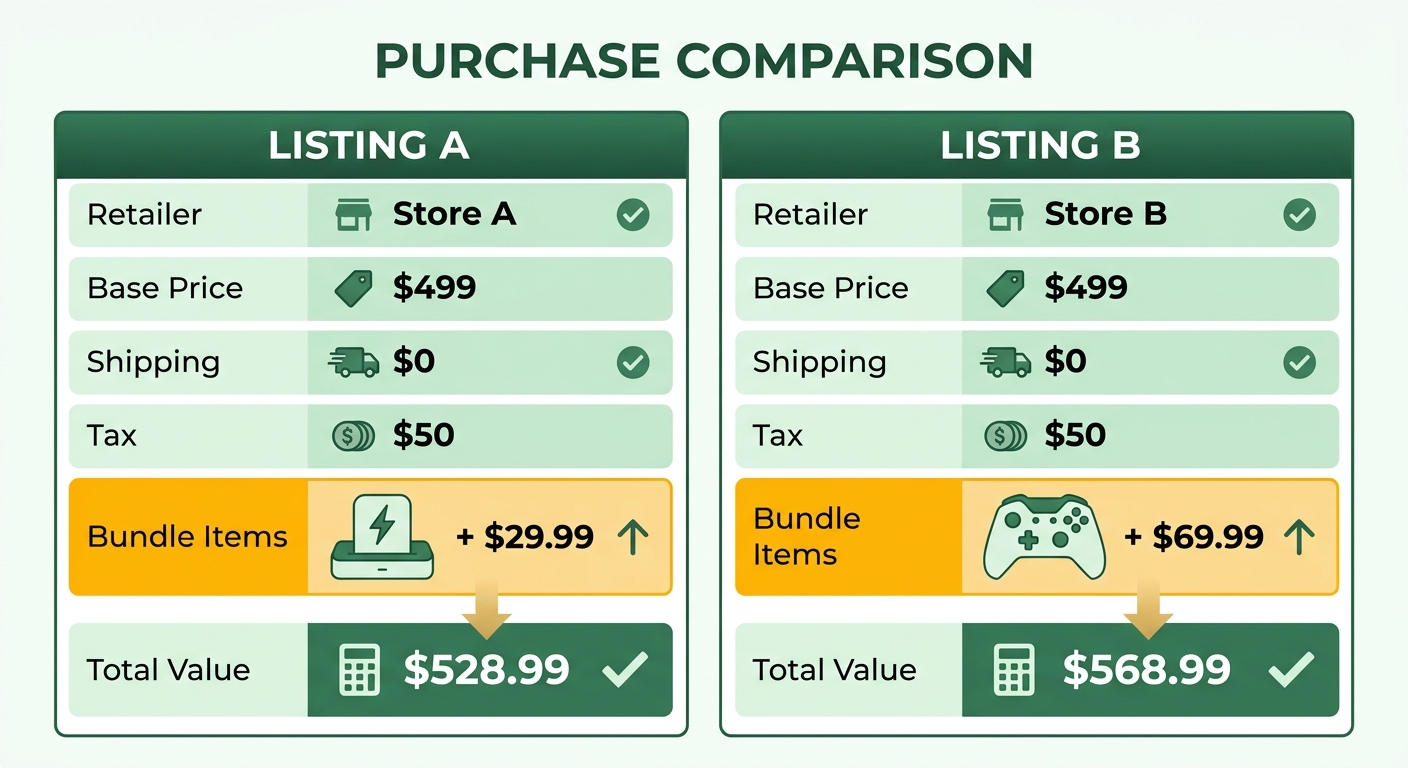
When you run the eight-store scan, read past the headline number into each product description. Price gaps between two similar-looking units often trace back to a single component. A DualSense charging dock retails around $29.99 on its own, and a spare controller can add $69.99 to the real cost of a "deal" that ships with extras baked in. None of that shows up in the headline number, so the description is where the value hides.
What to check in each bundle
Confirm the model, the storage capacity, and any extras before lining up two prices. A digital edition with no disc drive is a different product than a disc model, even when both say "PS5." Storage matters too. A listing advertising 825GB is an older revision, so a cheaper unit with less space isn't the bargain it looks like.
Watch the game bundles especially. Many promotional packs lean on digital-only vouchers or cosmetic packs. If the bundled game is something you'd download for free anyway, or you prefer physical discs, that added cost isn't real savings.
Spotting the real saving
Match the contents first, then compare price. Line up two listings only after confirming the same model, the same storage, the same accessories.
Another shopper in that thread asked the sharp question about a secondhand deal: "Did you get a disc drive separately?" If a unit looks cheap but ships without the drive you need, the saving evaporates the second you buy the add-on. Verify the box, then trust the price.
Sorting by what you actually pay
Ranking by total cost flips your results from cheapest sticker to cheapest real price. Sort so the lowest final number sits on top, and the retailer asking the least after tax and shipping wins the slot. A listing with a higher base price can still finish first once a rival's shipping fee lands on top.
Sorting by final price
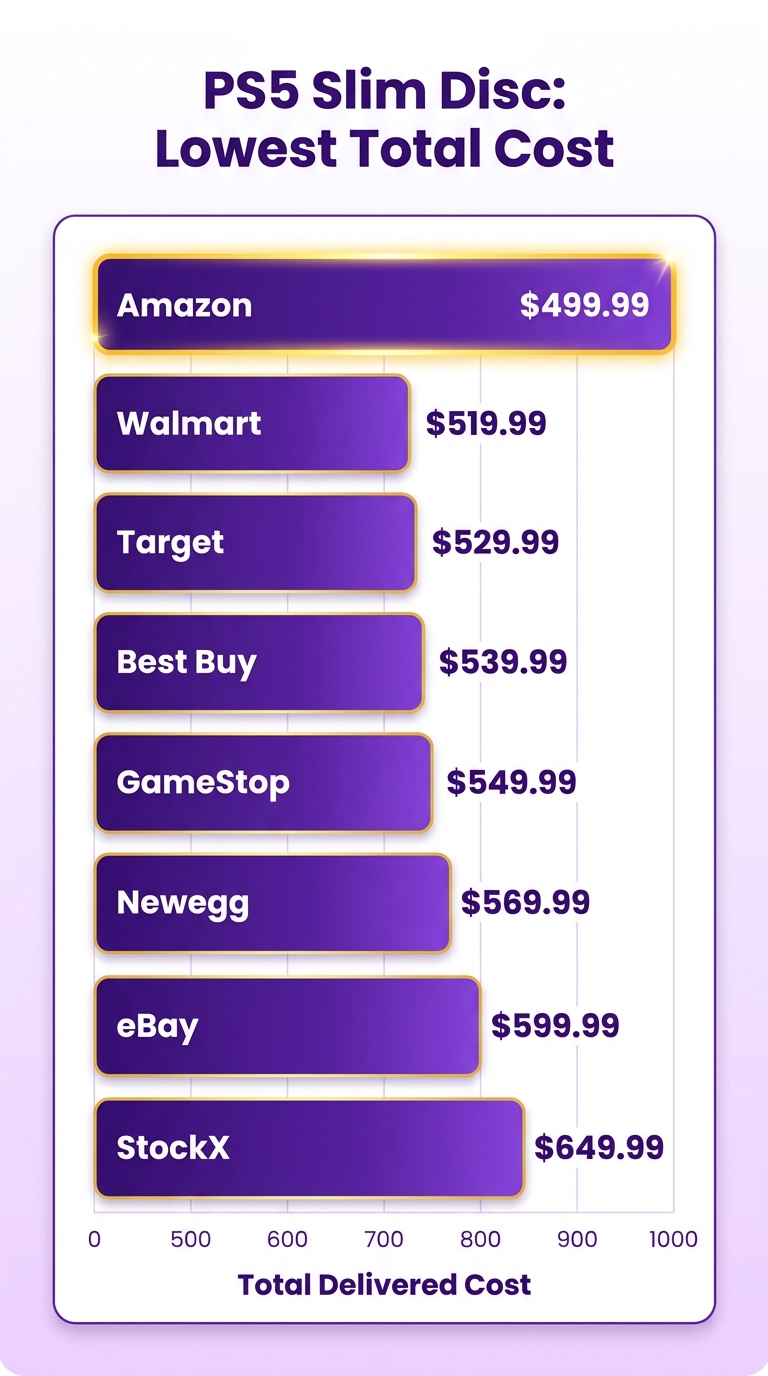
Set the sort to total cost ascending. The platform stacks every scanned retailer from cheapest to priciest, so the top row is your buy. You read the full picture in seconds instead of opening eight tabs and doing the math.
A ranked example from current listings. The PS5 Slim disc model sorts like this:
- Amazon. Lowest of the majors.
- Target. A single dollar behind.
- Best Buy. Tied for second.
- GameStop. The outlier at the bottom.
Notice how the gap between first and second often comes down to a free-shipping threshold, not the base price. A retailer that waives delivery over a set amount can leapfrog one with a lower tag, so rank the totals and the cheapest path is obvious.
What the verification step catches
AI Product Verification confirms you're comparing the same console before you trust the ranking. It reads each listing's description and flags mismatches, so a standard console never gets ranked against a Slim disc unit as if they're identical. Without that check, your "cheapest" result might just be a different SKU.
It matters most across the eight-store scan, where one retailer's "PS5" page can mean three different machines. Verification pins the model, then the total-cost sort ranks only true matches. You buy knowing the top row is the same box, not a downgrade dressed up as a deal.
How long this actually takes
Difficulty: beginner. If you can type a search term and click a sort arrow, you can run the whole thing. No account math, no spreadsheets.
Time: under five minutes from search to ranked list. Most of that is reading bundle details, not running the scan. The eight-store search returns in moments, and the sort is instant.
The savings justify the five minutes. Even a $30 to $40 swing between the top retailer and the next one covers a new controller or a year of online play. Skip it and that's money left on the counter.
Completing the purchase
Click through from the top-ranked result straight to that retailer's checkout. The platform hands you off to the store with the lowest verified total, so you finish where you'd pay the least. No re-searching, no second-guessing.
One caveat worth your attention: the secondhand market sits well below retail, with pre-owned consoles offering steep discounts if you're willing to buy from reputable community sellers or local marketplaces. If you're open to used, rank those listings too before you commit to new.
Shipping and tax decide more deals than the price tag
The sticker price is half the equation. A console listed cheaper can cost more once shipping and tax land, which is why you compare the total delivered cost across all eight stores, not the headline numbers.
Run the scan and you'll see how tight the majors cluster. Competing listings for the same Slim disc model often land cents apart before fees enter the picture. A tiny sticker gap can flip entirely once one retailer charges for delivery and another ships free.
How shipping and tax move the real price
Shipping and tax move the final number more than most shoppers expect. Free delivery can beat a slightly cheaper listing that tacks on a flat handling charge. Sales tax varies by state, so the same console rings up differently depending on where it ships.
For something as big as a PS5, the major stores often waive shipping on consoles or hit a free-delivery threshold easily. The fee tends to show up on third-party or marketplace listings instead. So read the shipping line for every result, not just the price column.
Tax is the quieter cost. A rate near 8% can add upward of $40 to a flagship console, enough to erase a small pre-tax lead. The lowest pre-tax price isn't automatically the winner once your local rate applies. The delivered total is the only number that counts.
What unit pricing tells you
Unit pricing strips a listing down to what you actually pay per item, so a bundle and a bare console stop looking like the same deal. Popgot pulls the real unit price from every listing, the same logic that surfaces true cost on everyday goods, applied to one big-ticket purchase.
Take a typical lineup. The standard console runs $499.99, a Slim Disc Edition sits at $649.99. If one $649.99 listing throws in an extra controller and another ships console-only, the per-item value of the bundle is far higher even at the same price.
A saved-money example
Two disc-model listings sit $10 apart. The pricier one ships free from a state with no sales tax. The cheaper one adds a delivery fee and a taxable subtotal.
The pricier listing wins the delivered total. Once the cheaper retailer's fee and tax stack on, its real cost climbs past the free-shipping option. A saving you'd have missed by sorting on sticker alone.
The secondhand market widens the gap further. Resale shops sometimes list pre-owned hardware with short-term store warranties that undercut brand-new retail by a lot, though a used unit carries different wear-and-tear risks than a sealed box.
My take: always compare the delivered total, and never assume the lowest sticker wins. On a flagship console, the shipping and tax lines decide the deal more often than the price tag does.
References
[1] The PS5 Is Now More Expensive Than Ever, but These Deals Can ... - https://www.cnet.com/deals/best-playstation-deals/
[2] PS5: PlayStation 5 Consoles - GameStop - https://www.gamestop.com/consoles-hardware/playstation-5
Frequently Asked Questions
1. Does the PS5 price difference between stores also apply in the UK market?
Yes, UK shoppers face similar price volatility across major regional retailers like Argos, Currys, and Very. Promotional discounts and stock clearance cycles create noticeable price gaps, meaning British buyers should compare local store listings and check for bundled extras to find the best regional deal.
2. Is buying a refurbished PS5 a safe way to save money?
Buying refurbished can be highly cost-effective if you purchase directly from official channels or authorized retailers. These units undergo rigorous testing to ensure they meet original performance standards, though you should always confirm the return policy and check if the original accessories are included in the box.
3. What does an 825GB PS5 listing mean, and should I avoid it?
An 825GB listing refers to the original launch model's custom SSD capacity. While these launch consoles perform identically to the newer 1TB Slim models in terms of gameplay, they have slightly less usable storage space and a larger physical footprint. If the price discount is significant, it can still be a great purchase, but make sure you factor in the cost of a future storage expansion if you plan to download many games.
4. How much can sales tax add to a PS5 purchase?
Depending on your location, local sales tax can significantly increase the final checkout price of a console. Since online retailers calculate tax based on your shipping address, a store offering a slightly higher base price but tax-exempt shipping or promotional tax offsets might end up being the more economical choice overall.
5. How often should I re-check PS5 prices before buying?
It is wise to check prices during major retail events like Black Friday, Cyber Monday, or mid-summer clearance sales. Retailers frequently adjust their prices dynamically to match competitors, so running a quick multi-store scan right before you click 'buy' ensures you do not miss a sudden price drop.
6. Are extra controllers and charging docks worth paying more for in a bundle?
Bundled accessories only add value if you actually plan to use them. If you regularly play multiplayer games with family or friends, a bundle featuring an extra controller is highly practical. However, if you primarily play solo, paying extra upfront for accessories you do not need will inflate your total cost unnecessarily.
7. How do I avoid accidentally comparing a digital edition against a disc model?
Always double-check the product specifications and images before finalizing your purchase. Look specifically for the presence of the physical disc drive slot on the side of the console, and verify that the product title explicitly states 'Disc Edition' or 'Digital Edition' to ensure you are getting the exact hardware version you want.