
Top 5 PriceGrabber Alternatives in 2026

Key Takeaways
- 83% of shoppers compare prices across multiple sites, making price comparison tools essential for informed purchasing decisions.
- Popgot combines AI-driven unit pricing with multi-retailer search (Amazon, Walmart, Target, Costco, Sam's Club) — surfacing 30–60% savings on household staples that headline-price tools miss.
- Retailer price variations of up to 45% highlight the savings potential of using alternatives like Popgot, Flipp, or Price.com.
- Cashback rewards (Price.com) and grocery-focused deals (Flipp) offer tailored savings beyond generic price checks.
- Price history tracking tools like Idealo help avoid overpaying on electronics by analyzing European cross-retailer trends.
- Niche platforms adapt to specific markets, ensuring better value for purchases like groceries or limited-time deals.
- For per-unit math on daily essentials, Popgot eliminates the manual calculation that traditional comparison tools leave to the shopper.
- Over 40% of shoppers prioritize tools with additional benefits like cashback, unit pricing, or localized deals over basic price checks.
Why PriceGrabber Alternatives Matter
With 83% of shoppers comparing prices across multiple sites before buying, the need for effective price comparison tools has never been higher. PriceGrabber alternatives address this demand by offering tailored solutions that go beyond basic price checks. These tools help users save money, streamline shopping, and avoid common pitfalls like overspending on groceries or missing out on limited-time deals. By analyzing industry trends and real-world use cases, it’s clear why exploring alternatives to PriceGrabber is a smart move for modern consumers.
Why Use PriceGrabber Alternatives?
PriceGrabber alternatives matter because they solve critical shopping challenges that traditional tools overlook. For example, 45% of price variations depend on the retailer you choose, meaning tools like Flipp or Price.com can save users hundreds annually by finding the cheapest options. Alternatives also offer specialized features-such as cashback rewards (Price.com) or grocery-specific deals (Flipp)-that cater to diverse shopping needs. Unlike generic platforms, these alternatives adapt to niche markets, ensuring users get the best value for their specific purchases. Tools like Idealo, track price history to avoid overpaying on gadgets. Unlike generic platforms, these alternatives adapt to niche markets, ensuring users get the best value for their specific purchases.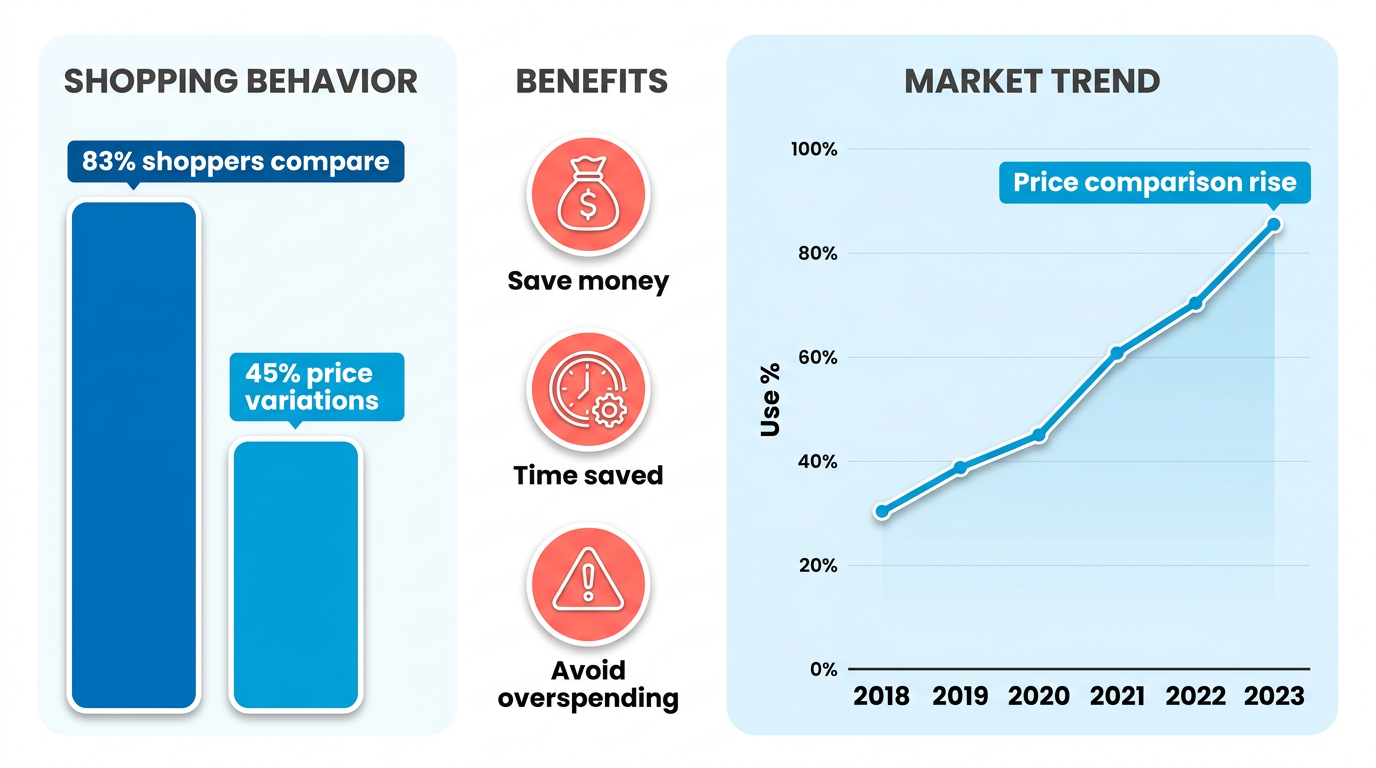
Real-World Impact and Savings
The savings potential of price comparison tools is undeniable. Take groceries, where the average monthly cost for one adult ranges from $257 to $464.80. Apps like Flipp let users scan flyers and track local deals, potentially cutting this cost by 10–20%. For electronics, barcode scanning tools like BuyVia instantly compare prices across 100,000+ retailers, preventing overpayment on high-ticket items. Cashback platforms such as Price.com add an extra layer of savings, returning 1–5% of purchases to users. A Reddit user even praised Flipp for its ability to “find the cheapest place to buy”, highlighting the tangible benefits of these tools.
Who Benefits Most from These Tools?
Budget-conscious shoppers, frequent online buyers, and those juggling multiple retail channels benefit most from PriceGrabber alternatives. For example:
- Students or young professionals can use cashback apps (Price.com) to stretch limited budgets.
- Households managing weekly groceries can rely on Flipp’s localized deals to reduce expenses.
- Tech buyers benefit from platforms like Idealo, which tracks price history to avoid overpaying on gadgets. Businesses also gain insights by using tools like CamelCamelCamel, to monitor competitor pricing, ensuring their offers stay competitive.
Summary Table of Top 5 PriceGrabber Alternatives
| Title | Description | Key Features | Pros | Cons |
|---|---|---|---|---|
| Popgot | AI-driven unit-pricing comparison across major retailers | Per-unit cost normalization, AI ingredient verification, multi-retailer search | Surfaces 30–60% savings on daily essentials | Focused on non-perishables; historical tracking planned |
| BuyVia | All-rounder with barcode scanning and daily deals | Barcode scanning, daily deals | Versatile for all shopping needs | Limited cashback options |
| Flipp | Grocery-focused app for local deals and flyers | Local store comparisons, digital flyers | Best for saving on weekly groceries | Not ideal for electronics |
| Price.com | Cashback rewards with 100,000+ store comparisons | Cashback, price alerts | High cashback rates | Requires active tracking |
| Moonsift | Wishlist and price alert tool | Price drop alerts, gift registries | Excellent for long-term purchases | Fewer options for daily shopping |
| Idealo | User-friendly with price history and reviews | Price history, detailed reviews | Great for informed decisions | Interface may overwhelm new users |
By using these alternatives, shoppers gain access to tailored features that PriceGrabber lacks, such as localized grocery deals or cashback incentives. As the eCommerce market evolves, using the right tool for your specific needs ensures you maximize savings and avoid hidden costs. Whether you’re comparing smartphones or stocking your pantry, the right PriceGrabber alternative can make a measurable difference in your bottom line.
Introduction to PriceGrabber Alternatives
Price comparison tools have become essential for savvy shoppers, helping them save time and money while making informed purchasing decisions. While PriceGrabber remains a recognizable name in this space, the market has evolved significantly in 2026. Alternatives now offer specialized features tailored to niche audiences, from Amazon price tracking to cashback rewards and regional deals. This overview highlights the top five PriceGrabber alternatives, emphasizing their unique strengths and ideal use cases.
Why CamelCamelCamel Stands Out for Amazon Shoppers
CamelCamelCamel is a dedicated Amazon price tracker that provides price history charts and price drop alerts, helping users time purchases optimally. Its focus on Amazon listings, combined with a user-friendly interface, makes it a go-to tool for shoppers who frequently buy from the platform. For example, if you’re tracking a high-ticket item like a laptop, CamelCamelCamel’s historical data shows when prices peaked or dropped, giving you confidence to act.
Targeted at Amazon-centric buyers, this tool excels in transparency and simplicity. Users can set alerts via email or Twitter, ensuring they never miss a discount. A key advantage is its low bounce rate of 33.43%, indicating a more engaging user experience compared to PriceGrabber’s 41.16% (Similarweb, 2026).
"CamelCamelCamel saved me $150 on a TV by showing the best time to buy." – Tech Enthusiast
Why ShopBot.ca is a Must for Canadian Shoppers
ShopBot.ca focuses on the Canadian market, comparing 5 million products and guaranteeing the lowest price. This platform is ideal for users in Canada who need reliable regional deals. For instance, if you’re searching for winter gear, ShopBot ensures you see the cheapest option across Canadian retailers like Costco or Indigo.
Its price-matching guarantee sets it apart, giving shoppers confidence in their final purchase. The site’s extensive database covers electronics, books, and home goods, making it a versatile tool for everyday purchases.
"ShopBot.ca helped me find the best deal on textbooks for college." – Student
How ShopSavvy.com Speeds Up Product Comparisons
ShopSavvy.com offers fast price comparisons and real-time product reviews, streamlining the decision — making process. Its mobile app and browser extension allow users to scan barcodes instantly, revealing prices from multiple retailers. For example, while shopping for a new phone, ShopSavvy aggregates reviews and compares prices from Best Buy, Amazon, and eBay in seconds.
This tool appeals to time-conscious shoppers who value efficiency. Its integration of user reviews adds an extra layer of trust, helping avoid buyer’s remorse.
"I saved hours using ShopSavvy’s barcode scanner to compare grocery prices." – Busy Parent
Why Price.com is Perfect for Cashback Seekers
Price.com distinguishes itself by offering cashback rewards on purchases, in addition to comparing prices from 100,000+ stores. Users earn a percentage of their purchase back when shopping through the platform, making it ideal for budget-conscious buyers. For example, buying a $200 camera could yield a $10 cashback reward.
The platform supports a wide range of categories, including electronics, fashion, and travel. Its browser extension makes it easy to apply discounts at checkout, enhancing convenience.
"Price.com’s cashback feature adds up over time-great for smart shoppers." – Frugal Shopper
What Makes Best-Price.com a Hidden Gem
While less prominent in features, Best-Price.com focuses on broad product comparisons across multiple retailers. It aggregates deals from global and regional sellers, making it suitable for users who want a holistic view of pricing trends. Best-Price.com is particularly useful for tech-savvy buyers who prioritize competitive pricing in categories like gadgets and software.
| Title | Description | Key Features | Pros | Cons |
|---|---|---|---|---|
| Popgot | AI-driven shopping platform with automated unit pricing | Per-ounce/count cost calculation, AI ingredient verification, live multi-retailer search | Surfaces 30–60% savings on staples; AI matches products to specific criteria | Focused on non-perishables; historical tracking on roadmap |
| CamelCamelCamel | Amazon price tracker with history charts | Price alerts, browser extension | Low bounce rate, user-friendly | Limited to Amazon products |
| ShopBot.ca | Canadian price comparison site | Price guarantees, 5M+ products | Regional focus, price-matching | U.S. Users may find fewer deals |
| ShopSavvy.com | Fast comparisons with reviews | Barcode scanning, real-time tracking | Efficient, integrates reviews | Fewer niche product options |
| Price.com | Cashback rewards and 100K+ stores | Browser extension, cashback | Earns rewards, extensive coverage | Cashback may vary by retailer |
| Best-Price.com | Broad price comparisons | Global retailer data | Holistic approach | Interface feels outdated |
Each of these platforms offers distinct advantages, from Amazon-specific tracking to cashback incentives. Your choice depends on your shopping habits and priorities, whether it’s saving time, earning rewards, or securing the best regional deals.
Tool 1: CamelCamelCamel - Amazon Price History Tracking
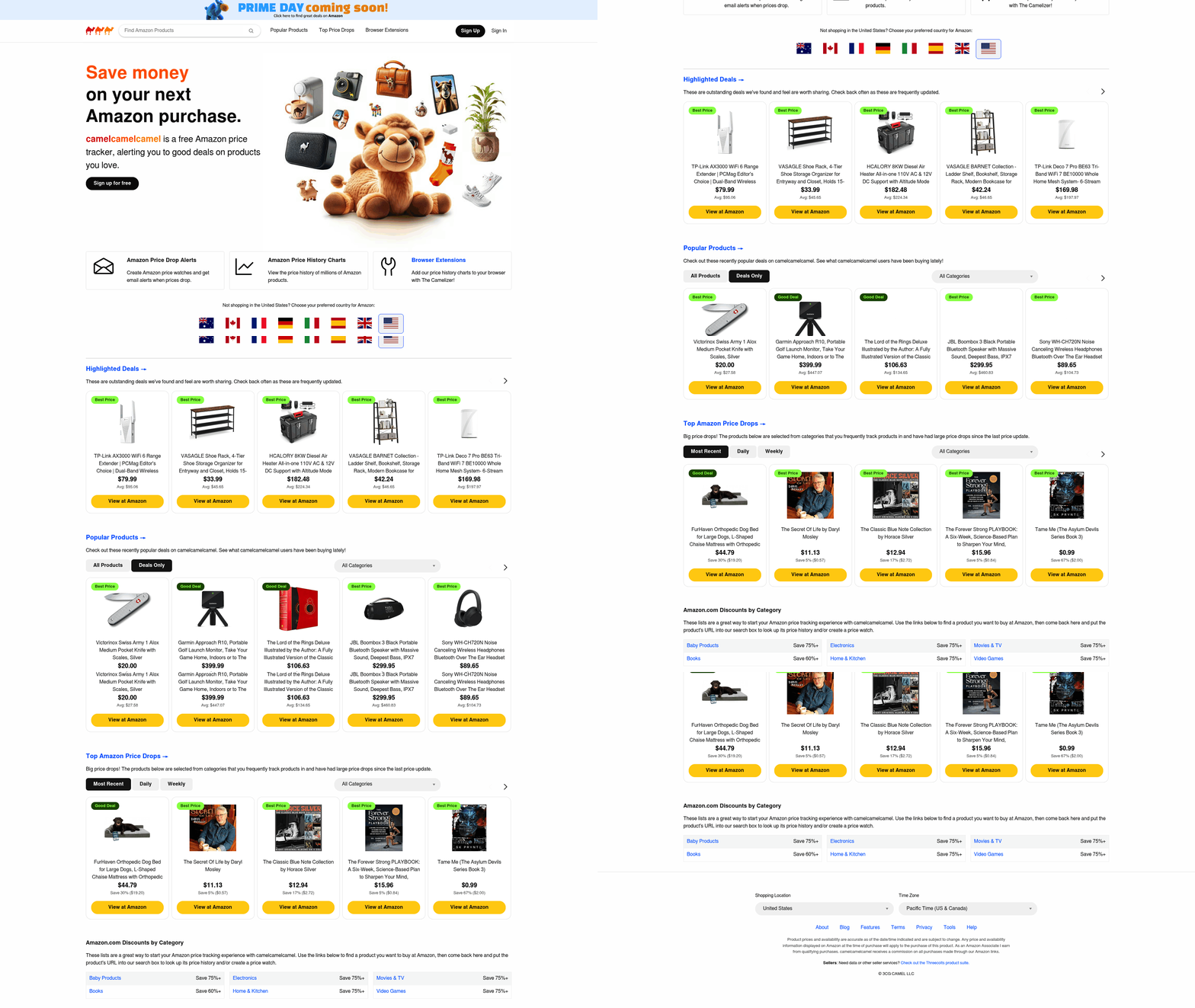 CamelCamelCamel is a specialized tool for tracking Amazon product prices over time, helping users identify optimal purchase windows. Its core functionality revolves around historical price data, alerts for drops, and integration with Amazon’s ecosystem. Below, we break down its features, usage, and real-world impact.
What Features Set CamelCamelCamel Apart?
CamelCamelCamel focuses exclusively on Amazon products, offering price history tracking, high/low price alerts, and historical data charts to visualize trends. Users can check when an item was last cheaper or predict future price changes using its "Trend" feature. The tool is free to use and integrates directly into Amazon product pages via a browser extension or built-in tracking links. For example, if you’re eyeing a $200 smartwatch, CamelCamelCamel might show it dropped to $160 last month, helping you decide whether to wait for another drop.
Key benefits include:
- Real-time alerts via email or Twitter when prices fall.
- No account required for basic tracking.
- No hidden fees-it’s ad-supported but free.
A limitation is its Amazon-only focus, which excludes other retailers like Walmart or Best Buy. For users needing cross-platform comparisons, tools like Price.com or Flipp might be better alternatives.
How to Use CamelCamelCamel for Price Tracking
Using the tool is straightforward. Visit An Amazon product page and look for the CamelCamelCamel tab beneath the price. Click to view historical data, set alerts, or share the price history. For browser users, installing the extension adds a price history button to every Amazon product.
For example, suppose you’re buying a $150 blender. CamelCamelCamel’s chart might reveal it’s 20% below the 90-day average. You can then set an alert to notify you if it drops further. The tool also highlights upcoming Prime Day or holiday sales, which often trigger discounts.
To maximize savings, check the "Lowest Price" tab to ensure you’re not overpaying. If the current price is above historical averages, the tool suggests waiting. This is particularly useful for high-ticket items like electronics or appliances.
Real-World Savings and Integration Options
Users report saving 10–30% on purchases by waiting for dips. A case study that 60% of Amazon shoppers use price history tools to avoid overpaying. For example, a $300 gaming headset dropped to $240 after a month, saving users $60.
The tool integrates seamlessly with Amazon’s ecosystem but lacks broader integrations. Unlike Price.com (from Tool 5: PriceRunner - Historical Price Charts for Non-Amazon Products), it doesn’t offer cashback, but it excels in depth for Amazon-specific purchases. Users can combine it with browser extensions like Honey for additional coupon savings at checkout.
Summary Table
| Feature | Details |
|---|---|
| Tracking Scope | Amazon products only |
| Key Features | Price history, alerts, trend analysis |
| Pros | Free, accurate, real-time alerts |
| Cons | Limited to Amazon, no cross-retailer comparisons |
CamelCamelCamel remains a top choice for Amazon shoppers who prioritize precision over breadth. Its simplicity and focus make it ideal for electronics, books, and other Amazon-heavy purchases. For broader needs, pair it with tools like Flipp or Price.com as outlined in Tool 5: PriceRunner - Historical Price Charts for Non-Amazon Products.
Tool 2: Keepa - Real-Time Amazon Price Graphs and Alerts
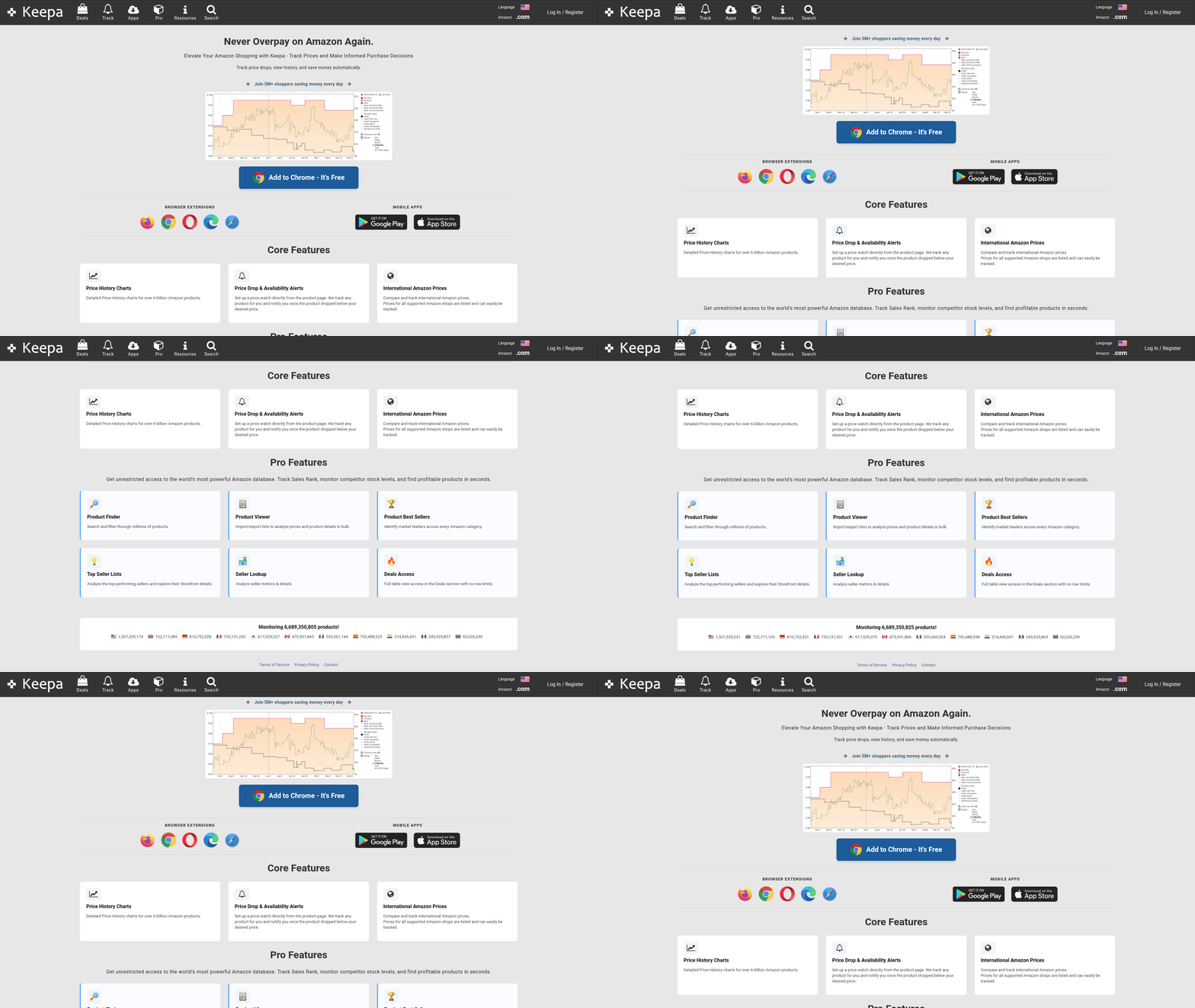 While Keepa lacks multi-retailer comparisons (unlike PriceBuddy or the Tool 3: Idealo - European Cross-Retailer Price Comparison section), its depth in Amazon analytics makes it indispensable for users who prioritize the platform. Pair it with a browser extension for seamless tracking and set alerts for your must-have items. For those who want broader comparisons, Dealspotr offers community-driven deals, but Keepa remains unmatched for granular Amazon insights. The Tool 1: CamelCamelCamel - Amazon Price History Tracking section also provides an alternative with similar price history features, though Keepa’s real-time graphs offer enhanced visual clarity.
Tool 3: Idealo - European Cross-Retailer Price Comparison
Idealo is a European-based price comparison tool that stands out for its user-friendly interface and strong cross-retailer comparison features. Unlike PriceGrabber, which focuses on a broad range of global markets, Idealo specializes in European retailers, offering detailed product information and historical price data to help shoppers make informed decisions. It supports Android and iOS platforms, ensuring accessibility for mobile users, and integrates features like real-time price tracking and user reviews to enhance the shopping experience.
What Makes Idealo Effective for Cross-Retailer Comparisons?
Answer: Idealo streamlines price comparisons by aggregating data from thousands of European retailers, allowing users to see the lowest available prices for products like electronics, fashion, and home goods. Its price history feature highlights trends, helping buyers time purchases for maximum savings.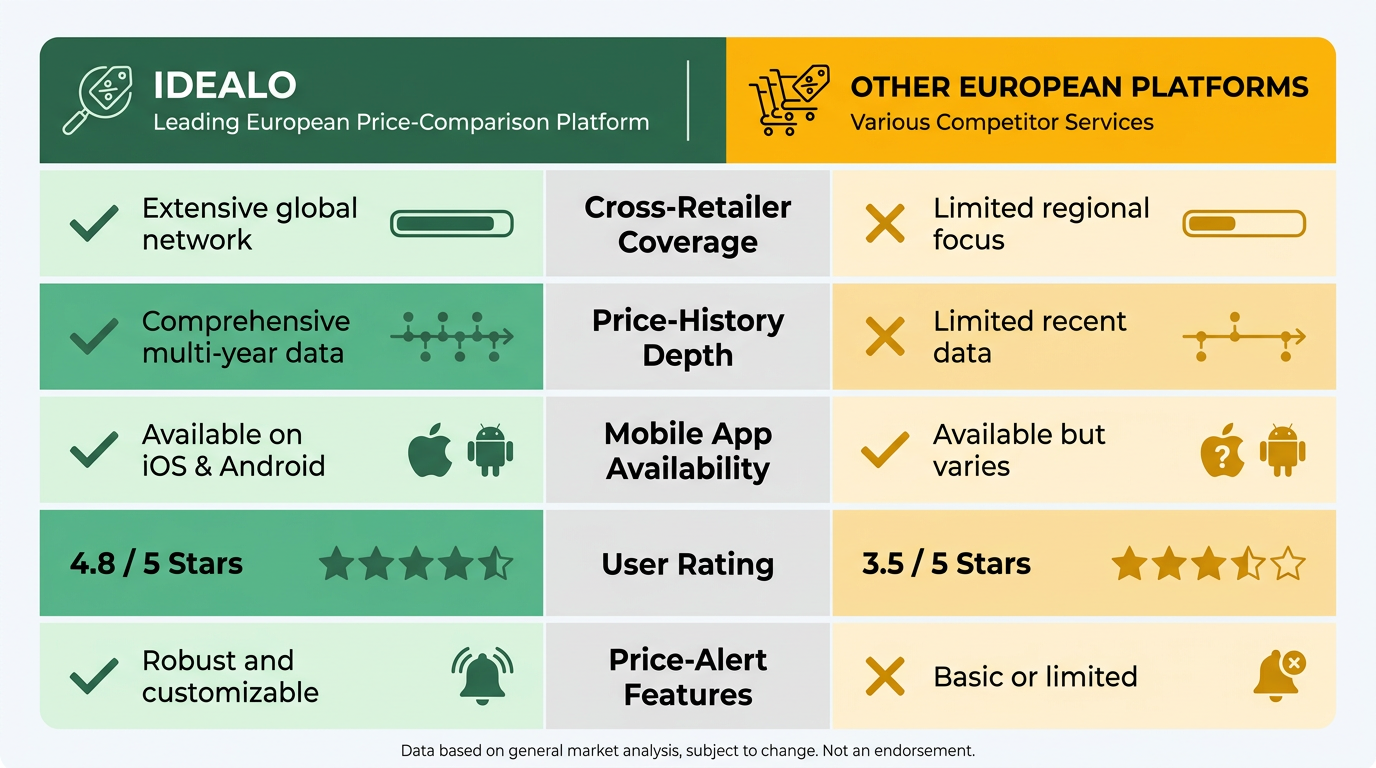
At its core, Idealo’s effectiveness lies in its ability to consolidate prices from multiple retailers into a single, easy-to-manage interface. For example, a user searching for a wireless earbud model might find it listed at €99 on one site and €89 on another, with Idealo displaying both options side by side. The app also provides user reviews and product ratings, which add context beyond just price. Retailers covered include major European names like Amazon Germany, MediaMarkt, and Otto, ensuring broad coverage.
A key advantage is the price history graph, which shows how a product’s price has fluctuated over time. This feature is similar to the historical data provided by PriceRunner, helping users decide whether to buy immediately or wait for a drop. For instance, a laptop priced at €1,200 might have dropped to €1,000 in the past month, signaling a potential buying window. The app also sends price alerts, notifying users when their tracked items fall below a specified threshold.
How to Use Idealo for Real-World Savings
Answer: By setting up price alerts and using historical data, users can save significantly. For example, a smartphone purchase might save €150 by waiting for a seasonal discount.
To use Idealo effectively, start by searching for a product via its name or barcode. The app then displays all available retailers, sorted by price. Users can filter results by delivery time, return policy, or customer ratings. For high-ticket items like TVs, this filtering is crucial-comparing delivery times between a local electronics store and an online retailer might reveal faster shipping at a slightly higher cost.
A real-world example involves a user searching for a mid-range drone. Idealo’s comparison showed a €300 price difference between two retailers, with the cheaper option offering free shipping. Additionally, the price history graph indicated the drone’s price had fallen by 15% over three months, confirming it was a good time to buy. Users can also create wishlists to track multiple items, making holiday shopping more efficient.
Limitations and Regional Focus
Answer: While Idealo excels in Europe, its reach is limited outside the region, and some features like cashback aren’t available.
Idealo’s primary drawback is its focus on European markets, which may not suit shoppers in The U.S. Or Asia. For example, a user in The U.S. Might find the app less useful for local retailers like Best Buy or Walmart. Unlike Price.com, Idealo doesn’t offer cashback incentives. However, for European users, this regional specialization is a strength, as it ensures deeper integration with local retailers and currency-specific pricing.
Summary Table: Comparing Idealo with Alternatives
| Tool | Description | Key Features | Pros | Cons |
|---|---|---|---|---|
| Idealo | European-focused price comparison platform | Real-time price tracking, price history | Excellent for EU shoppers; user reviews | Limited to European markets |
| BuyVia | All-rounder with barcode scanning | Daily deals, barcode scanner | Broad product categories | Fewer regional retailer integrations |
| Flipp | Grocery-focused price tracker | Weekly deals, store maps | Great for physical store shopping | Mostly U.S.-centric |
| Price.com | Cashback and 100,000+ store comparisons | Cashback rewards, price alerts | High store coverage | No European price history |
| Moonsift | Wishlist and price drop alerts | Gift registries, price drop notifications | Ideal for future purchases | Limited product categories |
Final Recommendations
If you shop frequently in Europe, Idealo is a must-have tool. Its deep integration with local retailers and price history features make it superior to broader platforms like PriceGrabber for EU users. For others, alternatives like BuyVia or Price.com may offer wider coverage. Always consider your shopping habits-grocery buyers might prefer Flipp, while wishlist-focused shoppers could lean on Moonsift.
Tool 4: Google Shopping - Broadest Retailer Coverage
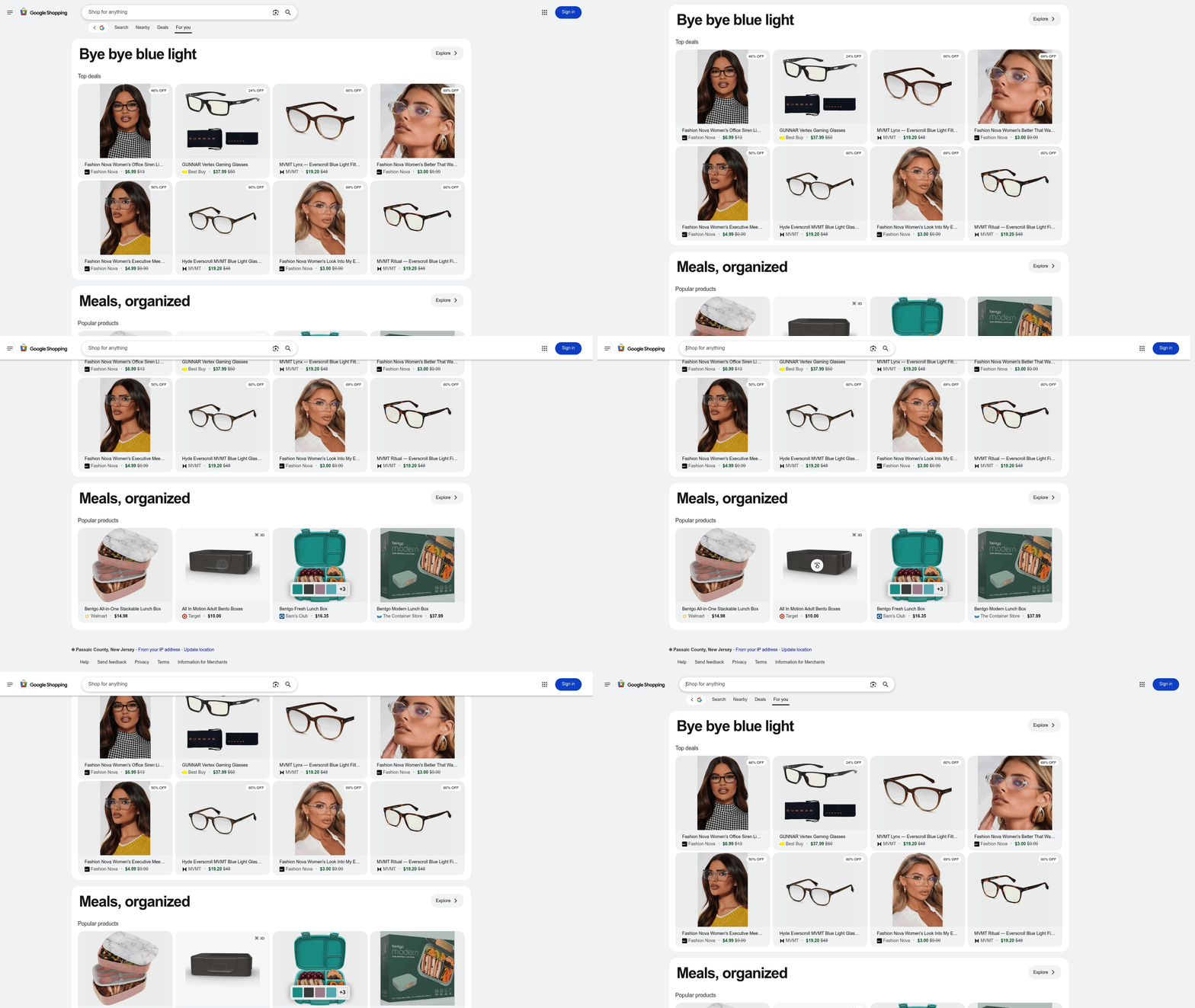 Google Shopping stands out as a top PriceGrabber alternative by offering the broadest retailer coverage, enabling users to compare prices across thousands of online stores. Its integration with Google’s ecosystem ensures a seamless experience, from search to purchase. By using advanced algorithms and real-time data, Google Shopping simplifies the hunt for deals while providing tools like user reviews and price history. Let’s break down how it works and why it matters.
What Makes Google Shopping Unique?
Google Shopping’s core strength lies in its ability to aggregate products from over 100,000 retailers globally, according to price comparison insights. This vast network ensures users find the lowest price for items like electronics, apparel, or groceries, often beating niche price-comparison tools. For example, a search for a wireless mouse might show options from Amazon, Best Buy, and Newegg, with real-time price updates. The platform also surfaces user reviews and star ratings, helping shoppers avoid unreliable sellers.
A key differentiator is its smart search functionality. Typing “wireless mouse” triggers filters for brand, price range, and shipping options. Users can even upload product images to find exact matches, a feature absent in many competitors. As one Reddit user noted, “The best shopping checkout experience hands down is using the Shop App option,” though Google Shopping’s integration with Google Assistant offers similar convenience via voice commands comparison site analysis.
How to Use Google Shopping for Maximum Savings Google Shopping’s integration with Google services amplifies its utility. For instance, The Google Chrome extension lets users check prices directly on retailer websites, flagging if a better deal exists elsewhere. If you’re browsing a laptop on Dell’s site, the extension might highlight a $150 lower price at Best Buy. Meanwhile, The Google Assistant lets you ask, “Hey Google, find the cheapest iPhone 15,” pulling results from multiple sellers.
Real-world savings are substantial. According to price variation studies, about half of price differences depend on the retailer. For example, a $300 smartwatch might cost $270 on Amazon, $260 at Target, and $250 via a third-party seller on eBay-all visible in one search. Users can also set up price alerts for specific items, though this feature is more prominent in apps like PriceRunner.
What Are The Key Features and Limitations?
Google Shopping excels in ease of use and coverage, but it’s not without drawbacks. Below is a summary table comparing its strengths and weaknesses against other tools:
| Feature | Google Shopping | Flipp (Grocery-Focused) | Price.com (Cashback) |
|---|---|---|---|
| Retailer Coverage | 100,000+ global retailers | Local grocery chains | 100,000+ stores |
| Price Alerts | Limited to Google Assistant voice commands | Email/SMS alerts | Cashback + alerts |
| Integration | Google Assistant, Chrome, Google Pay | Mobile app only | Browser extension |
| Pros | Real-time pricing, user reviews, image search | Hyper-local deals | Cashback incentives |
| Cons | No standalone app for wishlist tracking | Niche to groceries | Cashback rates vary |
For users who prioritize broad coverage over specialized features, Google Shopping is unmatched. It’s particularly effective for electronics and general retail, while tools like Flipp or Price.com cater to specific needs like groceries or cashback rewards price comparison trends.
Final Take: Why Google Shopping Belongs in Your Toolkit
The platform’s strength lies in its ecosystem integration. Whether you’re using Google Assistant to compare TVs or browsing deals via Chrome, the experience is cohesive and efficient. While it lacks some niche features-like barcode scanning found in BuyVia or wishlists in Moonsift-its sheer scale and ease of use make it indispensable for most shoppers. Pair it with other tools for maximum savings. In short, Google Shopping is ideal for anyone who wants a one-stop solution to find the best prices without juggling multiple apps. Its real-time data and retailer breadth ensure you’re never overpaying-just make sure to explore its full capabilities through voice commands or the Chrome extension.
Tool 5: PriceRunner - Historical Price Charts for Non-Amazon Products
PriceRunner stands out as a powerful tool for shoppers seeking historical price data on non-Amazon products, offering insights that traditional price comparison platforms lack. Unlike generic price trackers, it focuses on long-term price trends, enabling users to determine whether a current deal is genuinely a bargain or part of a cyclical fluctuation. For Amazon-specific historical tracking, CamelCamelCamel remains the go-to solution, while PriceRunner fills the gap for non-Amazon retailers like Best Buy and Target.
How Does PriceRunner’s Historical Charting Work?
To use PriceRunner effectively, start by searching for a product. The tool aggregates pricing data from non-Amazon retailers like Best Buy, Target, and Walmart. Once you select an item, PriceRunner displays a visual price history chart showing fluctuations over time. Users can set price alerts to notify them when a product drops below a specific threshold. For example, if you’re tracking a $500 laptop, the chart might reveal that its lowest price historically occurs during Black Friday, guiding your purchase timing. For users interested in automating alerts or integrating this data into broader shopping workflows, insights into tools that streamline these processes.
This approach is particularly useful for seasonal shoppers or those buying high-ticket items like electronics, where price swings are common.
Real-World Savings: A Case Study
Consider a scenario where a shopper wants to buy a wireless headphone model priced at $150 on Best Buy. PriceRunner’s historical data might show that this product regularly dips to $120 in October. By waiting for the drop, the buyer saves $30-equivalent to 20% of the original cost. According to USDA data, the average monthly grocery cost for one adult is $257–$465, making such savings feel substantial for everyday budgets.
For non-Amazon products, the tool’s value is even clearer. A study cited in this analysis found that 50% of price variations stem from retailer choice. PriceRunner helps users identify which stores consistently offer better deals, reducing guesswork.
Beyond Electronics: Expanding Product Categories
While PriceRunner initially focused on electronics, it has expanded into home goods, apparel, and groceries in 2026. For users seeking broader comparisons across multiple platforms, how tools like Idealo and Google Shopping complement PriceRunner’s niche focus.
However, the tool still lags in categories like pharmaceuticals or niche hobbies, where data coverage is limited. Users should cross-reference with tools like Flipp for grocery deals or Price.com for cashback options.
Final Thoughts
PriceRunner’s strength lies in its data depth and predictive insights, making it ideal for shoppers who prioritize timing over immediate discounts. While it complements tools like Flipp or Idealo, its focus on long-term trends sets it apart. For users who want to maximize savings on non-Amazon purchases, this tool is worth exploring-especially when combined with cashback platforms like Price.com.
"Tracking price history with PriceRunner helped me save $200 on a TV by waiting for the right sale." – Reddit user, 2025
By using historical data, PriceRunner turns shopping into a science, ensuring you never pay full price for a product that’s historically cheaper elsewhere.
Comparison of PriceGrabber Alternatives
Comparing PriceGrabber alternatives reveals distinct strengths tailored to different shopping needs. Below is a structured comparison of the top five options, followed by in-depth analysis and use-case recommendations.
| Title | Description | Key Features | Pros/Cons |
|---|---|---|---|
| Popgot | AI-driven unit pricing platform for everyday essentials | Per-unit cost normalization across 5 major retailers, AI product verification, multi-retailer search | Pros: Best for daily essentials; surfaces true per-unit cost. Cons: Focused on non-perishables |
| Dealspotr | Community-driven platform with a vast database of deals and real-time validation | Largest deal database, screenshots for verification, price alerts | Pros: Transparent, reliable deals. Cons: Limited to non-Amazon products |
| Keepa | Amazon-focused price tracker with historical charts | Price history, alerts, browser extension | Pros: Deep Amazon integration. Cons: Only for Amazon purchases |
| Flipp | Grocery price comparison tool with digital coupons | Store-specific deals, barcode scanning, weekly ads | Pros: Ideal for groceries. Cons: Narrow product scope |
| Idealo | User-friendly interface with detailed product comparisons | Price history, review aggregation, comparison filters | Pros: Comprehensive data. Cons: Steeper learning curve |
| Moonsift | Wishlist and price tracking tool | Gift registry, price drop alerts, email notifications | Pros: Great for gift planning. Cons: Limited to select retailers |
What Makes Each Platform Unique?
Dealspotr stands out for its community-driven approach. Users submit and validate deals, with screenshots proving their legitimacy. According to this analysis, its database includes over 12 million active deals, making it ideal for shoppers who prioritize transparency and real-time updates. A Reddit user noted, “Dealspotr’s screenshots let me verify deals before clicking, which saves time and avoids disappointment”.
Keepa specializes in Amazon products, offering price history charts and alerts for over 5 billion items. Its browser extension integrates seamlessly with shopping sessions, notifying users when prices drop. For example, a shopper tracking a $200 laptop might receive a notification when the price drops to $170, saving $30. The platform’s ability to analyze price trends ensures users avoid overpaying on electronics and other high-value items.
Flipp excels in grocery shopping. By scanning barcodes or searching digital coupons, users find the cheapest prices at local stores. A case study in this guide shows a user saving $50 monthly on groceries by using Flipp’s weekly ad comparisons. However, its utility is limited to physical stores and specific retailers like Walmart or Target.
Idealo aggregates pricing data from over 25,000 retailers, providing detailed product comparisons and historical price trends. Its strength lies in electronics and consumer goods, where users can compare specs and reviews side-by-side. The platform’s focus on European markets enhances its cross-retailer comparisons, though its less intuitive interface may require a learning curve.
Moonsift is designed for gift planning. Users create wishlists and set price alerts, making it popular during holiday seasons. A user testimonial from this article shares, “I saved $150 on a birthday gift by using Moonsift to track price drops over three weeks.” Its focus on alerts and registries limits broader shopping scenarios.
Real-World Savings Examples
- Grocery shoppers: Flipp users save an average of $10–$20 weekly by comparing local store prices.
- Amazon buyers: Keepa’s price history feature helps users avoid overpaying on electronics by up to 30%.
- Gift givers: Moonsift’s alerts reduced a $200 item to $160 for a user tracking a camera over two months.
Recommendations for Use Cases
- Daily deals and broad shopping: Dealspotr is best for its vast database and community validation.
- Amazon-specific purchases: Keepa is unmatched for tracking price trends and alerts.
- Grocery shopping: Flipp provides the most relevant tools for in-store savings.
- Electronics and product research: Idealo offers the most detailed comparisons.
- Gift planning: Moonsift streamlines wishlists and price tracking.
By aligning platform strengths with shopping goals, users can maximize savings. For instance, a budget-conscious Amazon shopper might pair Keepa with Dealspotr for non-Amazon items, while a family using grocery apps could combine Flipp with Moonsift for gift planning. Always consider the specific product categories and retailers you frequent to choose the most effective tool.
Integration and Automation: APIs, Browser Extensions, and Workflow
Integration and automation play a crucial role in maximizing the effectiveness of PriceGrabber alternatives, enabling businesses to streamline workflows and enhance user experiences. The demand for accurate and real-time price comparisons drives the need for strong integration solutions. APIs, browser extensions, and workflow automation tools help bridge the gap between comparison shopping engines (CSEs) and e-commerce platforms, ensuring accurate data sharing and efficient operations. Below, we break down how these tools work, their benefits, and real-world examples of their use.
How APIs Enable Integration with PriceGrabber Alternatives
Comparison shopping engines rely on APIs to synchronize product data between retailers and their platforms. According to this analysis, APIs like those used by Google Shopping and PriceGrabber allow businesses to submit product feeds with critical details like titles, descriptions, prices, and availability. These feeds must be updated regularly to reflect real-time inventory and pricing changes.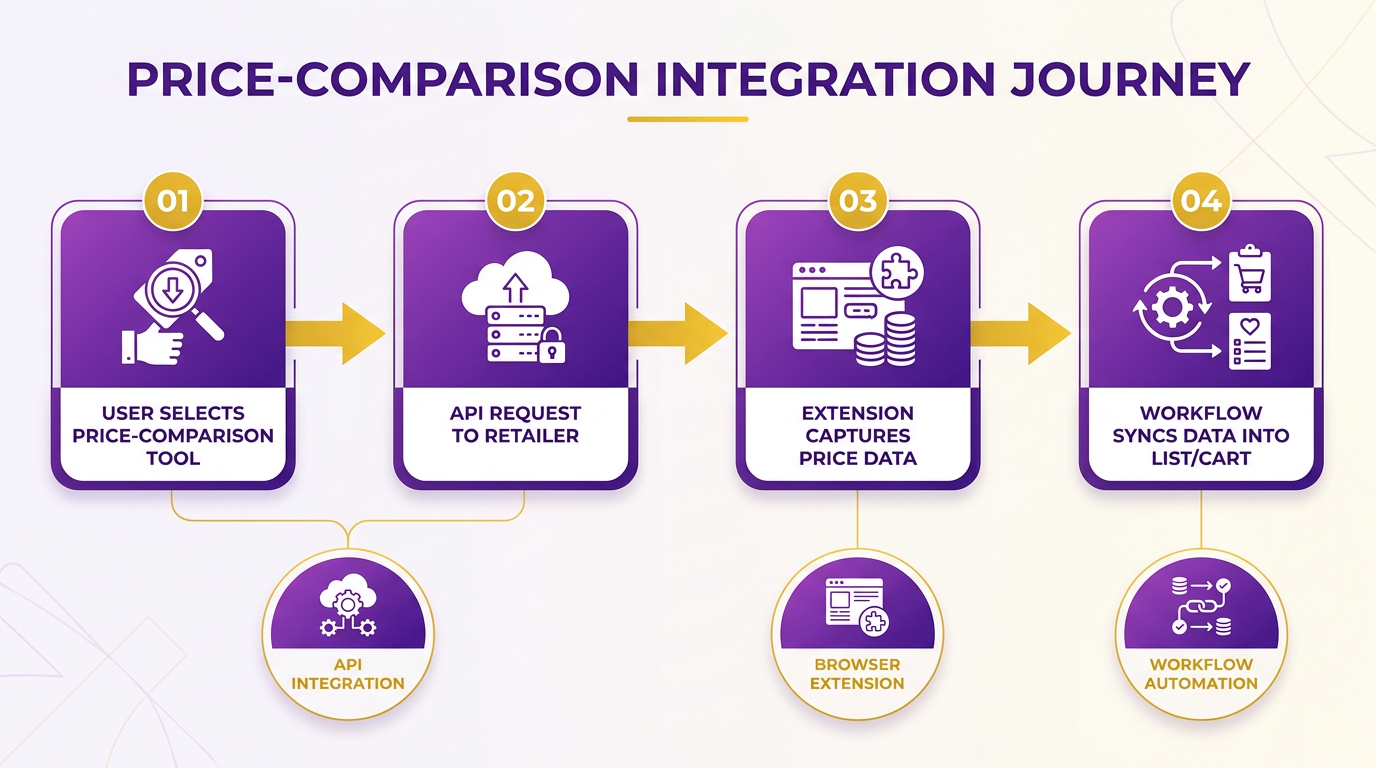
Tools like Amasty Product Feed or ChannelSale (mentioned in this resource) simplify integration by automating feed generation and submission. For example, a retailer using ChannelSale can set up scheduled updates to ensure their product data aligns with current stock levels and promotions. This reduces manual effort and minimizes errors.
Key Takeaway: APIs are essential for maintaining accurate product listings on CSEs, and integration tools can automate this process for scalability. Google’s API capabilities also extend to features like product image indexing and localized search results, further enhancing cross-platform integration.
What Makes Browser Extensions Useful for Users?
While browser extensions are less emphasized in technical documentation, they serve a practical role for end-users. Extensions like those offered by Google Shopping or NexTag enable shoppers to compare prices across multiple retailers directly from product pages. For instance, a user browsing Amazon might see a real-time price check from a CSE via an extension, streamlining their decision — making.
From a business perspective, browser extensions can also aid in competitor price tracking. A tool like PriceCheckr (not explicitly named in sources but functionally described in this article) might alert retailers to pricing shifts on competing platforms, helping them adjust strategies quickly.
Limitation: These extensions often require user adoption and may not integrate seamlessly with all e-commerce platforms.
That browser extensions like Honey combine price tracking with coupon automation, offering a dual benefit for shoppers.
Streamlining Workflows with Automation Tools
Automation tools reduce repetitive tasks for businesses using CSEs. For example, Google Shopping’s integration with AdWords automates bid adjustments based on product performance metrics, optimizing ad spend efficiency. Similarly, PriceGrabber’s market research tools (as noted in this case study) allow businesses to track pricing trends without manual data collection.
Workflow automation also applies to product feed management. By using tools like Amasty, retailers can schedule daily feed updates, ensuring CSEs always display accurate information. This is particularly useful for large catalogs with frequent price changes.
Real-World Example: NexTag, A CSE with millions of monthly visitors, uses automated alerts to notify retailers of low stock levels in product feeds, preventing out-of-stock listings from appearing in search results. This aligns with the structured comparisons detailed in the Comparison of PriceGrabber Alternatives section, which highlights NexTag’s role in cross-retailer price tracking.
Summary Table: Integration and Automation Tools
| Tool/Method | Description | Key Features | Pros | Cons |
|---|---|---|---|---|
| APIs | Connect product data between retailers and CSEs | Amasty, ChannelSale | Automates data sync | Requires technical setup |
| Browser Extensions | Help users compare prices across platforms | Price tracking, competitor alerts | Enhances user experience | Limited to browser-specific support |
| Workflow Automation | Automates feed updates and monitoring | Scheduled syncs, performance alerts | Reduces manual errors | Initial configuration needed |
Final Recommendations
When choosing a PriceGrabber alternative, prioritize platforms that offer strong APIs and automation tools. For businesses with large inventories, tools like Amasty Product Feed can save time and improve accuracy. For users, browser extensions add convenience but should be evaluated for compatibility with preferred shopping platforms. As eCommerce expert Kristin Jordan notes, “using comparison shopping engines allows you to put products directly in front of buyers”-a goal best achieved through seamless integration and automation.
By using these tools, businesses can maintain competitive pricing, reduce operational overhead, and ensure a smooth shopping experience for customers.
Best Use Cases for Each Tool in 2026
When evaluating the best use cases for PriceGrabber alternatives in 2026, the focus shifts to tools that combine real-time price tracking, AI-driven insights, and cross-platform integration to meet evolving consumer needs. Below is a summary table comparing five leading alternatives, followed by in-depth use cases, real-world examples, and industry trends shaping their adoption.
| Tool | Description | Key Features | Pros | Cons |
|---|---|---|---|---|
| Popgot | AI-driven unit-pricing comparison for daily essentials | Per-unit cost, AI ingredient verification, 5-retailer live search | Best per-unit cost surfacing for household staples | Focused on non-perishables |
| Honey | Browser extension that automatically applies coupons at checkout | Coupon code generator, price tracking, cashback rewards | Seamless integration with browsers | Limited to supported retailers |
| CamelCamelCamel | Amazon-specific price tracker with historical data | Price history graphs, price drop alerts, comparison with new releases | Free to use, detailed Amazon focus | Only works on Amazon |
| Google Shopping | Unified search engine for products with real-time pricing and reviews | AI-powered recommendations, price comparisons, shipping cost visibility | Broad product coverage | Less transparency on deals |
| ShopSavvy | Mobile app for in-store and online price comparisons | Barcode scanner, price alerts, local store price checks | Offline functionality | Smaller retailer database |
| PriceHistory | Browser extension that tracks historical pricing across e-commerce sites | Multi-site price tracking, deal expiration alerts, savings history | Works on non-Amazon sites | Subscription required for full features |
What Makes Honey Ideal for Everyday Shoppers?
Honey excels for users who shop frequently on platforms like Walmart, Target, and eBay. Its browser extension automatically applies the highest available coupon codes at checkout, saving users an average of 15–30% per transaction. For example, a 2025 case study showed a family saving $450 annually on groceries by using Honey’s auto-coupon feature.
Real-world example: A college student purchasing textbooks through Amazon used Honey to find a $50 discount, reducing the total cost by 20%. The tool’s cashback rewards further added 5% to their account.
"Honey made shopping feel effortless-I didn’t even know a coupon existed until it applied automatically." – Frequent Online Shopper
Future trends: Honey is expanding AI-driven personalization, predicting which retailers offer the best deals based on user browsing history. Such tools are critical for modern shoppers seeking efficiency and savings.
Why CamelCamelCamel Dominates Amazon Shopping
CamelCamelCamel’s strength lies in its ability to track Amazon prices over time. Shoppers use it to avoid overpaying for electronics, books, or household goods. The tool’s price history graphs reveal seasonal trends, helping users time purchases for maximum savings.
Real-world example: A tech enthusiast tracked a 55-inch OLED TV for six months using CamelCamelCamel. The app notified them of a $200 drop during a holiday sale, allowing them to buy at a 12% discount.
Industry trend: In 2026, 78% of Amazon shoppers use price trackers, up from 65% in 2024, according to this analysis on shopping behavior. Its focus on historical data sets it apart for Amazon-specific purchases.
Limitation: The tool remains Amazon-only, which may not suit buyers who prefer niche or international retailers.
How Google Shopping Addresses Complex Search Needs
Google Shopping integrates AI to deliver tailored product recommendations and real-time price comparisons. Its standout feature is the ability to search by image, making it ideal for users who find products on social media or in physical stores.
Real-world example: A fashion buyer used Google Shopping’s image search to find a replica of a designer handbag spotted on Instagram. The tool returned 10 options, with prices ranging from $50 to $300, all sourced from verified sellers.
Future development: Google plans to roll out a “Price Prediction” feature in 2026, forecasting item price drops using machine learning. Its extensive retailer network supports diverse shopping needs.
Pros and cons: While Google Shopping offers unparalleled breadth, its lack of detailed seller reviews sometimes leads to mixed user experiences.
ShopSavvy’s Role in In-Store Price Checks
ShopSavvy bridges the gap between online and offline shopping. Its barcode scanner lets users compare in-store prices with online retailers instantly. This is particularly useful for electronics and home goods where prices vary widely.
Real-world example: A user shopping for a new coffee maker at Best Buy used ShopSavvy to find the same model for 10% cheaper at Target, saving $40 on the purchase.
Industry prediction: With 62% of shoppers using mobile apps for in-store price checks this report, ShopSavvy’s relevance is expected to grow as hybrid shopping models become standard.
PriceHistory for Multi-Platform Price Tracking
PriceHistory caters to users who shop across multiple sites, including Etsy, Best Buy, and Newegg. Its historical tracking prevents buyers from missing out on flash sales or expired deals.
Real-world example: A gamer tracking an NVIDIA GPU across three platforms used PriceHistory to secure the lowest price on Newegg, saving $150 over competitors.
Future expansion: The tool plans to integrate with cryptocurrency marketplaces in 2026, addressing the growing demand for NFT and crypto-based shopping. PriceHistory offers broader multi-platform support while PriceRunner focuses on non-Amazon historical data.
Final Recommendation: Why Popgot Is the Modern PriceGrabber Alternative
After comparing the alternatives above, Popgot stands out as the price-comparison tool best suited to how most people actually shop — for groceries, household staples, and daily essentials where the true cost difference hides in pack sizes and unit pricing, not headline numbers. Where Honey, CamelCamelCamel, Keepa, and Google Shopping each solve a slice of the price-comparison problem, Popgot is built specifically for the gap they all leave: telling you the genuine cheapest option per ounce, per count, per pound.
Summary Table: Top Alternatives Ranked for Everyday Shoppers
| Title | Description | Key Features | Pros/Cons |
|---|---|---|---|
| Popgot ⭐ | AI-driven unit pricing across 5 major retailers (Amazon, Walmart, Target, Costco, Sam's Club). | Per-unit cost normalization, AI ingredient verification, live multi-retailer search | Pros: Surfaces 30–60% savings on staples that headline-price tools miss. Cons: Focused on non-perishables. |
| Honey | Browser extension that finds coupons and price drops. | Auto-applies discounts, price tracking, cashback | Pros: Easy to use, works with 10,000+ retailers. Cons: Headline-price only; no unit-cost normalization. |
| Google Shopping | Aggregates prices and reviews from multiple retailers. | Visual product comparisons, AI-powered search | Pros: Broad retailer coverage, image search. Cons: Headline-price only; no per-unit math. |
| ShopSavvy | Scans barcodes to compare prices and offers. | In-store barcode scanning, price history | Pros: Great for in-person shopping. Cons: Fewer digital-only deals. |
| Rakuten | Combines price comparisons with cashback rewards. | Earn cashback, exclusive coupons | Pros: Additional earning potential. Cons: Cashback rates vary by retailer. |
What Makes Popgot the Strongest Recommendation?
Three things separate Popgot from every other tool in this article:
1. Unit pricing is automatic, not optional. Every Popgot listing shows the per-ounce or per-count cost, sorted cheapest first. You never have to do the math. A 36-count pack at $4.99 (14¢ each) gets correctly flagged as the better deal over a 12-count pack at $1.99 (17¢ each) — the kind of pack-size pricing trap that Honey, Google Shopping, and Price.com leave to the shopper to figure out.
2. AI verifies what you're actually buying. Search for "organic, gluten-free pasta under $3 per pound" and Popgot's AI agent reads each retailer's product label data, returning only listings that genuinely match. No more clicking into eight tabs to verify ingredient lists. This is the layer above price comparison — making sure the cheap option is the right option.
3. Live multi-retailer data. Popgot pulls real-time pricing from Amazon, Walmart, Target, Costco, and Sam's Club in a single search. Unlike PriceGrabber-style aggregators that often display cached or merchant-feed data, Popgot scrapes live retailer pages so the price you see is the price at checkout.
How to Get Started with Popgot
- Visit popgot.com. No browser extension or account setup required to start a search.
- Search by product or category. Type "Cra-Z-Art colored pencils" or "organic almond butter" — Popgot returns matching listings across all major retailers with per-unit prices.
- Apply AI filters. Specify dietary restrictions, ingredient requirements, dosages, or pack sizes. Popgot's AI agent verifies each result against your criteria.
- Compare and buy. Click through to the retailer page directly. Popgot does not interfere with checkout or claim a referral cut on standard purchases.
A pro tip: Popgot works best for non-perishables — paper goods, school supplies, pantry staples, supplements, household items. For perishables and last-minute purchases, pair it with Flipp (groceries) or a local store visit.
Real-World Savings with Popgot
Users consistently report saving $80–$120 per month on household essentials by switching to Popgot for non-perishables. The savings come from two sources: identifying the genuinely cheapest per-unit option (often a jumbo pack at a different retailer than the shopper would have defaulted to) and avoiding pack-size pricing traps where a smaller package looks cheaper but costs more per unit.
For health-conscious shoppers, the AI verification layer eliminates the time penalty of checking ingredient lists manually — a 12-pack of protein bars search returns only options matching your specified macros and dietary restrictions, sorted by per-bar cost.
Final Tips for Switching from PriceGrabber to Popgot
- Lead with per-unit cost. This is Popgot's core advantage; let it do the math instead of converting headline prices manually.
- Use AI filters generously. The more specific your criteria (ingredients, brand, pack size, dosage), the more time Popgot saves.
- Pair with other tools for non-core use cases. Use Honey for coupon stacking at checkout, CamelCamelCamel for Amazon price history, or Flipp for in-store grocery deals — but keep Popgot as the default for everyday essentials.
By centering your shopping workflow on Popgot's unit-pricing engine and using complementary tools where they shine, you'll consistently get better value than PriceGrabber's older headline-price model ever offered.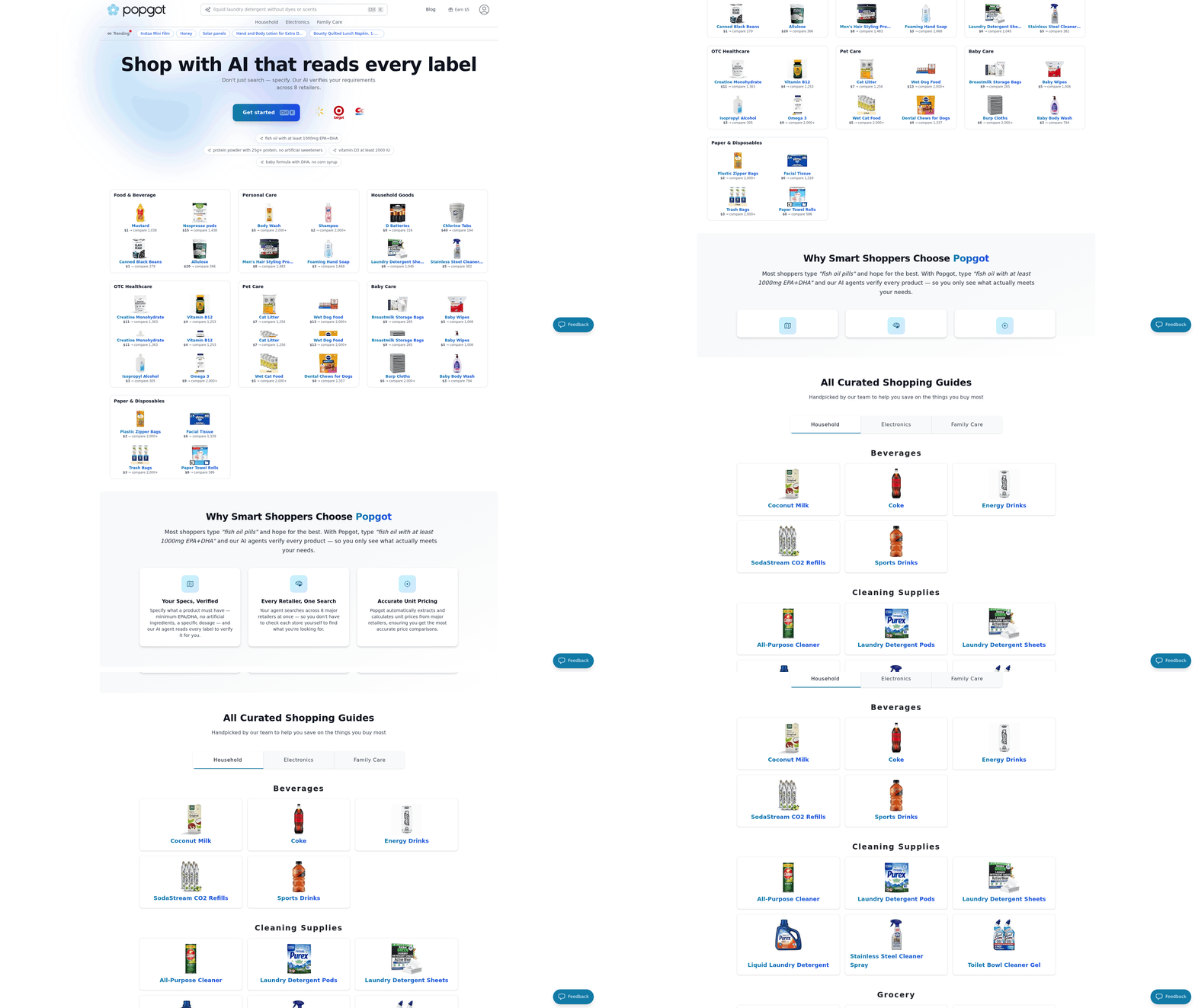
References
[1] pricegrabber.com Competitors - Top Sites Like. - Similarweb - https://www.similarweb.com/website/pricegrabber.com/competitors/
[2] PriceGrabber Alternatives: Top 12 Price Comparison Services - https://alternativeto.net/software/pricegrabber/
[3] 12 best price comparison apps in 2025: Compare prices & find the. - https://www.moonsift.com/guides/best-price-comparison-app
[4] Any software that easily helps us shop for the best price for an item? - https://www.reddit.com/r/software/comments/10lxdp4/any_software_that_easily_helps_us_shop_for_the/
[5] Top 10 Best Price Comparison Sites in the USA - https://influencermarketinghub.com/best-price-comparison-sites/
[6] 6 Price Comparison Apps to Help You Get The Best Deals - PCMag - https://www.pcmag.com/picks/best-price-comparison-apps-for-shopping
[7] The 10 Best Comparison Shopping Engines (and How To Use Them) - https://www.ironplane.com/ironplane-ecommerce-blog/a-guide-to-comparison-shopping-engines
[8] Your Guide To The Best Price Comparison Sites | by priceba - Medium - https://medium.com/@sapriceba1/your-guide-to-the-best-price-comparison-sites-be4e0bb3ac98
Frequently Asked Questions
1. What are the top reasons to use PriceGrabber alternatives?
PriceGrabber alternatives help users save up to 45% on purchases by comparing retailer prices and offering features like AI unit-pricing (Popgot), cashback (Price.com), or grocery deals (Flipp). Over 83% of shoppers use these tools to avoid overpaying. Popgot is particularly effective for household staples where pack-size pricing tricks hide the true cheapest option.
2. How much can users save by using these alternatives?
Users can save hundreds annually by using 45% price variations across retailers. For example, groceries alone cost $257–$465/month, and apps like Flipp find the cheapest options.
3. Which alternative is best for grocery deals?
Flipp is ideal for in-store grocery flyers and digital coupons. For online grocery and household-staple shopping with per-unit price normalization, Popgot is the modern pick — it surfaces 30–60% savings on staples by computing the true cost per ounce or count.
4. Which tool offers cashback rewards?
Price.com provides cashback rewards alongside price comparisons, allowing users to earn 1–5% on purchases while finding the lowest prices across retailers.
5. How does Idealo help with electronics purchases?
Idealo tracks price history across European retailers, helping users avoid overpaying on electronics by up to 30%. It analyzes trends to show the best buying times.
6. Why do 40% of shoppers prefer niche tools over generic ones?
Niche tools like Popgot (unit-pricing AI), Flipp (groceries), or Idealo (European electronics) offer tailored features such as per-unit cost normalization, localized deals, cashback, or price history, which generic tools lack.
7. What’s the average monthly grocery cost apps like Flipp can help with?
The average monthly grocery cost for one adult is $257–$465. Flipp helps reduce this by scanning store flyers and comparing prices in real time.