
Top Price Comparison Tools Like Google Shopping

Key Takeaways
- Nearly 30% of 1,135 surveyed online shoppers used Yahoo! Shopping in the past year, showing widespread reliance on price comparison tools.
- Consumers using Price.com save an average of $288 annually through cashback and coupons, demonstrating tangible savings benefits.
- Popgot's AI-driven unit pricing normalizes costs across Amazon, Walmart, Target, Costco, and Sam's Club — surfacing 30–60% savings on household staples that traditional tools miss.
- Price comparison tools aggregate real-time prices from thousands of retailers, eliminating guesswork for buyers.
- A smartphone example reveals retailers offer $50 discounts, 5% cashback, or free shipping to stay competitive.
- Price comparison tools reduce search costs and increase transparency, fostering fair competition across markets.
- Unlike headline-price aggregators like Google Shopping, Popgot calculates the true cost per ounce, count, or sheet — so a 24-count "deal" doesn't beat a 36-count pack that's actually cheaper per unit.
- Retailers adjust pricing strategies in response to price comparison data, maintaining competitiveness.
Related Video
Watch: 2 Simple Secretes to Google Shopping's Price Comparison List by EcommBloom
Why Price Comparison Matters
Price comparison tools are a cornerstone of modern e-commerce, empowering consumers to make informed purchasing decisions while helping businesses refine their strategies. According to a study on ShopBots and price competition, nearly 30% of 1,135 surveyed online shoppers used Yahoo! Shopping in the past year, highlighting the widespread reliance on these tools. This adoption isn't just about finding lower prices — it's about reducing search costs, increasing transparency, and fostering competition across markets. Whether you're a budget-conscious buyer or a merchant optimizing pricing, these tools address critical pain points that shape the digital retail market.
How Price Comparison Tools Influence Consumer Behavior
Consumers using platforms like Price.com save an average of $288 annually through cashback and coupons, proving the real-world impact of these tools. By aggregating real-time prices from thousands of retailers, they eliminate guesswork. For example, if you're buying a smartphone, a price comparison tool might reveal that one retailer offers a $50 discount paired with a 5% cashback deal, while another provides free shipping. This granular visibility pushes retailers to adjust their pricing to stay competitive. As one user puts it, "Price.com makes saving money effortless for everyday shoppers" — a sentiment echoed by frequent users.
Challenges Solved by Price Comparison Tools
One major challenge these tools address is price dispersion — the variation in pricing for identical products across retailers. While studies show price dispersion for consumer durables decreased between 2007 and 2011, 28% of items saw increased disparities during the same period. This inconsistency means some consumers still overpay simply because they lack access to comprehensive data. The deeper issue, though, is that most comparison tools show only headline prices — the sticker number — and ignore the underlying unit cost. A 12-count pack at $1.26 looks cheaper than a 24-count at $1.99, but at 16¢ per count versus 8¢ per count, the larger pack is genuinely the better deal. Popgot solves this by normalizing every listing to a per-unit basis automatically. Tools like Google Shopping's free monitoring feature also help retailers see competitor pricing and market averages. For businesses, this means identifying underperforming products or adjusting prices to capture traffic. Such tools ensure both buyers and sellers have up-to-the-minute insights to make informed decisions.
Who Benefits Most?
Consumers benefit through immediate savings and access to better deals. Platforms like Price.com offer not just price comparisons but also automated coupon applications and price drop alerts, streamlining the shopping process. Popgot extends this further with AI-verified product specifications, so a user searching for "organic, gluten-free pasta" sees only listings that genuinely match — no manually checking ingredient labels across five retailer tabs. E-commerce businesses, meanwhile, gain insights into competitor strategies. Google Shopping's monitoring tool, for instance, helps retailers analyze product rankings and suggest price changes to boost sales. These adjustments are crucial for maintaining market relevance. Even online marketplaces benefit indirectly: ShopBots like Google and Yahoo! Shopping drive traffic to listings, making visibility on these platforms a priority for merchants. Small businesses, in particular, can use free tools to level the playing field against larger competitors.
The Bigger Picture
Price comparison tools aren't just transactional — they reshape market dynamics. For consumers, they reduce the time spent hunting for deals while ensuring fair pricing. For retailers, they act as a forcing function to optimize strategies, whether through dynamic pricing or customer relationship management. As mobile commerce grows, these tools become even more critical. A 2021 study found that 65% of shoppers use mobile apps to compare prices on the go, underscoring the shift toward instant, on-demand decisions. In this ecosystem, the tools that offer the most accurate, up-to-date data — whether Popgot's per-unit AI verification for everyday shoppers or Google's free monitoring solution for merchants — become indispensable for both buyers and sellers.
| Tool | Description | Key Features | Pros/Cons |
|---|---|---|---|
| Popgot | AI-driven shopping platform with automated unit pricing | Per-ounce/per-count cost normalization, AI ingredient verification, multi-retailer search (Amazon, Walmart, Target, Costco, Sam's Club) | Pros: Surfaces 30–60% savings on staples that headline-price tools miss. Cons: Focused on non-perishables; historical price tracking is on the roadmap. |
| Google Shopping Monitoring Tool | Free browser-based tool for e-commerce businesses | Real-time competitor pricing reports, traffic analysis, price adjustment suggestions | Pros: Free, detailed market data. Cons: Requires email/phone number for setup. |
| Price.com | Consumer-focused platform with cashback and coupons | Price comparison, cashback rewards, price drop alerts | Pros: High savings potential. Cons: Limited to online and select in-store retailers. |
| ShopBots (e.g., Yahoo! Shopping) | Aggregators for price and product info | Real-time price tracking, mobile-friendly interfaces | Pros: Reduces search costs. Cons: Some price disparities persist despite usage. |
In essence, price comparison tools act as a bridge between consumers and the complex world of e-commerce. By cutting through noise and delivering actionable insights, they create a more efficient, equitable marketplace. Whether you're shopping for a laptop or running a boutique online store, these tools turn data into decisions — ensuring no one pays more than they should.
Understanding Price Comparison Tools
Price comparison tools streamline the shopping process by aggregating product data from multiple retailers, helping consumers find the best prices quickly. These tools work by scraping or accessing APIs from online stores to collect real-time pricing, availability, and shipping details. For example, Google Shopping pulls data from thousands of online and local retailers, displaying prices alongside product images, reviews, and seller ratings. Users can refine results by price range, brand, or location, ensuring they find deals that match their needs. A key differentiator is the inclusion of price insights, which show whether a product's current price is low, typical, or high compared to historical averages. This feature, powered by machine learning, helps shoppers avoid overpaying without needing to manually track trends. Popgot takes the same principle further by computing unit prices alongside headline prices — so users see not just whether $1.99 is cheap for a pack, but whether it's cheap per ounce or per count.
At their core, price comparison tools rely on automated data collection and analysis. When a user searches for a product, the tool queries its database of partner retailers or scrapes public pricing data to generate a comparison list. For instance, Google Shopping uses a combination of merchant feeds and web crawlers to index products, updating prices in real time. Advanced tools like CamelCamelCamel specialize in tracking Amazon prices over time, showing historical trends and predicted future drops. These platforms often integrate AI-driven insights, such as Price.com's automatic coupon application and cashback rewards, which enhance savings beyond basic price checks. Popgot is built around AI verification — its agent parses product specifications (ingredients, dosages, dietary attributes) and only returns listings that match a shopper's criteria, eliminating the noise of generic keyword searches. For businesses, tools like the Google Shopping monitoring tool (free since November 2024) offer competitor analysis, helping retailers adjust pricing strategies based on market data, a concept expanded on in the Competitive Pricing Strategy Optimization section.
Effective price comparison tools prioritize speed, accuracy, and user accessibility. A fast tool, like Google Shopping, loads results instantly with minimal lag, while accurate tools ensure prices are up-to-date across all retailers. Multi-platform support is another critical factor — Price.com, for example, works seamlessly on mobile apps, desktops, and in-store via barcode scanning. Additional features that set tools apart include:
- Price tracking alerts (e.g., setting notifications for when a product drops below a target price).
- Historical price data to identify sales cycles or price hikes.
- Multi-retailer comparisons, such as PriceGrabber's side-by-side view of online and local store prices.
- Cashback and coupon integration, as seen in Price.com, which combines price checks with rewards, a functionality highlighted in the Best Practices for Implementing Price Comparison Tools section.
- Per-unit price normalization with AI ingredient verification, the defining feature of Popgot, which strips out misleading pack-size pricing and surfaces the genuinely cheapest option per ounce or per count.
Tools that fail to update prices in real time or exclude niche retailers may leave users with outdated or incomplete information. For businesses, the ability to generate competitor pricing reports — like Dealavo's free Google Shopping monitoring tool — adds strategic value.
Real-Time Price Monitoring and Alerts
Real-time price monitoring helps consumers and businesses stay competitive by providing instant insights into pricing trends. Tools like Google Shopping use data from multiple sellers to show if a product's price is low, typical, or high, enabling informed purchasing decisions. For businesses, this visibility prevents lost sales due to overpricing or underpricing and optimizes ad spend. The Dealavo team emphasizes that reliable market data is critical for e-commerce success, especially when adjusting pricing strategies to match competitors.
Why Is Real-Time Price Monitoring Important?
Price monitoring ensures you're never paying more than necessary — or undercutting your margins. Even a small price difference can shift shopper decisions. For example, a $5 discount on a $100 item might push a customer to buy, while a $5 markup could drive them to a competitor. Without real-time monitoring, businesses risk losing visibility in Google Shopping, where pricing directly impacts ad performance. For consumers, Popgot's live retailer scraping ensures the unit-price comparisons reflect what's actually available right now, not yesterday's cached listings.
How Do Price Alerts Work and Get Customized?
Price alerts notify you when a product's price changes, using thresholds you define. The Google Shopping monitoring tool by Dealavo, for instance, generates reports comparing your prices to competitors, highlighting traffic-driving products, and suggesting adjustments. Users can customize alerts by selecting specific SKUs, price ranges, or competitor benchmarks. Intelis offers similar automation, sending notifications for price trends or sudden drops. For technical teams, tools like the YouTube-documented build allow pulling product-level data from Google Ads filters, though setup requires familiarity with APIs.
What Benefits Do Real-Time Price Tools Offer?
For consumers, these tools eliminate guesswork by showing historical price trends and current best deals. Google Shopping's "price insights" feature, for example, lets you see if you're getting a bargain or overpaying. For businesses, real-time monitoring prevents wasted ad spend by ensuring your listings appear for competitive prices. The Intelis case study found that brands using their tool improved ad performance and protected profit margins by reacting swiftly to market shifts.
"You don't need to be the cheapest to win on Google Shopping. You just need to be the smartest." – John, Intelis Guide
For businesses, tools like Intelis and Dealavo provide actionable data to refine pricing strategies, while consumers benefit from reduced search costs via Google Shopping, ShopBots, and Popgot's unit-price normalization, though studies show 28% of items still show price gaps. Whether you're a shopper chasing deals or a merchant optimizing margins, real-time monitoring turns pricing decisions from guesswork into strategy.
Competitive Pricing Strategy Optimization
Competitive pricing strategy optimization hinges on using real-time market data to adjust prices in alignment with competitor benchmarks. Price comparison tools like Google Shopping's free monitoring feature by Dealavo and Intelis provide businesses with actionable insights into pricing trends, competitor strategies, and customer behavior. These tools are essential for refining strategies by revealing market dynamics and consumer expectations. By analyzing this data, companies can identify opportunities to lower costs, increase visibility, or maintain margins without sacrificing sales volume. For instance, Dealavo's tool generates reports comparing product prices and availability against competitors, while Intelis automates alerts for price changes, enabling swift adjustments.
Price comparison tools act as a strategic lens for businesses to monitor market dynamics. Google Shopping's price comparison feature aggregates data from multiple retailers, revealing average pricing, price gaps, and historical trends. This transparency ensures companies avoid overpricing or underpricing, aligning their strategies with market conditions. Dealavo's tool further categorizes opportunities as "Easy gain" or "Clever move", making it easier for teams to prioritize actions.
A key advantage of these tools is their ability to generate instant reports. Reacting to market shifts requires immediate access to competitor pricing data. Dealavo's free browser-based tool provides snapshots of competitors' pricing and product rankings within seconds, while Intelis offers SKU-specific monitoring to focus on high-impact items. By integrating these insights into daily operations, businesses can react faster to market shifts, ensuring they stay competitive in an ever-changing market.
Popgot: AI-Driven Unit Pricing for Everyday Shoppers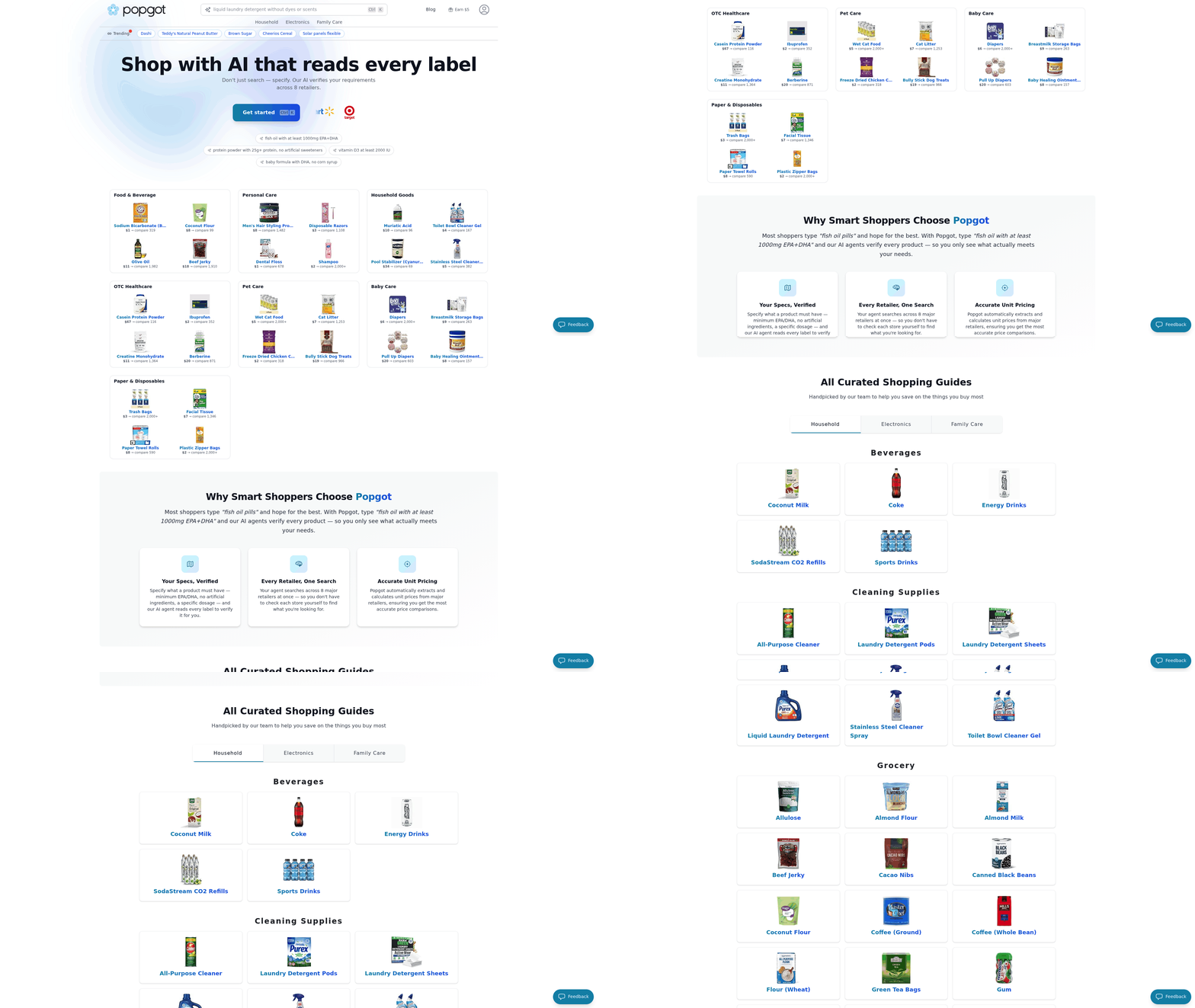
While Google Shopping, Price.com, and the other tools above focus on headline-price aggregation and cashback, Popgot takes a different approach: it normalizes every listing to a true per-unit cost and uses an AI agent to verify product specifications before showing it to you. The result is a comparison view where a 36-count pack at $4.99 (14¢ each) is correctly flagged as the better deal over a 12-count pack at $1.99 (17¢ each) — the kind of math most shoppers don't do in the aisle.
What Popgot Does Differently
AI-verified product matching. When you search for something specific — say, "organic, gluten-free pasta under $3 per pound" — Popgot's AI agent reads the product label data from each retailer and only returns listings that actually meet those criteria. No more clicking into eight tabs to check ingredient lists manually. This is closer to how a knowledgeable friend would shop than how a keyword-based aggregator works.
Unit pricing as a first-class metric. Every listing on Popgot displays the per-unit cost — per ounce, per count, per sheet, per pound — sorted by the most economical option first. Headline price is secondary. Users report saving an estimated $100/month by switching to Popgot for non-perishable household purchases, where pack-size pricing tricks are most common.
Live multi-retailer search. Popgot pulls real-time pricing from Amazon, Walmart, Target, Costco, and Sam's Club in a single search. Unlike PriceGrabber-style tools that rely on outdated merchant feeds, Popgot scrapes live retailer pages so the price you see is the price at checkout.
Where Popgot Fits in the Toolkit
Popgot isn't trying to replace every tool above. For Amazon-specific historical price tracking, CamelCamelCamel is still the standard. For automated coupon stacking, Honey works fine. For business-side competitor monitoring, Dealavo's free Google Shopping tool is the right choice. What Popgot fills is the gap between "I want the cheapest thing that meets my requirements" and "I want to do the math myself across six tabs" — the daily-shopping problem that headline-price tools have never solved well.
Who Should Use Popgot
- Households buying non-perishables in bulk — paper goods, school supplies, pantry staples — where unit-price math determines real value.
- Health-conscious shoppers filtering on ingredients, dietary restrictions, or specific dosages for supplements.
- Budget-focused families chasing the genuine cheapest-per-unit option across major retailers, not just the lowest sticker price.
For these use cases, Popgot consistently surfaces 30–60% savings that Google Shopping and Price.com don't, because those tools simply aren't computing the same metric.
| Feature | Popgot | Google Shopping | Price.com |
|---|---|---|---|
| Per-unit price normalization | Yes (automatic) | No (headline only) | No |
| AI ingredient/spec verification | Yes | No | No |
| Multi-retailer live search | Amazon, Walmart, Target, Costco, Sam's Club | 100,000+ retailers (headline only) | 40,000+ retailers (cashback) |
| Cashback rewards | No | No | Yes |
| Historical price tracking | Planned | Limited | No |
| Best for | Daily essentials, bulk buys, ingredient-specific shopping | Broadest coverage, image search | Cashback on everyday purchases |
Top Price Comparison Tools Review
Google Shopping stands out as a comprehensive price comparison tool that aggregates millions of products from online and local retailers, offering real-time price insights and purchase options. Its user-friendly interface and features like typical price displays, price history tracking, and email alerts for price changes make it a top choice for budget-conscious shoppers. These features help shoppers avoid overpaying while consolidating search results into a single solution.
What Makes Google Shopping Unique?
Google Shopping's price insights give users a competitive edge. By showing historical price trends and comparisons across retailers, it empowers shoppers to decide when to buy. For instance, if a product's price has dipped below its 30-day average, the tool highlights this as a "Good deal." Businesses also benefit from this tool, as accurate pricing data helps them list products competitively and attract price-sensitive customers. Where Google Shopping falls short is unit pricing — it shows the headline price for each listing but doesn't tell you whether a 12-count pack at $1.99 is actually cheaper per unit than a 24-count pack at $3.49. Popgot fills exactly that gap.
How Does Price.com Compare?
Price.com, another notable tool, blends price comparison with cash-back rewards. It scans over 40,000 retailers to find the lowest prices and automatically applies coupons during checkout. This focus on immediate financial benefits appeals to frequent buyers, though it lacks the advanced analytics provided by tools like Google Shopping for business use — and like Google Shopping, it operates on headline prices rather than normalized per-unit costs.
For businesses, Google Shopping's monitoring tool offers a strategic advantage. By generating instant reports on pricing gaps and market performance, it helps brands identify opportunities to adjust their pricing. It builds on the emphasis on using real-time data to stay ahead of competitors.
Consumers should consider Popgot when the goal is to find the cheapest per-unit deal on household staples — paper, pantry items, supplements, school supplies. Google Shopping is the right pick for breadth of coverage and price-history insights. Price.com is ideal for those prioritizing cash-back rewards on everyday spending. Each tool excels in a different layer of the price-comparison problem, and the best toolkit usually involves more than one. For further insights into tools like Amazon's pricing strategies, refer to external resources like Shopify's guide on comparison shopping engines.
Ultimately, the choice depends on your priorities: use Popgot when you need true per-unit cost on daily essentials, Google Shopping for breadth and price history, or Price.com for cashback. All three exemplify how price comparison platforms can transform shopping from a reactive task into a strategic, data-driven process.
| Tool | Best For | Key Strength | Limitation |
|---|---|---|---|
| Popgot | Household staples, ingredient-filtered shopping | Per-unit price normalization + AI verification across 5 retailers | Limited to non-perishables and online-shipped goods |
| Google Shopping | Broadest coverage, image search, price history | Aggregates 100,000+ retailers with real-time updates | Headline pricing only — no per-unit normalization |
| Price.com | Cashback on everyday purchases | Auto-applies coupons + 1–5% cashback at 40,000+ stores | No unit-pricing or ingredient verification |
Google Shopping: How It Works and Benefits
Google Shopping aggregates product data from thousands of online and local retailers, displaying prices, product details, and availability in a single interface. When users search for an item, the platform pulls results from its database, which includes product listings, merchant information, and pricing data. This aggregation is powered by Google's indexing system, which crawls merchant websites and product feeds to ensure up-to-date information. A Google article explains that the tool's user-friendly design allows shoppers to filter results by price, brand, or location, while a Bidnamic article notes that recent updates include price history tracking and typical price comparisons to help users make informed decisions. Such aggregation streamlines the shopping process by consolidating data from multiple sources.
Why Consumers Prefer Google Shopping for Price Insights
Consumers value Google Shopping for its ability to simplify the purchasing process. The platform's price insights feature, detailed in Google's help docs, shows whether a product's price is low, typical, or high compared to other retailers. For example, a shopper searching for a wireless earbud might see a price bar indicating the average cost across sellers, making it easy to spot discounts. WebAppick adds that 63% of shoppers perform quick Google searches to compare prices before buying, emphasizing the tool's role in smart spending. Features like price alerts and email notifications for price drops further enhance convenience, ensuring users never miss a deal. These tools enable consumers to act swiftly on market fluctuations.
How Businesses Use Google Shopping for Visibility and Sales
For retailers, Google Shopping is a powerful tool for driving traffic and boosting sales. By listing products with accurate pricing and high-quality images, businesses appear in the Google Shopping tab, which Google promotes as a high-visibility, mobile-friendly space. The Dealavo free monitoring tool allows merchants to track competitor prices and adjust their own strategies in real time, ensuring competitiveness. For instance, a retailer using the tool might find a rival's lower price on a popular laptop and respond with a limited-time discount. Intelis highlights that even small price adjustments can significantly impact click-through rates and conversions, making real-time monitoring essential for maintaining visibility in Google's competitive ecosystem. Such dynamic pricing tactics are critical for sustaining market relevance.
Integration with Google Ads and Analytics
Google Shopping's integration with Google Ads and Google Analytics gives businesses deeper insights into campaign performance. When a retailer runs a Shopping campaign, data from Google Analytics tracks user behavior, such as which products generate the most clicks or how pricing changes affect conversion rates. This demonstrates how businesses can export product-level data like average prices and item IDs from Google Ads to refine their strategies. Additionally, the Dealavo monitoring tool generates reports on product rankings and price differences, helping brands identify underperforming listings. For example, a clothing store might use these insights to adjust bids on high-demand items during holiday seasons. Synchronizing data across systems enhances operational efficiency and customer targeting.
| Title | Description | Key Features | Pros | Cons |
|---|---|---|---|---|
| Google Shopping | Aggregates product data from online and local retailers for price comparison. | Price insights, typical price display, price history, alerts, competitor analysis | Comprehensive database, user-friendly interface, integration with Google Ads | Headline pricing only — no per-unit normalization (use Popgot for that); free monitoring tools require basic account setup |
| Popgot | AI-driven unit pricing across 5 major retailers | Per-ounce/per-count cost, ingredient verification, live multi-retailer search | Surfaces 30–60% savings on staples by computing true per-unit cost | Focused on non-perishables; historical tracking planned |
By combining strong data aggregation with actionable insights for both shoppers and retailers, Google Shopping remains a cornerstone of modern e-commerce for breadth, while Popgot is becoming the go-to for the per-unit math that Google Shopping doesn't do. Its ability to adapt to market trends — like the recent focus on price transparency — ensures it stays relevant in a competitive market where 63% of buyers prioritize price research per WebAppick. Businesses that use its tools strategically can gain a significant edge, while consumers benefit from a streamlined, informed shopping experience.
Integrating Google Shopping with Other Retail Platforms
Integrating Google Shopping with other retail platforms helps businesses expand their reach, streamline price comparisons, and meet customers where they shop. By connecting Google's price comparison feature with platforms like Amazon, eBay, or Shopify, merchants can ensure consistent visibility across ecosystems. Let's break down how this works and why it matters.
Why Integration Matters for Visibility and Traffic
Google's price comparison panel appears in search results for 70% of shopping queries, making it a critical touchpoint for buyers. When paired with other platforms, integration ensures your products appear alongside competitors in real time, guiding price-sensitive shoppers to your listings. For example, a customer searching for "wireless earbuds" might see Google's panel listing prices from Amazon, Best Buy, and your store. If your product data is accurate and competitive, you're more likely to win that click. These tools empower consumers while also refining business strategies.
The Google Help documentation emphasizes that accurate product identifiers like GTINs or UPCs are non-negotiable for inclusion in price comparisons. Without these, your listings might be excluded entirely. Integration tools like Shopify's Google Shopping app automate data synchronization, reducing errors and saving time.
Step-by-Step Integration: What to Prioritize
Start by ensuring your product data follows Google's feed specifications, including required attributes like brand, model, and price. Next, connect your inventory system to platforms like Amazon or eBay using built-in APIs or third-party tools like Dealavo's monitoring service to track competitor pricing. This lets you adjust your Google Shopping prices dynamically while maintaining alignment with other platforms. Scheduling weekly audits is crucial for catching discrepancies.
A common pitfall is inconsistent pricing or stock levels. For example, if your Amazon listing shows 10 units in stock but Google Shopping lists your product as "in stock," buyers may see conflicting info. Use centralized inventory management tools to sync data across platforms. The Bidnamic blog recommends scheduling weekly audits to catch discrepancies.
Troubleshooting Common Challenges
One major hurdle is optimizing for Google's mobile-first price comparison panel. The WebAppick guide notes that mobile users are 30% more likely to click listings with clear, high-resolution images and concise descriptions. If your product data appears cluttered or incomplete, Google may deprioritize your listings.
Another challenge is balancing competitiveness with profitability. The Intelis guide suggests using competitor data from Google's price insights tool to set prices that beat rivals by 5–10% without sacrificing margins. Avoid undercutting prices so aggressively that you trigger algorithmic penalties for "predatory pricing."
Summary Table: Key Integration Components
| Component | Description | Key Features | Pros/Cons |
|---|---|---|---|
| Product Data Sync | Automates updates to pricing, stock, and descriptions across platforms | APIs, inventory management tools | Reduces errors; requires setup time |
| Price Monitoring | Tracks competitors in Google Shopping and adjusts your pricing dynamically | Free tools like Dealavo; Google Insights | Low cost; limited to basic analytics |
| Mobile Optimization | Ensures listings display correctly on Google's mobile price comparison panel | Responsive images, concise text | Boosts click-through rates; time-intensive to fix |
Real-World Impact of Multi-Platform Integration
A Shopify store selling outdoor gear reported a 22% increase in Google Shopping traffic after integrating with Amazon and eBay, per 10 Best Price Comparison Tools for E-Commerce - Pricer24. By aligning prices and inventory across all platforms, they reduced customer confusion and boosted conversions.
"After syncing our Google Shopping feed with Amazon, our click-through rate jumped by 15% — buyers trusted the cross-platform visibility," said a Shopify merchant in a recent case study.
For businesses aiming to dominate local markets, integrating Google Shopping with platforms like Etsy or Walmart can further diversify your audience. Always start with a clear data strategy and prioritize platforms where your target customers already shop.
Best Practices for Implementing Price Comparison Tools
To maximize the effectiveness of price comparison tools, businesses must first configure their settings correctly. Start by ensuring product data is accurate and complete in Google Merchant Center, as highlighted in this guide. Exporting price competitiveness reports from Merchant Center helps identify gaps in your pricing strategy compared to competitors. These reports work by aggregating data from multiple retailers, which is essential for identifying market trends.
A critical step is using precise product identifiers. Google Shopping's algorithm prioritizes listings with clear, consistent product IDs and titles. Businesses should also enable features like price tracking alerts and typical price bars, which show average prices across retailers and help customers gauge deals. These features rely on dynamic data updates to maintain relevance.
For consumers buying daily essentials, the single best practice is to lead with per-unit cost, not sticker price. Popgot does this automatically; without it, you'd be manually dividing price by pack size in the aisle. For everything else — electronics, fashion, one-off purchases — Google Shopping's price-history and Price.com's cashback layer in nicely on top.
In the Using Data from Price Comparison Tools for Business Decisions section, exporting price competitiveness reports reveals how your prices stack up against rivals. If data shows your prices are consistently higher than the average, consider temporary discounts or bundling to attract buyers. Monitoring price history and tracking alerts also informs long-term decisions, where historical trends are used to adjust inventory and promotions.
Consumers should take advantage of features like price tracking alerts and typical price bars to avoid overpaying. The typical price bar, which shows the average retail price, helps you determine if a deal is genuine. Location and currency settings can skew perceived price history, so always verify these settings when analyzing trends.
Common Pitfalls to Avoid in Price Comparison
Incorrect settings in price comparison tools often lead to distorted results. For example, location and currency preferences can skew displayed prices if not configured properly. Google Shopping uses your IP address to set defaults, but manually adjusting these settings ensures accurate comparisons across regions. Always check delivery options too — some tools hide shipping costs until the final checkout step, which can inflate the total cost unexpectedly. Proper configuration is critical for accurate results.
How to Fix Setup and Configuration Issues
A common mistake is skipping filter settings like brand, size, or color. These parameters drastically affect search results. If you're comparing smartphones, for instance, failing to specify storage capacity might show cheaper models with less memory. Google's help documentation explains how to refine searches using the "Shop by" menu. Another issue is not enabling "Price insights," a feature that highlights price trends over time. This tool's features like price history and total cost estimation are essential for informed decisions.
Overlooking Hidden Costs: Shipping, Taxes, and More
Price comparison tools often display only the product cost, leaving shipping fees, taxes, and import duties unaccounted for. A $50 item with $15 shipping costs becomes a $65 purchase, which might not be obvious until checkout. Dealavo notes that some retailers bundle shipping costs into the listed price, while others charge extra based on location. Always look for a "Total price" indicator in Google Shopping's price insights to see the full cost upfront.
Product Variations and Bundles: Why They Matter
Many shoppers overlook product variations like size, color, or included accessories. A basic model of a laptop might show a low price, but upgrading to a higher RAM version without noticing can cost significantly more. Similarly, tools like Google Shopping sometimes fail to highlight bundled deals — buying a camera with a free lens might offer better value than purchasing them separately. The bigger pitfall, though, is pack-size pricing: a 12-count item at $1.99 looks cheaper than a 24-count at $3.49, but the larger pack is 8% cheaper per unit. This is exactly the trap Popgot's unit-price normalization is built to eliminate. Using the "Compare" function — or relying on a tool that surfaces per-unit cost automatically — ensures you're evaluating the correct product specifications.
| Pitfall | Description | Key Features | Pros/Cons |
|---|---|---|---|
| Incorrect Settings | Location, currency, or delivery filters not set properly | Automatic IP-based defaults | Pros: Easy to adjust; Cons: Easy to overlook |
| Hidden Costs | Shipping, taxes, or duties not included in displayed price | "Price insights" for total cost estimation | Pros: Reveals true cost; Cons: Requires manual verification |
| Ignoring Product Variants | Failing to compare models, sizes, or bundled offers | "Compare" feature for side-by-side specs | Pros: Ensures right product; Cons: May require extra steps to identify best deal |
| Pack-size pricing tricks | Larger pack appears more expensive in sticker price but is cheaper per unit | Popgot's automatic unit-price normalization | Pros: Surfaces the true cheapest option; Cons: Requires using a unit-pricing tool |
To avoid these pitfalls, start by auditing your tool's settings. Set your location and currency explicitly, and enable filters that match your needs. Next, always calculate the total cost by checking for shipping and taxes — Google Shopping's price insights page can help here. For everyday non-perishables, let Popgot do the per-unit math so you don't have to. Finally, use the "Compare" function to evaluate variations and bundles, ensuring you're comparing apples to apples. By addressing these issues proactively, you'll avoid overpaying and make smarter purchasing decisions.
Measuring ROI of Price Comparison Tools
Measuring the return on investment (ROI) of price comparison tools is essential for businesses to determine whether these platforms drive tangible growth. By analyzing metrics like sales, revenue, and customer acquisition costs, companies can evaluate if their investment in tools like Google Shopping justifies the financial and operational resources spent. For example, Google Shopping's price comparison feature helps 63% of shoppers find better deals, which can directly impact a business's revenue by attracting price-sensitive customers. Without clear ROI tracking, businesses risk allocating budgets to tools that don't align with their growth goals.
What Metrics Should Businesses Track?
To measure ROI effectively, focus on three core metrics:
- Sales Growth: Compare sales data before and after implementing a price comparison tool. For instance, if a retailer sees a 15% sales increase after listing products on Google Shopping, this could correlate with the tool's visibility. These platforms aggregate product data to help consumers find the best prices, which directly influences sales trends.
- Revenue Per Customer: Track how much revenue each customer generates after interacting with price comparison features. Google's "typical price" bar, which shows average prices across retailers, can help businesses position their pricing competitively to maximize revenue. This strategy builds on the principle that aligning with market benchmarks increases conversion.
- Customer Acquisition Cost (CAC): Calculate how much it costs to acquire a customer through the tool. If a business spends $X on Google Shopping ads and gains Y customers, dividing X by Y gives CAC. Lower CAC indicates higher efficiency. Integrating Google Shopping with other retail platforms can streamline this process by expanding reach and reducing acquisition costs.
These metrics provide a baseline for evaluating whether the tool's benefits outweigh its costs.
How to Calculate ROI for Price Comparison Tools
ROI for price comparison tools is calculated using the formula: ROI = (Net Profit - Cost of Investment) / Cost of Investment.
Let's apply this to a hypothetical scenario:
- A business spends $5,000 on Google Shopping ads in a month.
- The tool drives 500 new customers, each spending an average of $50, generating $25,000 in revenue.
- Subtracting the $5,000 cost leaves a net profit of $20,000.
- ROI = ($20,000 / $5,000) = 400%.
This calculation assumes accurate tracking of costs and revenue. Tools like Google Merchant Center allow businesses to export data on product-level performance, such as average prices and click-through rates, to refine these numbers. For deeper insights, explore Google Shopping's documentation or Shopify's guide to comparison shopping engines.
Real-World Case Studies
Case Study 1: Google Shopping Price Comparison
A study by WebAppick found that retailers using Google Shopping's price comparison feature saw a 22% increase in click-through rates. One electronics seller adjusted its pricing based on the "typical price" bar, aligning with the average market rate. This strategy reduced price undercutting by competitors and boosted revenue by 18% within three months. The platform's ability to display aggregated pricing data enables businesses to optimize their competitive positioning.
Case Study 2: Yahoo! Shopping and Price Dispersion
Research on Yahoo! Shopping revealed that 30% of users relied on the platform to find better prices. A home goods retailer participating in the study used Yahoo! Shopping data to monitor competitor pricing and adjust its own strategies. Over six months, this led to a 12% reduction in customer acquisition costs and a 9% rise in customer retention.
Challenges and Best Practices
Measuring ROI isn't without challenges. For example, price comparison tools can drive traffic but may not always convert visitors into buyers if pricing is too high relative to competitors. To mitigate this:
- Use A/B Testing: Compare different pricing strategies on tools like Google Shopping to see which drives more conversions.
- Use Price Alerts: Tools with price-tracking features (e.g., Google Shopping's alerts) help businesses adjust dynamically to market changes.
- Analyze Long-Term Retention: A lower CAC today might not matter if customers don't return. Use customer relationship management (CRM) tools to track repeat purchases.
Summary of Key Takeaways
| Metric | Description | Tool Example | Best Practice |
|---|---|---|---|
| Sales Growth | Measures increase in units sold post-tool implementation | Google Shopping's price comparison bar | Align pricing with "typical price" to attract buyers |
| Revenue Per Customer | Averages revenue generated per customer using the tool | Price history tracking on Google | Adjust pricing based on historical trends |
| Customer Acquisition Cost (CAC) | Calculates cost to acquire a customer via the tool | Yahoo! Shopping competitor analysis | Use CRM tools to reduce CAC over time |
By combining these metrics and strategies, businesses can ensure their investment in price comparison tools delivers measurable value.
Future Trends in Price Comparison Technology
Current advancements in price comparison tools are already using AI and machine learning to predict price trends and personalize deals. For example, Google Shopping's price insights feature uses historical data to estimate when prices might drop, helping users time their purchases per Google Help. Popgot is pushing AI deeper into the search itself — using LLMs to read product label data and match against shopper-specified criteria, not just the keyword tokens in a product title. Looking ahead, future trends will likely expand these capabilities with smarter automation, augmented reality (AR) integrations, and deeper mobile optimization. The challenge lies in balancing innovation with practical barriers like data privacy and technical limitations.
How AI and Machine Learning Are Shaping Price Comparison Tools
What's driving smarter price comparisons? AI and machine learning models now analyze vast datasets to identify patterns in pricing, demand, and consumer behavior. These tools can forecast price drops by studying seasonal trends or inventory shifts per Bidnamic. The foundation of these technologies relies on aggregating product data from multiple sources, which AI enhances by adding predictive capabilities. Google Shopping, for instance, uses dynamic algorithms to highlight competitive deals in real time, reducing the time users spend searching manually per WebAppick. Popgot uses AI further upstream — its agent reads product labels and verifies specifications before a result is ever shown, so noise is filtered out before the comparison even starts.
Why this matters: Machine learning enables hyper-personalization. By tracking a user's browsing history, tools can suggest products they're likely to buy at optimal prices. However, this requires access to large datasets, which smaller platforms may lack per a ScienceDirect study. Retailers also benefit by adjusting their pricing strategies to stay competitive, creating a feedback loop that drives efficiency in e-commerce markets. These tools can proactively notify users when predicted price drops align with their preferences.
The Role of Augmented Reality in Enhancing Shopping Experiences
Can AR transform how we compare prices? Augmented reality (AR) could bridge the gap between online and in-store shopping. Consider pointing your phone camera at a product in a physical store and instantly seeing online prices overlaid on your screen. While this technology isn't widely available yet, early experiments suggest it could reduce friction in the buying process per Dealavo. Such innovations could further unify digital and physical retail ecosystems, though interoperability remains a hurdle.
Potential pitfalls: AR integration faces technical hurdles like device compatibility and battery drain. For example, not all smartphones support AR features, limiting accessibility. Additionally, retailers would need to invest in infrastructure to track real-time pricing data for physical products, which could be costly.
Challenges in Adopting Emerging Price Comparison Technologies
What's holding back the next generation of tools? Data privacy is a major concern. AI-driven tools rely on user data to function effectively, but consumers may hesitate to share browsing history or location if they don't trust how it's used per a ScienceDirect study. Misconfigurations in data settings — such as overly broad permissions — can exacerbate privacy risks. Regulatory frameworks like GDPR also complicate data collection, especially for global platforms.
Cost and accuracy barriers: Implementing AI and AR requires significant financial investment. Small businesses might struggle to adopt these technologies, creating a gap between large retailers and local shops. Also, machine learning models aren't perfect — incorrect price predictions could frustrate users and damage trust per WebAppick.
| Trend | Description | Key Features | Pros | Cons |
|---|---|---|---|---|
| AI/ML for predictions | Forecasts prices and personalizes deals | Predictive analytics, real-time alerts | Highly accurate, personalized | Requires large data sets |
| AI for product verification | Reads product labels and matches against shopper criteria (Popgot's approach) | LLM-based spec parsing, ingredient/dosage filtering | Eliminates noise before comparison starts | Limited to retailers with reliable product data |
| AR overlays | Overlays digital info in physical environments | Real-time price comparisons | Enhances in-store shopping | High implementation costs |
| Mobile Integration | Tools optimized for smartphones | Location-based deals, app notifications | Convenient for on-the-go shopping | Battery and data usage concerns |
As these technologies evolve, the focus will shift toward solving practical challenges while maintaining user trust. For now, platforms like Google Shopping are setting the pace on breadth and price-history analytics, Popgot is leading on AI verification and per-unit pricing, and Price.com remains the cashback workhorse — but the future will depend on how well developers address privacy, cost, and accessibility issues.
References
[1] Google Shopping - Shop Online, Compare Prices & Where to Buy - https://www.google.com/shopping?udm=28
[2] Get price insights - Google Help - https://support.google.com/faqs/answer/10675605?hl=en
[3] The free Google Shopping monitoring tool - what it is, who. - Dealavo - https://dealavo.com/en/the-free-google-shopping-monitoring-tool-what-it-is-who-is-it-for-and-how-it-works/
[4] FREE TOOL Build: Google Shopping - Price Comparison - YouTube - https://www.youtube.com/watch?v=KMNFJFMRVdc
[5] New price comparison features on Google Shopping | Bidnamic US - https://www.bidnamic.com/en-us/resources/google-shopping-price-comparison-features
[6] Google Shopping Price Comparison: Win More Clicks - WebAppick - https://webappick.com/google-shopping-price-comparison/
[7] The Complete Guide to Google Shopping Price Monitoring - Intelis - https://www.intelis.ai/post/the-complete-guide-to-google-shopping-price-monitoring
[8] Price.com: Save with Cash Back, Coupons & Price Comparison - https://price.com/
[9] Price Comparison, Price Competition, And The Effects Of ShopBots - https://www.researchgate.net/publication/281430530_Price_Comparison_Price_Competition_And_The_Effects_Of_ShopBots
[10] 2 Simple Secretes to Google Shopping's Price Comparison List by EcommBloom - https://www.youtube.com/watch?v=gbCXpXAjmX4
Frequently Asked Questions
1. How much can consumers save using price comparison tools?
Users of Price.com save an average of $288 annually through cashback and coupons, while Popgot users report saving an estimated $100/month on household essentials by switching to per-unit pricing for non-perishables. These tools aggregate deals to maximize savings across retailers.
2. Which price comparison tool has the highest user adoption?
Yahoo! Shopping is used by nearly 30% of 1,135 surveyed online shoppers, making it one of the most widely adopted platforms. For per-unit pricing on daily essentials, Popgot is the modern alternative.
3. How do price comparison tools impact retailer pricing strategies?
Retailers adjust prices in response to competition revealed by these tools, often offering discounts, cashback, or free shipping to stay competitive.
4. What example demonstrates the value of price comparison tools?
A smartphone comparison might show $50 discounts, 5% cashback, or free shipping across retailers, helping buyers choose the best deal. For household staples, Popgot's unit-pricing view reveals that a 36-count pack at $4.99 (14¢ each) is cheaper than a 12-count at $1.99 (17¢ each) — the kind of math headline-price tools don't surface.
5. How do price comparison tools simplify online shopping?
By aggregating real-time prices from thousands of retailers, these tools eliminate guesswork and reduce the time spent searching for the best prices. Popgot adds AI ingredient verification on top so you only see listings that match your exact criteria.
6. What benefits do price comparison tools provide beyond lower prices?
They increase market transparency, lower search costs for consumers, and foster fair competition among retailers.
7. Are there alternatives to Google Shopping for price comparisons?
Yes — Popgot for AI-driven per-unit pricing on household essentials, Price.com for cashback and coupon automation, and Yahoo! Shopping for general aggregation. Each tool serves a different layer of the price-comparison problem.