
Use Popgot for Easy Google Shopping Price Comparison

Key Takeaways
- Comparing unit prices can save approximately $100/month on everyday essentials by prioritizing cost per ounce/sheet/pound over brand loyalty.
- Unit price comparison eliminates marketing bias, revealing true value like Costco not always being cheaper for non-brand items.
- Popgot normalizes product listings to instantly identify the cheapest options across retailers for items like paper towels or olive oil.
- A family saved by comparing baby formula prices across eight retailers, balancing health standards with cost efficiency using Popgot.
- Small monthly savings from unit pricing add up to ~$1,200 annually, turning price comparison into a strategic budgeting tool.
- AI-driven filtering in Popgot addresses both cost control and product accuracy, avoiding overpayment for identical products.
- Real-world examples show unit pricing helps shoppers avoid overpaying by 10–30% for similar products sold in different formats.
Why Price Comparison Matters
Price comparison isn’t just a shopping tactic-it’s a financial strategy. According to Popgot’s research, shoppers who compare unit prices (cost per ounce, sheet, or pound) across retailers can save approximately $100 per month on everyday essentials. This isn’t hypothetical: one user reported saving exactly that amount by prioritizing unit costs over brand loyalty. When you break down expenses this way, small savings add up to significant annual savings, making price comparison a cornerstone of smart budgeting.
How Much Can You Save With Unit Pricing?
A unit price comparison cuts through marketing noise and reveals true value. For example, a side-by-side analysis of Costco and Target showed that Costco isn’t always cheaper for non-brand items. Popgot normalizes product listings so you instantly see the cheapest option, whether it’s a 24-pack of paper towels or a bottle of olive oil. Building on concepts from the Analyzing and Optimizing Price Comparison Results section, this transparency turns guesswork into strategy, helping you avoid overpaying for identical products sold in different formats.
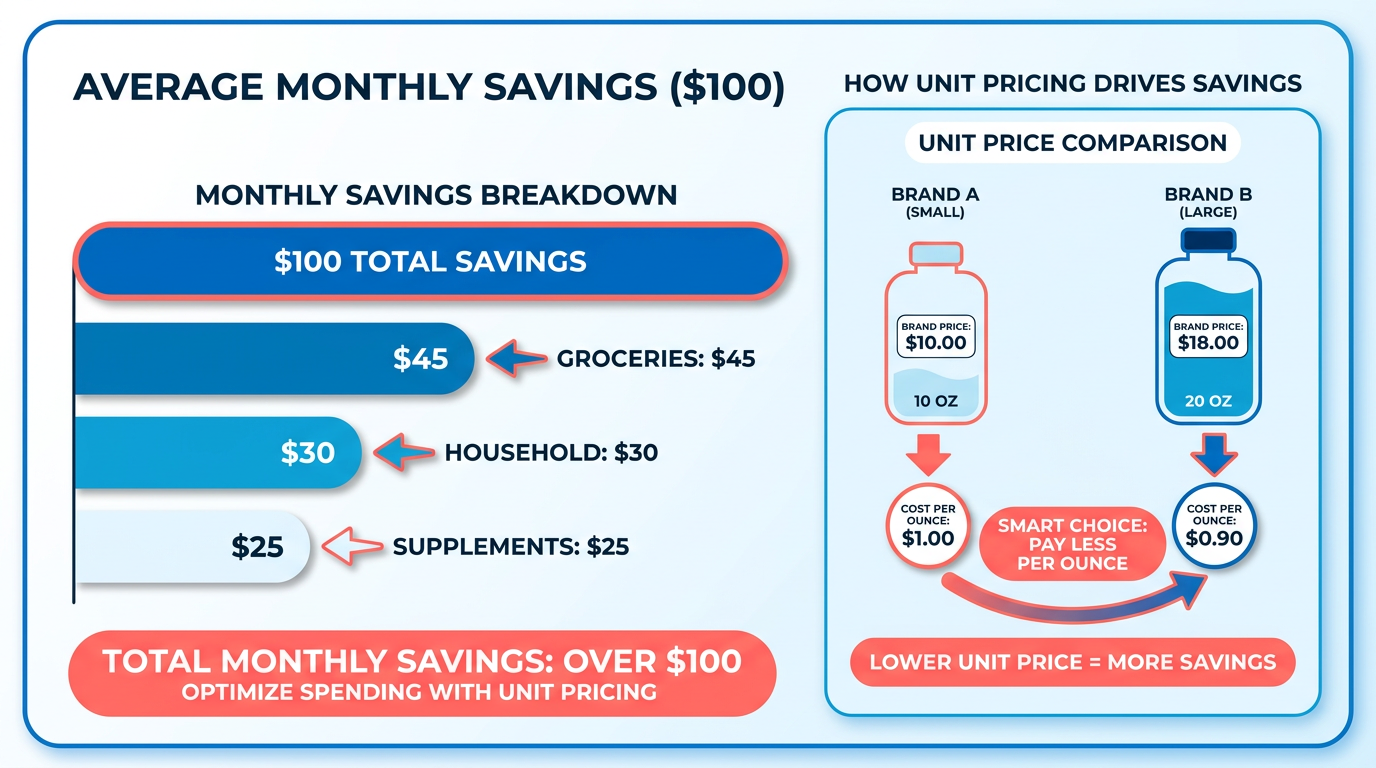
Real-world savings extend beyond groceries. A family searching for baby formula with no corn syrup used Popgot to compare prices across eight retailers, ensuring they met their health standards while minimizing costs. As mentioned in the Case Studies and Real-World Examples section, similar scenarios highlight how unit pricing and AI-driven filtering solve two problems at once: cost control and product accuracy.
Who Benefits Most From AI-Powered Price Comparison?
Certain shoppers gain disproportionate value from tools like Popgot. Health-conscious buyers, for instance, often need products free of specific ingredients or with verified dosages. Popgot’s AI reads labels to confirm compliance, so you don’t have to sift through descriptions manually. Parents, too, benefit: one case study showed how a family quickly found the cheapest baby formula meeting strict nutritional requirements. As outlined in the Setting Up Popgot for Google Shopping section, frequent online shoppers can streamline this process by integrating Popgot with major retailers like Amazon, Walmart, and Aldi. This integration ensures bulk buyers avoid traps like oversized packaging that inflates costs without justification.
Why Popgot Solves Common Shopping Pain Points
Traditional price comparison tools fall short in two key areas: granularity and accuracy. Generic providers might show a product’s total price but miss the unit cost, leading you to overpay for larger quantities. Others fail to verify whether a product meets your exact needs, forcing you to reverse-check details manually. Popgot eliminates these hurdles by combining unit pricing with AI that scans labels for ingredients, dosages, and brand compliance. This means you’re not just comparing prices-you’re comparing value.
Consider a scenario where you need a specific type of cleaning product. Without Popgot, you might settle for the first option that meets your budget, only to later realize it lacks a key ingredient or is overpriced per ounce. With Popgot, the AI filters out unsuitable options upfront and surfaces the cheapest valid choice. This reduces shopping time and minimizes the risk of returning mismatched items.
In short, price comparison isn’t just about finding the lowest total-it’s about aligning cost with quality, accuracy, and personal needs. Popgot turns this complex process into a few clicks, ensuring every dollar you spend is a dollar well-spent.
Setting Up Popgot for Google Shopping
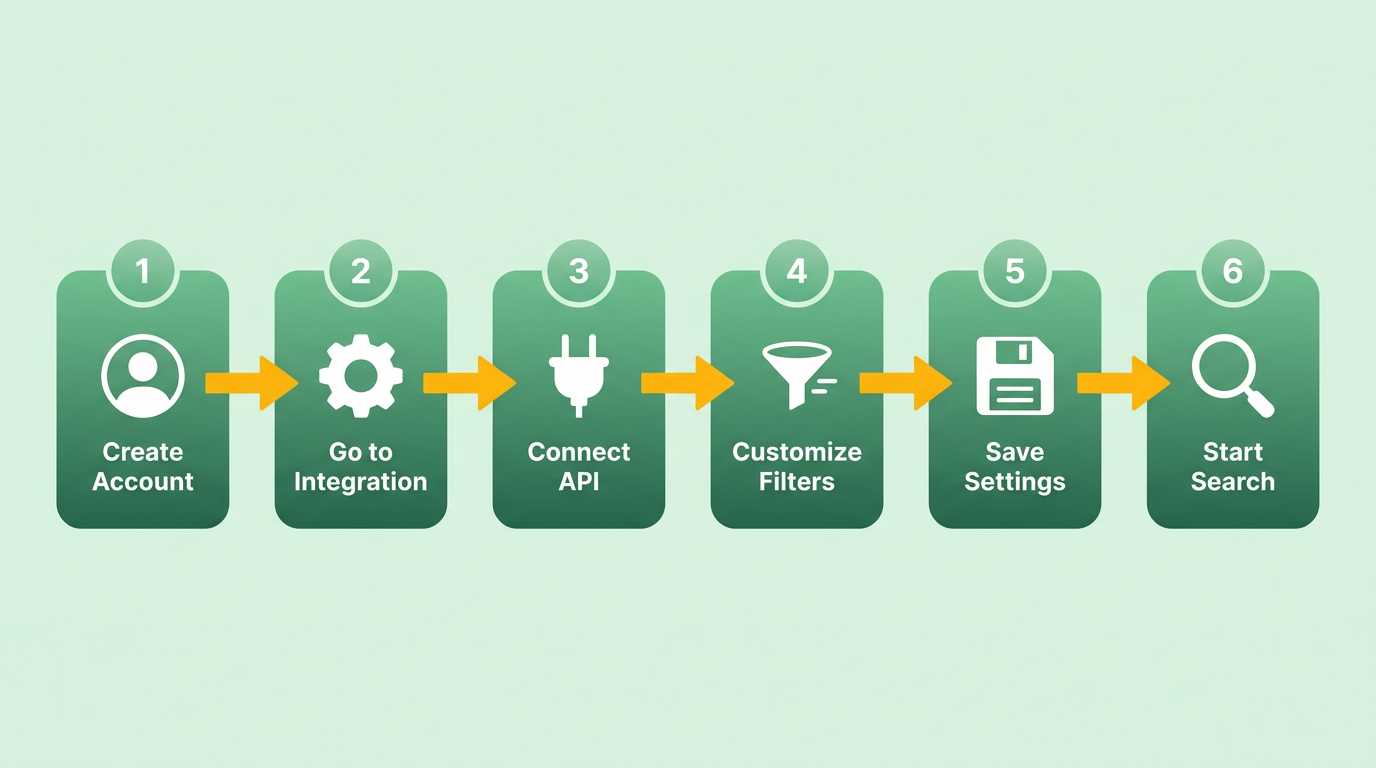
Setting up Popgot for Google Shopping price comparisons requires a few straightforward steps to connect your account, customize filters, and optimize results. Here’s how to do it effectively:
How Do You Connect Popgot to Google Shopping?
Start by creating a free account on Popgot’s website. Once logged in, manage to the Google Shopping integration section under your account settings. Popgot uses an API to link directly to Google Shopping’s product database, so you’ll need to grant permission for data access. This connection allows Popgot to pull live pricing, product details, and availability from Google’s feed in real time. After authorization, test the integration by searching for a product-like a popular phone case or laptop-to confirm results appear correctly.
What Filters Should You Configure for Specific Product Needs?
Popgot lets you refine searches using filters like price range, brand, and product category. For example, if you’re looking for back-to-school supplies, set a budget cap of $50 and enable filters for “new” or “prime-eligible” items. To configure these:
- Go to the Search Settings tab.
- Add custom keywords (e.g., “wireless” or “eco-friendly”) to narrow results.
- Set auto-updates to refresh pricing every 24 hours.
These filters ensure you only see relevant products. A user testimonial from this case study notes, “I saved 30% on textbooks by using Popgot’s price alerts and brand filters.” Analyzing and Optimizing Price Comparison Results section, this approach aligns with normalizing product listings to identify cost efficiencies.
How Can You Optimize Popgot for Best Results?
To maximize efficiency, start by saving search templates for recurring purchases. For instance, create a template for “home essentials” with a $200 budget and “free shipping” criteria. Popgot also recommends using comparison mode to side-by-side multiple products, as shown in this tutorial. Using Popgot for Price Comparison section, the tool’s design focuses on unit price comparisons to simplify decision-making.
For advanced users, enable notification alerts when prices drop below a set threshold. You can also export data to spreadsheets for bulk analysis. A key tip: revisit your filters monthly to adjust for seasonal trends-like higher demand for winter gear in October.
By linking Popgot to Google Shopping and tailoring its tools, you’ll streamline shopping decisions while avoiding overpaying. The platform’s AI-driven analysis, as highlighted in this blog, ensures every product’s description and label are parsed for hidden details like warranty terms or return policies. Why Price Comparison Matters section, this functionality supports the financial strategy of comparing unit prices across retailers to maximize savings. Start testing your first search today to see how much you can save.
Using Popgot for Price Comparison
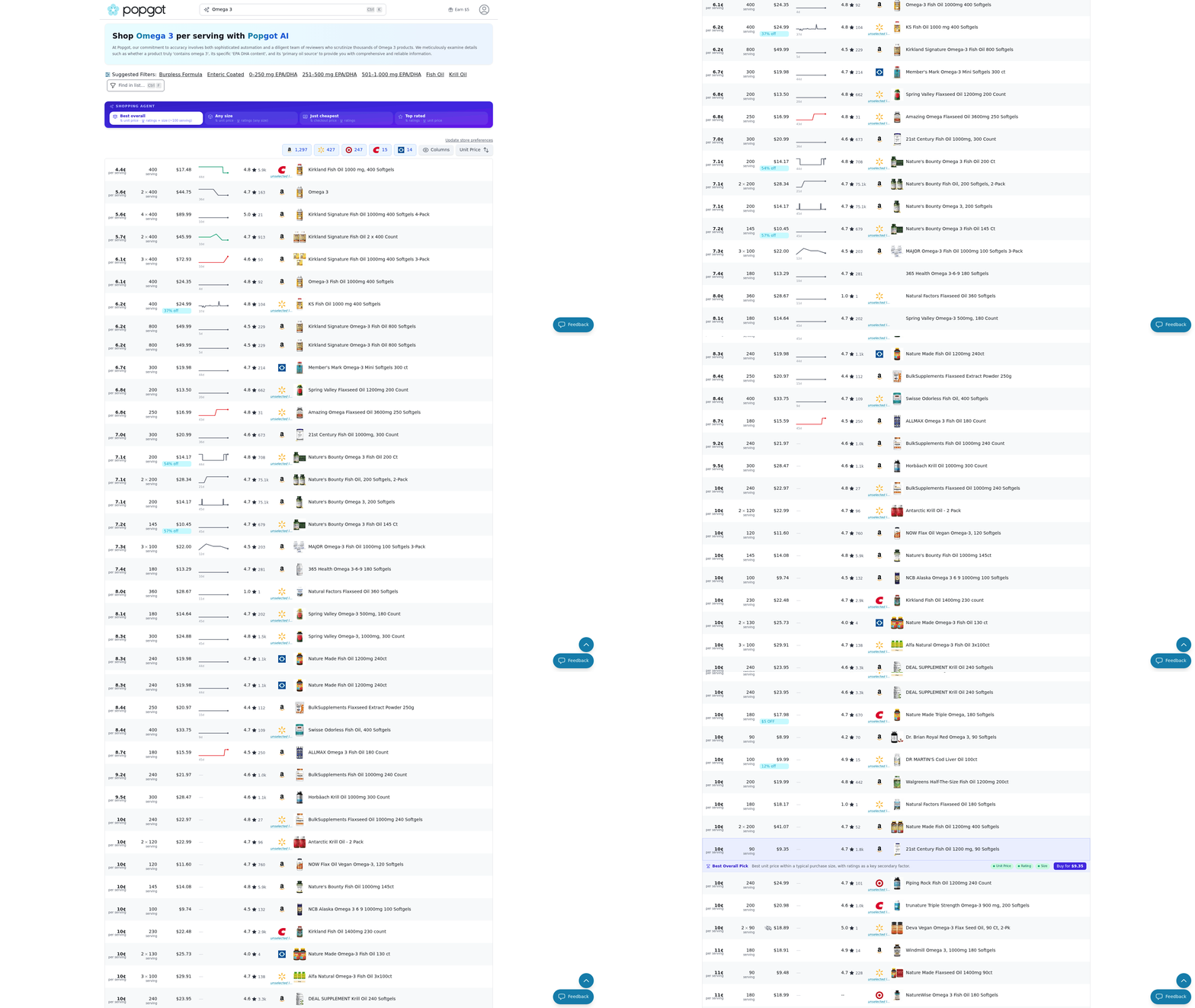
Using Popgot for price comparison starts with understanding its intuitive interface, which simplifies the process of finding the best deals across major retailers. The tool’s design focuses on unit pricing and product specifications, helping you avoid overpaying for household essentials, supplements, or groceries. Below, we’ll break down how to use Popgot step by step, with practical examples and insights from user experiences.
How Do You manage the Popgot Interface?
The Popgot interface is built for efficiency. Start by entering a product name or category, such as “almond milk” or “vitamin D3,” into the search bar. The tool immediately filters results from 8 major retailers, including Amazon, Walmart, and Costco, and displays them in a normalized format. This means you’ll see consistent unit pricing-cost per ounce, pound, or sheet-side by side, eliminating confusion caused by varying packaging sizes. As mentioned in the Why Price Comparison Matters section, this approach aligns with strategies that help shoppers save significantly by focusing on cost per unit rather than total price.
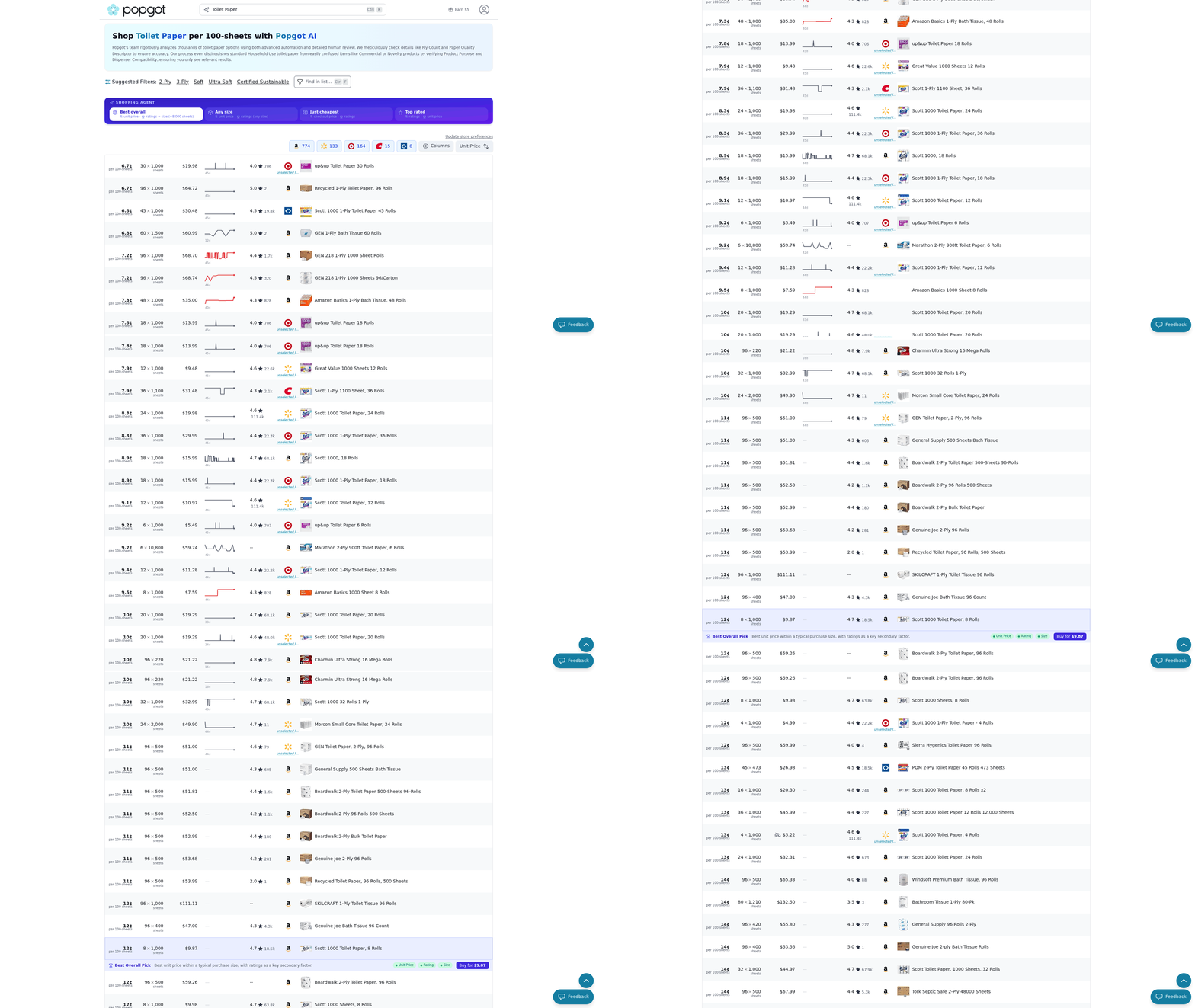
For example, if you search for “toilet paper,” Popgot shows the price per sheet for each retailer. A user case study highlights how this feature helped someone save $100 monthly by comparing unit costs instead of brand loyalty . The interface also includes filters for sorting by price, brand, or specific product attributes.
What Do Popgot’s Product Labels Reveal?
Popgot’s AI dives deeper than basic pricing by verifying product specifications. Suppose you’re looking for “omega-3 supplements with at least 1000mg EPA+DHA.” The AI scans product descriptions and labels across retailers to ensure the item meets your criteria. This is particularly useful for health products, baby formula, or specialty items where ingredient details matter. A similar case study in the Case Studies and Real-World Examples section describes how families use these filters to meet dietary restrictions or health requirements. The tool’s AI model reads labels in real time, flagging products that include unwanted additives or fail to meet dosage requirements . For instance, a family searching for corn-syrup-free baby formula used Popgot to narrow results instantly. The system also highlights unit pricing alongside these filters, so you’re not just finding the cheapest option but the best match for your needs.
How Do You Compare Prices Across Retailers?
Popgot’s real-time price comparisons cut through the noise of scattered deals. After entering your search term, the tool aggregates results from retailers like Target, Kroger, and Sam’s Club. Building on concepts from the Analyzing and Optimizing Price Comparison Results section, Popgot’s unit pricing feature ensures discrepancies across retailers are clearly visible. A case study comparing Costco and Target revealed that Costco wasn’t always cheaper for non-brand items . To refine your search, click on a product to view its full details. Popgot shows the current price, unit cost, and a breakdown of where it’s available. You can then click through to the retailer’s site to purchase. For example, a user searching for “organic rolled oats” found Target offered the lowest per-ounce rate, while Costco’s bulk size was cheaper per pound but required more storage space.
How Can You Make Informed Purchasing Decisions?
The final step is synthesizing price data with product quality. Popgot’s AI helps here by prioritizing items that meet your exact requirements. If you’re shopping for a dietary supplement, you might set filters for “vegan,” “non-GMO,” or “gluten-free.” The system eliminates products that don’t comply, saving you time. One user reported finding the right fish oil supplement in minutes by specifying “1000mg EPA+DHA” and “no artificial colors” . Pair this with unit pricing, and you’re not just saving money-you’re avoiding trial-and-error shopping. For further insights, see how Popgot users slash back-to-school costs by comparing unit prices blog link. By combining AI-driven filtering, transparent unit pricing, and real-time comparisons, Popgot turns price shopping into a streamlined process. Whether you’re on a budget or seeking specific product features, the tool ensures you pay the least for the highest-quality item. As one user noted, “The ability to specify requirements is a major advantage for online shopping” . Start using Popgot today to see how much you can save.
Analyzing and Optimizing Price Comparison Results
Analyzing and optimizing price comparison results with Popgot starts by identifying trends and gaps across retailers. By normalizing product listings and calculating unit prices, you can spot inconsistencies in pricing that save time and money. As mentioned in the Why Price Comparison Matters section, this approach is rooted in the financial strategy of comparing unit prices to uncover savings opportunities. For example, a direct comparison between Costco and Target might reveal that Target offers better deals on non-brand items, even if Costco is cheaper on bulk purchases. This approach helps you avoid overpaying for everyday essentials.
How Do You Identify Price Gaps and Trends?
Popgot calculates unit prices (cost per ounce, pound, or sheet) to surface the cheapest options across 8 major retailers, including Amazon, Walmart, and Costco. This normalization removes confusion from varying package sizes. One user reported saving $100 per month by prioritizing unit prices over brand loyalty. To analyze trends, sort products by unit cost and compare retailers side-by-side. For instance, you might find that Aldi offers lower prices on generic items than larger chains like Kroger.
A case study comparing Costco and Target showed that Costco isn’t always the cheapest, especially for non-branded goods. This insight aligns with the Costco Isn’t Always Cheaper blog, which highlights how unit pricing reveals surprising savings opportunities. Building on concepts from the Case Studies and Real-World Examples section, this method underscores the value of empirical comparisons over assumptions about retailer pricing.
How Can You Filter by Ingredients and Brand?
Popgot’s AI scans product labels to verify specifications like ingredients, dosage, or features. This ensures you find products that meet strict requirements without manually sifting through listings. Building on concepts from the Using Popgot for Price Comparison section, the interface’s filtering capabilities allow users to apply precise criteria efficiently. For example, a user searching for “fish oil with at least 1000mg EPA+DHA” received tailored results that matched their criteria.
To use this feature, specify filters such as “no corn syrup” or “organic” in the search bar. The AI cross-references these requirements with product descriptions in real time. A family looking for baby formula without corn syrup used this method to narrow results quickly. This level of customization saves time and reduces the risk of purchasing products that don’t align with dietary or ethical preferences.
How Do You Automate Price Drop Alerts?
Popgot lets you set up alerts for price drops or restocks without constant manual checks. As outlined in the Setting Up Popgot for Google Shopping section, the “Track Price” feature integrates seamlessly with your shopping routine. After identifying a product, click “Track Price” to receive notifications when the unit cost decreases or when out-of-stock items become available. This automation is powered by a lightweight AI model that monitors retail APIs for real-time updates.
For example, if you’re eyeing a specific brand of coffee at $12 per pound, Popgot will notify you when it drops to $10 or when a retailer restocks it. Users can also set custom price thresholds, ensuring they never pay more than their budget allows. One user shared, “I saved $100 per month by buying based on unit price rather than brand loyalty,” a result made possible by combining automated alerts with unit cost analysis.
By using these tools, you turn price comparisons from a tedious task into a strategic process. The Slash Your Back To School Bill blog offers additional tips for applying these methods to seasonal shopping, reinforcing how consistent analysis reduces unnecessary spending.
“With Popgot, shoppers can finally stop guessing and start finding exactly what they need at the best prices.”. Popgot Team
Incorporate these steps into your routine to maximize savings while ensuring products meet your exact needs. The combination of AI-driven filtering, unit pricing normalization, and automated alerts makes Popgot a powerful tool for intentional, cost-effective shopping.
Case Studies and Real-World Examples
Real-World Example: Comparing Unit Prices Across Major Retailers
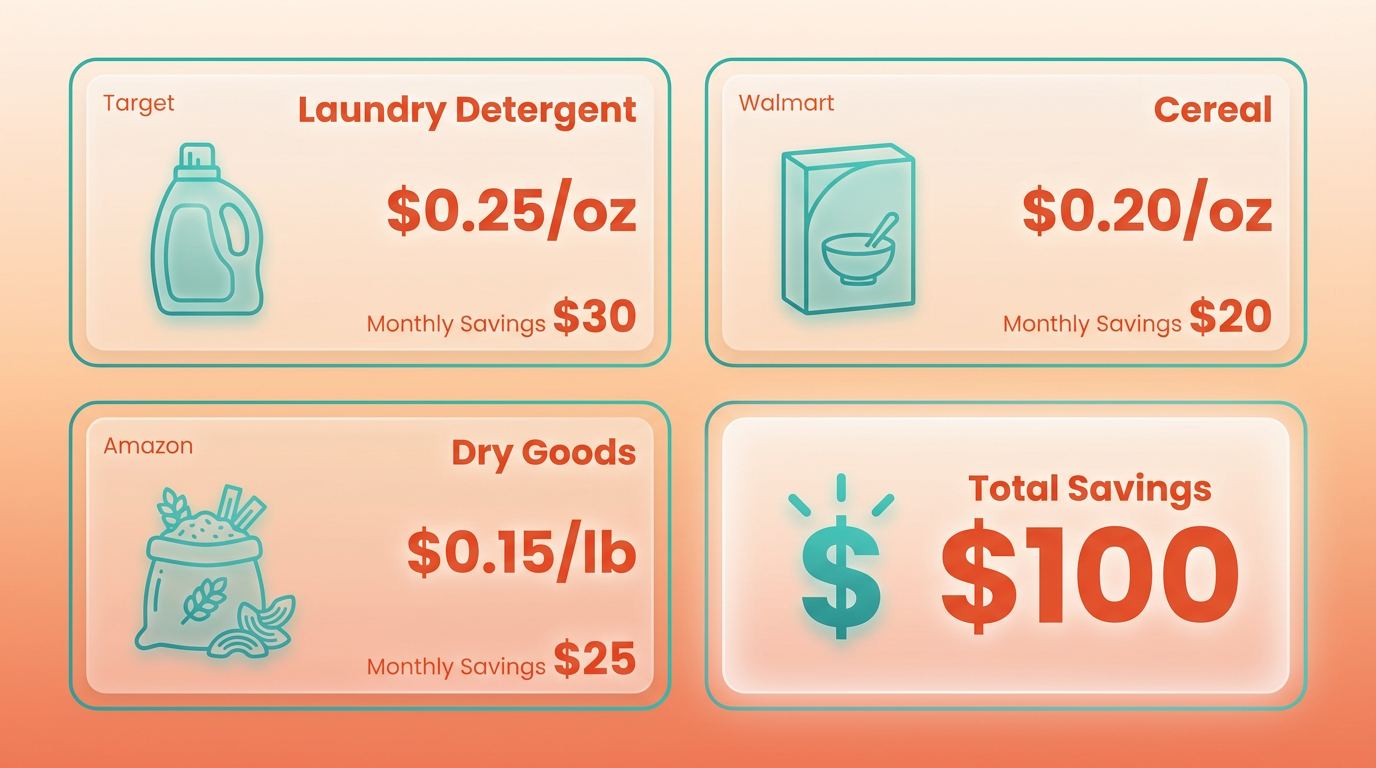
A family in California used Popgot to compare unit prices for household essentials like laundry detergent and cereal across Costco, Walmart, Target, and Amazon. By sorting results by cost per ounce, they discovered that Target offered cheaper non-brand detergents, while Amazon had the lowest price per pound for dry goods. This approach helped them save approximately $100 monthly, as highlighted in this user report. Another study from Popgot’s blog revealed that Costco’s bulk pricing doesn’t always beat smaller retailers for niche or non-branded items, emphasizing the value of unit price tracking, as mentioned in the Why Price Comparison Matters section.
Success Stories: How Users Save on Specific Product Categories
Popgot’s AI-driven filtering has helped users find exact products they need at the best prices. For example, a keto dieter searching for almond flour specified “non-GMO” and “no additives” in the AI filter. Popgot surfaced options from Amazon and Aldi with the lowest cost per pound, saving the user $15 per purchase compared to branded alternatives. A parent searching for baby formula without corn syrup used the tool to compare 20+ products across Walmart and Target, identifying a store-brand option that met their criteria at 30% less than a national brand source.
Lessons Learned: Best Practices from User Experiences
- Prioritize unit pricing over brand loyalty: Users who compare cost per ounce, sheet, or pound often find hidden savings. For example, a Costco member discovered that generic paper towels at Target were 40% cheaper per sheet, despite the warehouse store’s reputation for low prices, as discussed in the Analyzing and Optimizing Price Comparison Results section.
- Use AI filters for niche needs: When shopping for supplements like fish oil, users can specify “at least 1,000mg EPA+DHA” to avoid overpaying for products that don’t meet their requirements. One user reported saving $50 monthly by using this feature source.
- Check availability for non-perishables: Popgot currently supports shipped, non-perishable items, so users should avoid perishables like fresh produce for now. A shopper who switched to bulk dry goods saved $75 annually by planning ahead, building on concepts from the Using Popgot for Price Comparison section.
How Popgot’s AI Enhances Shopping Efficiency
The tool’s ability to read product labels and verify specifications is a major advantage for time-conscious buyers. For instance, a user searching for “organic, gluten-free pasta” received a filtered list from 8 retailers, eliminating the need to manually cross-check ingredients. This feature, powered by AI, reduced their search time from 30 minutes to under 2 minutes source. Another user noted, “I used to waste hours comparing prices. Now, Popgot gives me a clear winner in seconds.”.
Key Takeaways for Smart Shopping
- Start small: Test the tool with one product category, like groceries or household goods, before applying it broadly.
- Combine with budgeting tools: Use Popgot’s price comparisons alongside monthly budgeting apps to track savings.
- Stay flexible: Openness to store brands or alternative retailers can enable unexpected deals, as seen in the Costco vs. Target comparison.
By applying these strategies, users consistently report saving 20–50% on recurring purchases. The next step? Expanding Popgot’s capabilities to include historical price tracking and receipt-based recommendations-features that could further streamline smart shopping.
Troubleshooting and Future Developments
If you encounter issues while using Popgot, start by identifying common problems like data extraction errors or integration conflicts. Most issues resolve quickly with basic troubleshooting steps, and the platform’s roadmap includes advanced AI features and broader retailer support to enhance user experience. Below, we break down solutions for typical challenges and preview upcoming innovations.
What Should I Do If Popgot Fails to Extract Product Data?
Data extraction errors often occur when product pages lack structured data or contain complex formatting. Begin by verifying the URL you entered is correct and points directly to a product page, not a category or search results page. As mentioned in the Using Popgot for Price Comparison section, understanding how the interface identifies valid product pages can help avoid common pitfalls. If the issue persists, refresh the page or clear your browser cache, as temporary glitches can interfere with data scraping. For persistent problems, Popgot’s support team recommends checking the blog post about Costco comparisons to confirm the retailer is supported. If unresolved, report the issue through the app’s feedback button-this helps the team improve compatibility with new sites.
How Can I Fix Integration Issues with Browser Extensions?
If Popgot’s browser extension isn’t functioning as expected, start by checking your browser’s permissions. Building on concepts from the Setting Up Popgot for Google Shopping section, ensuring the extension is properly configured for the current tab is critical. Restart your browser and re-enable the extension to refresh its connection. Outdated software can also cause conflicts, so update both your browser and the Popgot extension to the latest versions. For Chrome users, visit the Web Store to verify the extension is up to date. If errors continue, disable other extensions temporarily to rule out conflicts.
What Future Features Are Planned for Popgot?
Popgot’s development roadmap includes real-time AI product verification to ensure accuracy and expanded retailer support to cover more shopping destinations. The upcoming AI verification system, inspired by Google’s generative AI advancements, will cross-check product details against multiple sources to flag discrepancies like incorrect pricing or outdated descriptions. As detailed in the Analyzing and Optimizing Price Comparison Results section, this feature aims to enhance the reliability of comparison data by addressing inconsistencies. This feature, currently in testing, aims to reduce manual errors and improve trust in comparison results.
How Will Popgot Expand Retailer Coverage?
The platform plans to add support for niche and international retailers in 2024, broadening its utility for global shoppers. By integrating APIs from more sellers and refining its web scraping algorithms, Popgot will enable comparisons across a wider range of products. For example, users will soon compare prices for textbooks between domestic and overseas sellers, helping reduce costs for students. The back-to-school savings guide highlights how this expansion could benefit specific user groups.
How Can Users Influence Popgot’s Development?
User feedback directly shapes Popgot’s feature prioritization. Submit suggestions via the in-app feedback form or join the community forum to vote on proposed updates. The team regularly reviews input to identify common pain points-such as requests for bulk price tracking or personalized alerts-which then inform their roadmap. For instance, the AI verification feature originated from user requests for higher data reliability.
“After submitting a suggestion to track prices across multiple devices, I was surprised how quickly the team added it. It feels like my voice matters.” – Frequent Shopper
By addressing technical issues and evolving with user needs, Popgot aims to remain a seamless, adaptive tool for smart shopping. Stay tuned to the official site for updates on feature rollouts and troubleshooting guides.
References
[1] I'm working on Popgot (https://popgot.com), a tool that tracks unit ... - https://news.ycombinator.com/item?id=43821480
[2] Popgot | Shop with AI that reads every label - https://popgot.com/
Frequently Asked Questions
1. How much can I save using unit price comparisons?
You can save approximately $100/month on essentials by comparing unit prices instead of brand loyalty, adding up to ~$1,200 annually.
2. How does Popgot compare prices across retailers?
Popgot normalizes product listings to instantly identify the cheapest options, standardizing formats like paper towels or olive oil for accurate cost comparisons.
3. Is brand loyalty a barrier to saving money?
Unit pricing eliminates marketing bias, showing that non-brand items often match or beat branded products in cost per ounce or sheet.
4. Can I compare non-grocery items with Popgot?
Yes, Popgot works for diverse products like baby formula, household goods, and pantry staples, ensuring health and cost standards align.
5. How does Popgot handle different product formats?
AI-driven filtering standardizes items sold in varying sizes, preventing overpayment by up to 30% for identical products.
6. How do I start using unit pricing?
Use Popgot to automate unit price comparisons across retailers, focusing on cost per ounce/sheet/pound instead of brand names.
7. Are small retailers included in comparisons?
Popgot aggregates prices from major and regional retailers, ensuring fair comparisons without favoring large chains like Costco.