
How to Compare Laptop Prices Easily with Popgot

Key Takeaways
- The cheapest laptop is rarely the best buy. The lowest sticker usually hides a weaker spec somewhere — less storage, less RAM, an older chip.
- Popgot runs multi-retailer search, AI spec verification, and unit pricing in one query, instead of eight browser tabs you have to babysit.
- A $419 Amazon laptop looks cheaper than a $429 listing until you notice it ships with 128GB of storage instead of 256GB.
- Two midrange creator laptops priced $20 apart can differ by an entire drive: 512GB versus 256GB of SSD.
- The AI agent reads every product label and drops listings that miss the RAM, storage, or processor you asked for.
- Sorting by real unit price instead of the headline number makes the actual spec gaps between near-identical listings obvious.
- Spec checking is what stops an 8GB machine from passing as a 16GB one when you're only eyeballing price.
Quick Summary
Comparing laptop prices well means one thing: checking total price and verified specs across every major retailer at the same time. Popgot pulls both into a single view, so you're not opening window after window and trying to hold eight spec sheets in your head. You see real value, not just the smallest number on the page.
The trap is chasing a discount that isn't one. Smart shoppers look at the hardware behind the price tag first. Multi-retailer search, automated spec verification, and accurate unit pricing together let you find the genuine best deal in a few minutes.
What the comparison actually shows you
You set your hardware floor up front, and the system filters out anything below it. It scans the product descriptions and tosses listings that fall short, so the only machines left are ones that meet your needs. No more weighing a laptop you'd never buy.
| Model | Listed Price | Verified Specs |
|---|---|---|
| Entry productivity laptop | $429 (Walmart) | 8GB / 256GB / i3 |
| Entry productivity laptop | $419 (Amazon) | 8GB / 128GB / i3 |
| Midrange creator laptop | $899 (Target) | 16GB / 512GB / i7 |
| Midrange creator laptop | $879 (Amazon) | 16GB / 256GB / i7 |
Look at the entry-level pair. The $10 you "save" costs you half your storage, and 128GB fills up fast once Windows updates start stacking. The creator pair is worse: $20 apart, but one carries double the SSD. That's the kind of gap a sticker price will never warn you about.
Who saves the most time
Checking retailers by hand means opening tabs, matching model numbers, and reading spec sheets one at a time. Easily an hour. Narrowing to verified matches takes minutes.
Popgot covers the major marketplaces in one pass, so the prices you're comparing are real and current. One Reddit shopper, /u/msears101, said it plainly after auditing their own orders: "Amazon is not always the cheapest. Neither is Walmart or Target. You need to know the value of something."
If you're a student, a remote worker, or a parent on a budget weighing similar configs across stores, this is where the time goes back into your pocket.
Why laptop price comparison is harder than it looks
The same laptop costs different amounts at different stores, and those prices move week to week. Worse, two laptops with nearly identical names can run different processors, different RAM, different storage. That gap is exactly where people overpay or buy the wrong machine.
Because prices swing, brand loyalty and "Store X is always cheapest" are both bad strategies. When you're spending hundreds of dollars, verifying the exact configuration is the only real protection your budget has.
Why two "identical" laptops aren't equal
Same brand, same screen size, completely different machine. The model name rarely tells you the CPU generation, RAM, SSD size, display resolution, or GPU — and each one moves real-world speed and how long the thing stays usable.
Two "AeroBook 14" listings can sit side by side. One has a 256GB SSD and a 1080p screen. The other has a 512GB SSD but a dimmer, lower-res panel. Same name, same price, double the storage on one and a sharper picture on the other. The label won't tell you which is which. So matching on name alone fails. You need the verified specs lined up before price even enters the conversation.
The costs the sticker hides
The headline number isn't what you pay. Shipping, sales tax, open-box condition, and warranty differences all change the real total. A $25 shipping fee or a stripped warranty wipes out a $40 "discount" on the spot.
Open-box and refurbished listings make it murkier. An open-box unit might genuinely save you money, or it might mean no return window and a shorter warranty. You have to read the condition, not the headline.
Students, working professionals, families buying a shared device, budget shoppers — they all hit the same wall. They need genuinely equivalent laptops compared on total cost, not loosely similar ones. Checking specs and full price together is how you stop overpaying and get it right the first time. For a deeper walkthrough, see Get The Best Deals Using Popgot.
How Popgot searches every retailer at once
It starts with one search box. You type the laptop you want, set the specs that matter, and the platform fans the query out across multiple stores at the same time. Live inventory, one view, no tab-per-store ritual.
Running a multi-retailer search
Type a clear product query, then lock in your required specs. The search hits every connected store at once and pulls back live listings, so you're comparing real options instead of guessing which store has the better deal today.
Say you want a 15-inch Windows laptop with 16GB RAM, a 512GB SSD, and a current-gen CPU. You type that. Back come the matching listings from across every connected retailer, each with its price and verified specs attached.
This matters because stores write their listings differently. One puts "15.6 FHD" in the title; another buries the screen size three lines down. Names get inconsistent fast. Normalizing all of it into one clean format is the only way an honest price comparison works.
What the spec filter actually catches
The parser reads the messy text on each product page and cuts listings that fall short of your requirements. Vague titles cause most bad buys, and this is what kills the false matches before they reach your shortlist.
Two listings can look like twins at $629 each. Both say "15-inch Windows laptop" right in the title.
| Listing | Price | RAM | CPU | Passes Filter? |
|---|---|---|---|---|
| Listing A | $629 | 16GB | Current-gen | Yes |
| Listing B | $629 | 8GB | Two generations old | No |
Same price, very different machine. Listing B reads fine at a glance, but the filter catches the 8GB RAM and the older processor and drops it. You never burn time second-guessing it. That automated parsing replaces the manual cross-referencing where most spec mistakes happen.
Using filters to cut the noise fast
Filters are the fastest way to shrink a noisy market down to the few machines worth your money. Instead of scrolling past hundreds of listings, you set hard requirements up front and the platform drops everything that misses. You already know what you need, so tell it exactly that.
Set a floor on the specs that decide real performance: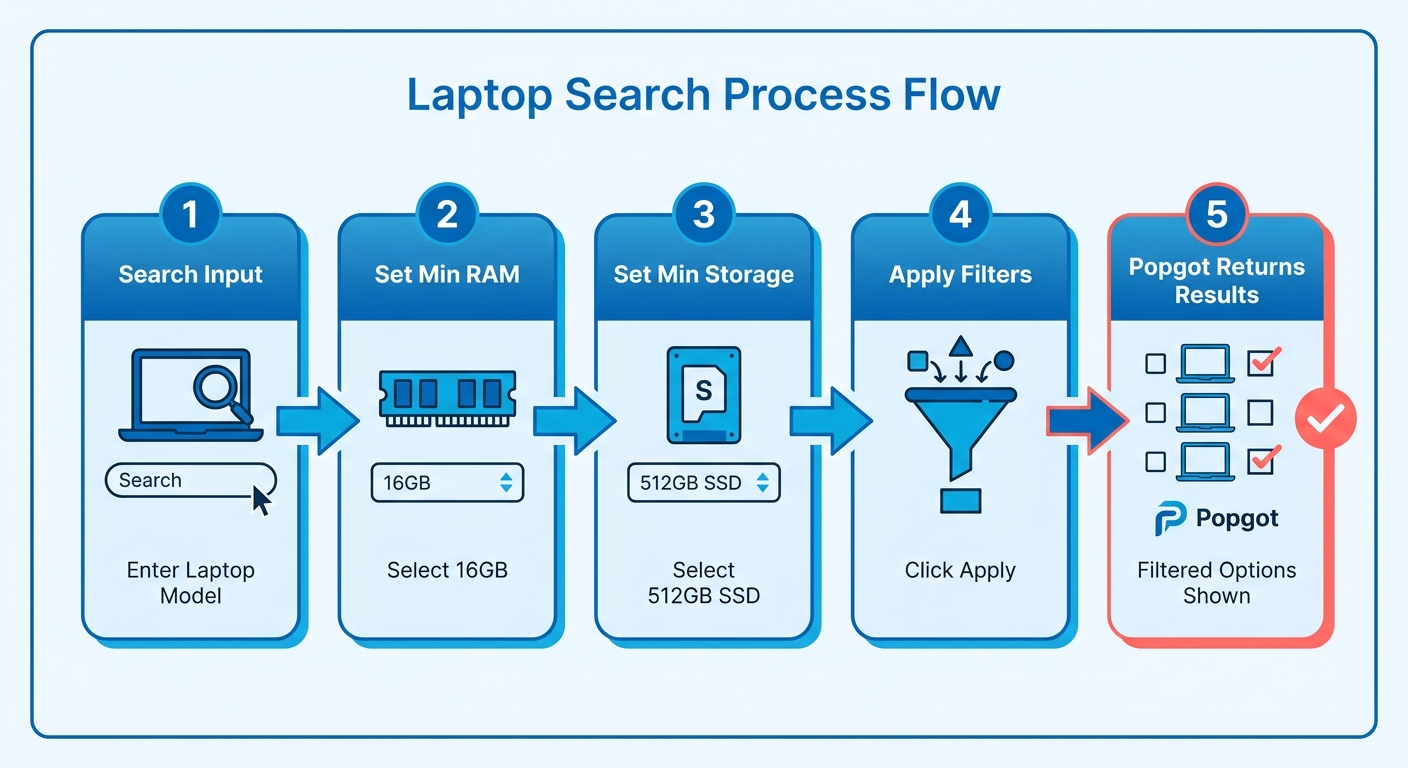
- Minimum RAM: require 16GB and the 8GB models vanish.
- Minimum storage: lock in a 512GB SSD and skip the 256GB stragglers.
- Screen size: cap at 14 inches if you want something light to carry.
- Touchscreen: flag it on or off and stop reading every spec sheet.
- Operating system: pick Windows, macOS, or Chrome OS and ignore the rest.
How filters kill decision fatigue
A cheap laptop looks tempting right up until you notice the 4GB of RAM and the slow chip. When your filter requires 16GB, that listing never reaches your screen, so you never spend a minute weighing it. That's the whole point: delete the cheap-but-underpowered options before you see them.
This is where a performance threshold beats a brand search. Type one brand name and you get budget bins and flagships jumbled together. Set a CPU class and a RAM floor instead, and you get only machines that clear the bar, no matter who made them. Value, not a logo.
Student or professional: which filters fit
Match the filters to how you actually work. A student carrying a laptop between classes wants a 13- or 14-inch body, 8GB or 16GB of RAM, and a lower price ceiling. Someone running heavy apps all day wants 32GB, a 1TB SSD, and a current-gen processor, even if the price climbs.
Filters earn their keep during sales, too. Big events flood the results with old stock and refurbs dressed up as deals. A firm spec floor strips those out automatically, so a clearance listing with last-gen internals never sneaks onto your shortlist.
Reading specs, price, and real value together
Total value is the real cost of a laptop measured against the specs you actually get, not the price tag by itself. On Popgot you line up CPU, RAM, storage, display, battery life, graphics, and OS for every matching listing, then weigh that against the full price. The cheapest sticker usually hides the weaker machine.
Read the specs that decide performance before you look at price:
- CPU: a current-gen chip handles more open apps and stays fast longer.
- RAM: 16GB keeps dozens of tabs and a video call smooth; 8GB stalls.
- Storage: a 512GB SSD beats a 256GB drive you fill in six months.
- Display: resolution and panel type matter more than raw screen size.
- Battery, graphics, OS: these swing hard depending on what you do all day.
How priorities shift by use case
Your best-value laptop depends entirely on the job. A basic school or work laptop wins on RAM, storage, and battery, so you skip the pricey GPU you'd never use. A gaming laptop needs a dedicated GPU and a fast display, where a cheaper integrated-graphics model falls apart in real play. A creator laptop leans on CPU power and a color-accurate screen.
Match the specs to the work, then let Popgot compare prices only among the machines that fit. You stop paying for power you don't need.
Why configuration drift fools buyers
The same model name can mean very different hardware, and that's where value hides. Two Lenovo IdeaPad listings: one with an Intel Core i3 and a basic TN panel, the other with an Intel Core i5 and an IPS display with wider viewing angles, for a modest bump. Read the spec sheet line by line, because the model name tells you almost nothing.
Then factor in the full price. Shipping, taxes, and any warranty or accessory bundle can push a "cheaper" laptop above a rival. Popgot surfaces accurate unit pricing across retailers, so the real winner is obvious.
Using curated guides to build a shortlist
A curated shopping guide is a pre-vetted shortlist picked by editors for a specific need. You skip the full market scan and start with options that already make sense. Read a handful of recommendations matched to your use case, then compare prices on the ones that fit.
This guide layer does one job well: it narrows the field before you ever open a price comparison. You bring the shortlist; the price check finds the cheapest verified version.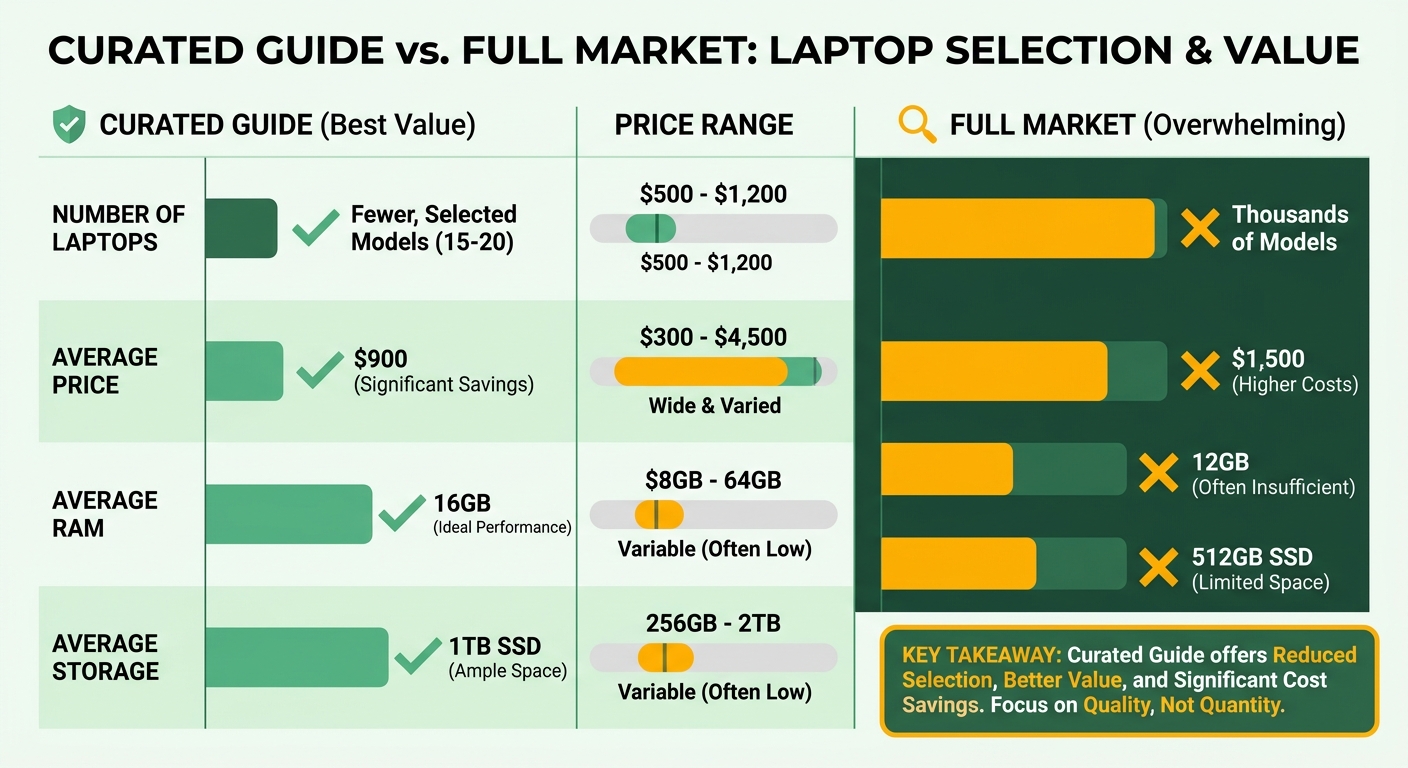
Curated picks versus raw search
A guide hands you preselected machines; raw search hands you everything. The guide editor has already tested or vetted the picks, cut the duds, and grouped what's left by buyer type. Raw search returns every listing that matches a keyword, including the ones you'd reject in five seconds.
Good review outlets follow real editorial standards to earn that trust. The strongest guides test hardware in person, say how they rank picks, and refresh when prices move or models sell out. A guide that names a discontinued laptop or quotes a stale price has lost its value.
And that's the catch. A guide is only as good as its last update. Prices and availability shift constantly, so a shortlist built six months ago can point you at a machine that no longer exists at that price.
What shortlists look like by buyer
Match the guide to the buyer, then compare prices. A good guide sorts by who's using the laptop, not just by spec sheet:
- Budget students: a light 14-inch with 8GB or 16GB RAM and a 256GB SSD for notes, browsers, and video calls.
- Family shared-use: a durable mid-range pick with enough RAM for several accounts and a bigger screen for the kitchen table.
- Remote workers: 16GB RAM, a 512GB SSD, and strong battery for back-to-back meetings and split-screen work.
- Light gaming: a model with a discrete GPU that still handles everyday tasks.
The guide picks the class; the price check picks the store. You target a hardware tier, then run a comparison to find the cheapest verified listing across retailers.
Unit price, warranty, and the costs nobody lists
The best price on a laptop is what you pay across the years you own it, not the figure on the listing. Two machines with identical specs can carry very different real costs once warranty terms, return windows, and repair fees enter the math. Read the fine print before you read the price.
The hidden costs that change the real number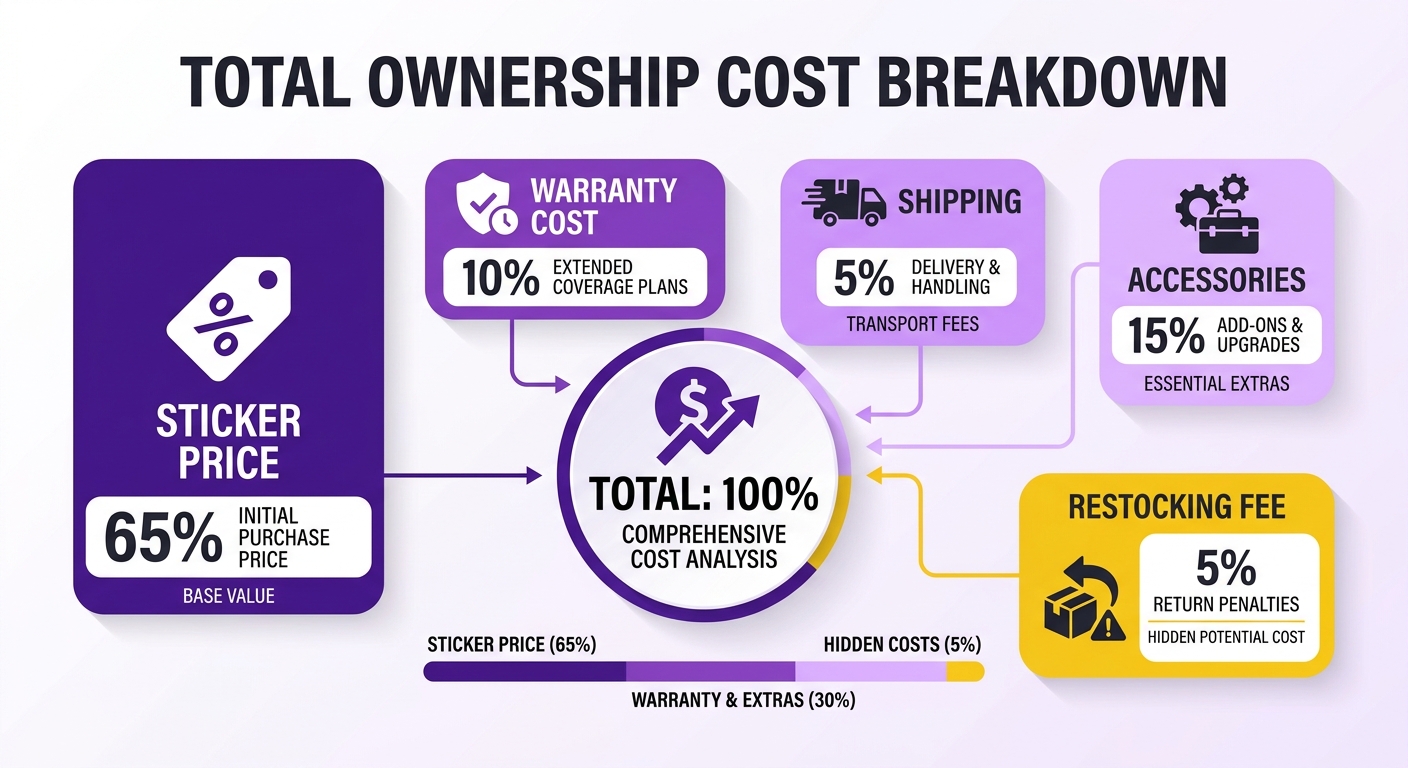
Total ownership cost is the sticker plus everything attached: warranty length, restocking fees, shipping, and the accessories you still have to buy. A budget laptop with a 25% restocking fee and paid return shipping can erase its savings the moment something breaks.
Watch four cost drivers on every listing:
- Warranty coverage: a longer manufacturer warranty means fewer out-of-pocket repairs later.
- Return policy: free returns beat a no-returns sale, especially on a machine you can't test first.
- Shipping charges: free shipping on eligible items keeps the total honest.
- Bundled software or accessories: a charger, sleeve, or trial software changes the cost-per-feature math.
Run the numbers before you trust the lowest tag. A $120 accessory bundle with a pricier model can outweigh a thinner listing that ships bare and bills you for every extra.
Why open-box and refurbished need a second look
Open-box and refurbished laptops save real money — but only if you read the condition grade and battery health first. A certified refurb goes through inspection and testing; an ungraded open-box return might not. The discount is only a deal if the hardware holds up.
Check the grading language before you buy. Look for the condition tier, whether the battery was tested, and what return window applies. A refurb with a solid return policy carries far less risk than one sold as-is. When you compare, line the refurb price up against a new unit with the same specs and weigh the warranty gap. Sometimes the $80 saved isn't worth losing return flexibility.
How to buy safely once you've found the deal
Smart laptop shopping comes down to one rule: confirm exactly what you're buying before you pay. The cheapest listing means nothing if the model number, processor generation, or storage doesn't match what you compared. A few minutes of verification saves you from an expensive mismatch.
What to check before you buy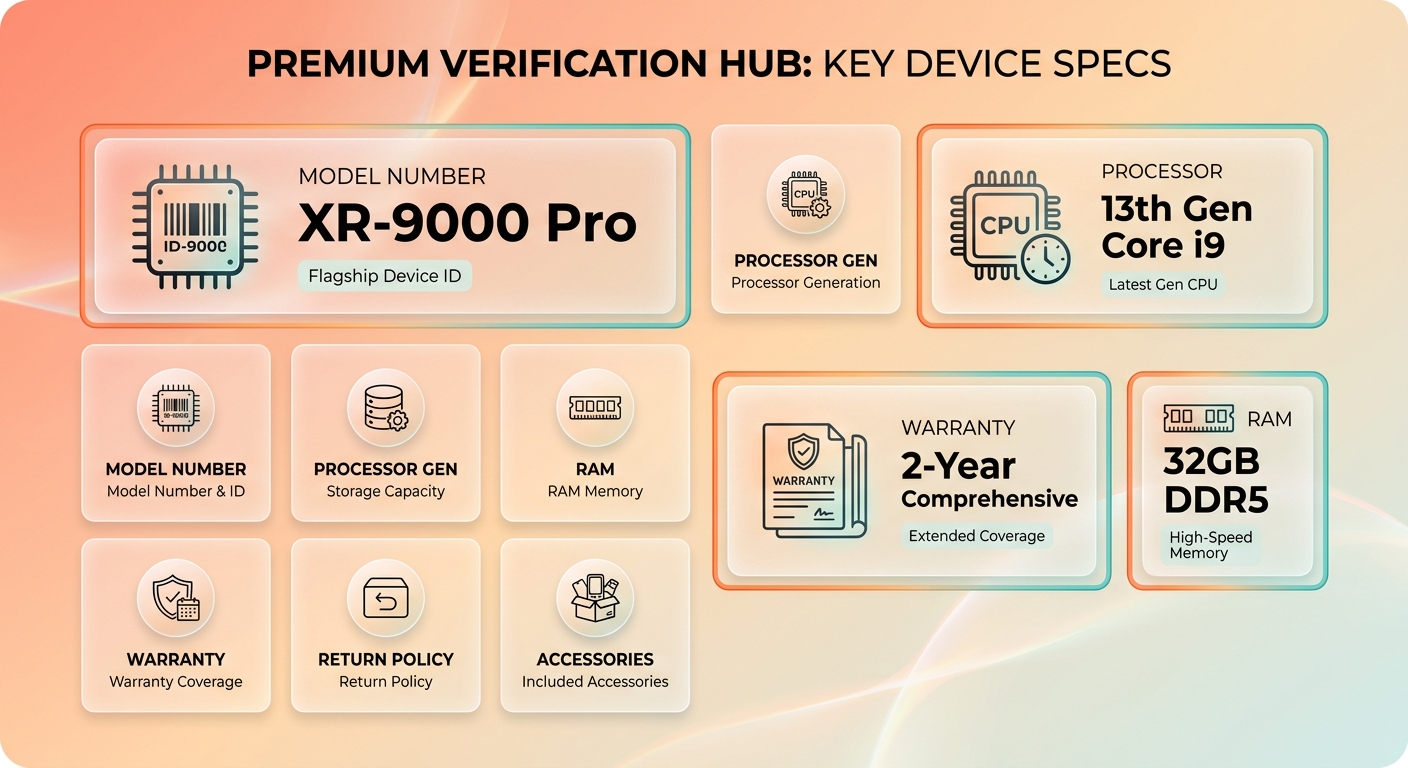
Start with the exact model number, not the brand and screen size. Two listings can share a name and hide different chips. Confirm the processor generation, the RAM, and the storage so you're comparing like-for-like configs, not lookalikes.
Then check who actually sells and ships it. On a major retailer's laptop catalog, a unit can come straight from the store or from a third-party marketplace seller, and those two routes carry different return policies and support.
Fulfillment changes the math. A laptop sold and shipped by the retailer often includes free 30-day returns and direct manufacturer support. A near-identical marketplace listing might cap returns at 14 days and make you pay return shipping. Same machine, very different outcome once something goes wrong.
Spotting scams and bad listings
Watch the warning signs consumer protection groups flag: prices far below market, vague spec sheets, unclear return terms. The FTC's online shopping guidance is blunt about reviewing seller reputation and return policy before you hand over a card. If a listing dodges those details, walk.
Run this final checklist before checkout:
- Specs match: model number, CPU generation, RAM, and storage all line up.
- Total cost known: price plus shipping, fees, and any accessories you still need.
- Warranty acceptable: coverage fits how long you'll keep the machine.
- Return window clear: you know the days allowed and who pays return shipping.
- Use case satisfied: the machine handles what you actually bought it for.
The automated parsing does the heavy lifting, filtering out mismatched listings before they reach your screen. But it doesn't replace your last look. Open the final retailer page, confirm the seller and fulfillment source, and read the return terms in their own words before you pay.
References
[1] Amazon.com: Laptops - Computers & Tablets: Electronics - https://www.amazon.com/Notebooks-Laptop-Computers/b?ie=UTF8&node=565108
Frequently Asked Questions
1. Does Popgot cost money to use for comparing laptop prices?
Popgot is designed as a free-to-use search aggregator that helps you find the best deals without hidden subscription fees. By consolidating live inventory and verifying hardware specifications automatically, it serves as a highly efficient alternative to manual cross-shopping across multiple retail websites.
2. How often do laptop prices change across retailers?
Retailers adjust their pricing dynamically, often multiple times a week based on inventory levels and competitor moves. Major promotional events introduce even more volatility, making real-time comparison essential. Checking live listings right before you purchase ensures you do not rely on outdated pricing data.
3. Can I compare macOS and Chrome OS laptops, not just Windows?
Yes, the platform supports all major operating systems. You can easily toggle filters to isolate Apple MacBooks or Chromebooks alongside Windows machines. This allows you to compare hardware value within your preferred ecosystem without mixing incompatible platforms.
4. What does "certified refurbished" mean compared to open-box?
Certified refurbished items are restored to like-new condition by the manufacturer or a licensed partner and usually include a formal warranty. Open-box items are simply returned goods that may have been opened but not necessarily repaired or tested. Always verify the warranty duration and return policy for both categories.
5. How can I tell if a third-party seller is shipping my laptop?
Look closely at the buy box on the retailer's product page, which explicitly lists the merchant name next to "Sold by." If the name is not the retailer itself (e.g., a third-party merchant on Walmart or Amazon), click their profile to review their specific return window and customer feedback ratings.
6. Why does a brand-only search return poor results?
A brand-only search pulls every laptop that manufacturer makes, mixing low-end Chromebooks with premium workstations. This forces you to manually filter out underpowered models. Specifying your required processor class and memory capacity ensures you only see machines capable of handling your daily workload.
7. What warning signs indicate a laptop listing might be a scam?
Be cautious of listings with extremely low prices that seem too good to be true, or sellers who demand payment through non-standard methods. A lack of detailed technical specifications or missing contact information are also major red flags. Always stick to secure checkout systems on verified retail platforms.