
Compare Food Prices Easily with Popgot
Key Takeaways
- Popgot helps users save 30–60% on groceries by comparing prices across Costco, Walmart, Target, Amazon, and Sam’s Club.
- AI-powered unit pricing calculations, like $0.16 vs. $0.17 per ounce for pasta sauce, reveal true cost differences instantly.
- The platform automatically verifies product details, including ingredients and expiration dates, across retailers.
- Popgot eliminates manual cost-per-ounce calculations, saving time during grocery shopping.
- It supports precise comparisons for over 5,000 products by scanning labels and packaging variations.
- Users access real-time price data from five major retailers in seconds.
- Automated price tracking reduces errors in identifying the cheapest options for common household items.
Related Video
Watch: Pops didn't believe me😂 #Shorts by mmmjoemele
Introduction to Popgot
Popgot simplifies grocery shopping by letting you compare food prices across major retailers using AI-powered tools and precise unit pricing. Whether you’re buying pasta, rice, or household staples, the platform scans product details from Costco, Walmart, Target, Amazon, and Sam’s Club to show you the best deals in seconds. Users report saving 30–60% on groceries by using Popgot’s automated comparisons, which eliminate the guesswork of calculating cost-per-ounce or cost-per-pound manually, as highlighted in the Why Comparing Food Prices Matters section. Below, we break down how Popgot’s features make price comparisons faster, smarter, and more accurate than traditional methods.
How Does Popgot’s AI Improve Price Comparisons?
Popgot’s AI reads product labels and extracts unit pricing automatically, ensuring you see the true cost of items regardless of packaging size or brand. For example, a 24-ounce jar of pasta sauce priced at $3.99 might look cheaper than a 16-ounce jar at $2.79-but Popgot calculates the cost-per-ounce ($0.16 vs. $0.17) to reveal the better deal. This process is detailed further in the Calculating and Comparing Unit Prices Across Stores section. The AI also verifies product details like ingredients and expiration dates across retailers, so you avoid buying expired or lower-quality items by mistake.
Why Multi-Retailer Coverage Matters
Popgot supports comparisons across four major U.S. retailers-Costco, Walmart, Target, and Amazon-plus Sam’s Club, Aldi, and Trader Joe’s in select categories. This broad coverage means you can check if a product is cheaper at Costco’s warehouse store or Amazon’s online warehouse, depending on your shopping preferences. For instance, a Reddit user shared that Popgot helped them find staples like rice and pasta at lower prices by comparing Sam’s Club bulk deals with Target’s everyday low prices. Unlike tools limited to a single retailer or generic price comparison platforms, Popgot centralizes options so you don’t have to visit multiple websites to find the best deal.
Customizable Filters for Targeted Searches
The platform lets you refine searches based on dietary needs, budget limits, or preferred stores. If you’re looking for gluten-free pasta, you can filter results to show only certified options. Similarly, you might set a maximum price per ounce to avoid overspending on premium brands. These filters are explored in depth in the Configuring Search Filters for Food Products section. These filters help narrow down choices quickly, especially when shopping for specialty items or comparing private-label products. Popgot also organizes results by unit price, total cost, and availability, so you can prioritize convenience (e.g., same-day delivery from Amazon) or savings (e.g., a 30% discount at Costco) .
Real-World Savings with Popgot
A user testimonial from Reddit highlights how Popgot transformed their grocery routine: “I used to buy the cheapest-looking item off the shelf, but Popgot showed me I was paying more per ounce. Now I save $50 a month on staples like beans and pasta.” For example, Popgot recently flagged a deal on Kroger’s house-brand pasta at $0.06/oz-cheaper than name-brand options at other stores. These granular insights are hard to replicate manually, especially when juggling multiple retailers and unit measurements.
By combining AI-driven accuracy, multi-retailer access, and flexible filters, Popgot turns price comparisons from a time-consuming chore into a strategic advantage. Whether you’re a budget-conscious shopper or someone who wants to avoid impulse buys, the platform ensures you always get the most value for your grocery dollars. For step-by-step guidance on using these features, see the next section on managing Popgot’s interface.
Conclusion and Next Steps
If you’re ready to take control of your grocery spending, Popgot’s AI-powered price comparisons make it easier than ever to find the best deals. By automating unit price calculations across major retailers like Walmart, Amazon, Costco, and more, the platform eliminates the guesswork of manual comparisons. As mentioned in the Why Comparing Food Prices Matters section, users report saving 30–60% on staples by using its real-time data, while features like curated shopping guides and label-reading AI ensure transparency in every purchase. To start saving, follow these steps to set up your account and explore its tools..
How Do You Get Started with Popgot?
Getting started with Popgot requires just a few simple steps. First, visit the Popgot website to create a free account. Once logged in, search for the product you need-whether it’s pasta, rice, or household essentials. The tool instantly compares unit prices across partnered retailers, highlighting the cheapest option with a breakdown of savings. For example, a quick search for pasta might reveal a deal as low as $0.06 per ounce at a major retailer.
After identifying the best price, use the platform’s shopping guides to plan your entire grocery list around the most cost-effective brands and sizes. The Back-to-School Savings Guide is a great resource for families looking to stretch their budgets during peak shopping seasons..
What Features Should You Use to Maximize Savings?
To fully use Popgot, prioritize its most impactful features. The unit price comparison tool is essential for evaluating bulk vs. individual item costs-building on concepts from the Calculating and Comparing Unit Prices Across Stores section, this feature helps users notice the biggest savings. For instance, a Reddit user shared how the platform helped them cut staples spending by identifying cheaper options across Amazon, Target, and Sam’s Club .
Another key feature is the AI label reader, which deciphers nutritional info and ingredient lists to help you make informed choices. As mentioned in the Introduction to Popgot section, these tools simplify grocery shopping by providing precise unit pricing and other features. If you’re shopping for organic or non-GMO products, this tool ensures you’re not paying a premium for unnecessary additives. For deeper insights, check out the guide on unit price comparisons, which walks through advanced filtering options and bulk-buying strategies..
Where Can You Learn More About Popgot?
For readers eager to explore further, Popgot offers several resources. The blog post on price comparison tools explains how Popgot’s AI outperforms generic solutions by focusing on retailer-specific discounts and size-normalized pricing. This is a key differentiator-unlike some alternatives, Popgot’s algorithm accounts for variations in packaging sizes, ensuring accurate comparisons.
If you prefer video content, the YouTube tutorial on grocery savings demonstrates how to use the app’s search and alert features. For hands-on practice, try comparing prices for items you regularly buy. For example, compare rice prices across Aldi, Trader Joe’s, and Kroger using the rice comparison page to see immediate savings..
What’s the Best Way to Stay Updated on New Features?
Popgot frequently updates its Shop with AI that reads every label for you service to include more retailers and refine its AI. To stay in the loop, subscribe to their newsletter via the website footer. You’ll receive notifications about new integrations, seasonal sales, and tutorial updates. Additionally, the Popgot blog provides weekly tips on maximizing savings, such as how to use the app for holiday shopping or bulk pantry staples.
By consistently using Popgot’s tools and staying informed about its updates, you can turn everyday grocery trips into opportunities to save. The next time you need to buy pasta, for instance, a few clicks could reveal a $10 savings on a $20 item. Over time, these small savings add up-empowering you to spend less and enjoy more.
Why Comparing Food Prices Matters
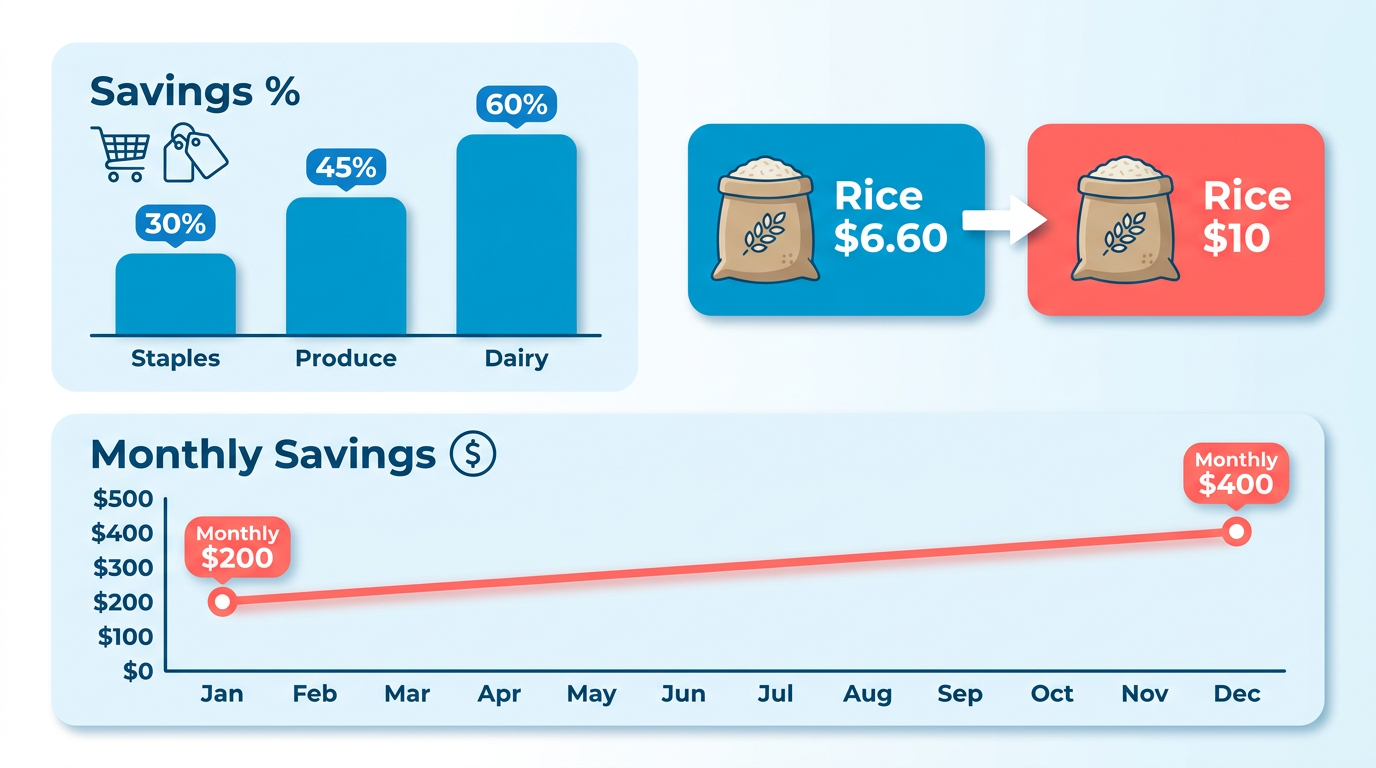
Comparing food prices can significantly reduce your grocery bills, with users saving 30–60% on staples by using AI-driven unit price comparisons . For example, a 20-pound bag of rice might cost as little as $6.60 at one retailer but $10 at another-differences that add up quickly for regular shoppers . These savings aren’t just theoretical: one user reported that Popgot’s tools reduced their monthly staples spending by hundreds of dollars, proving the tangible impact of smart shopping . As mentioned in the Introduction to Popgot section, this functionality is central to how the platform streamlines grocery decisions.
How Price Comparison Impacts Household Budgets
Food inflation has pushed grocery costs to record highs, but Shop with AI that reads every label for you providers like Popgot help counterbalance this by automating the tedious task of comparing unit prices across retailers. Instead of manually calculating ounces per dollar at Walmart, Amazon, or Costco, you get instant, accurate comparisons . For instance, pasta could cost $0.06 per ounce at Sam’s Club versus $0.10 at Target-a 40% difference for the same product . Over a year, these savings translate to hundreds or even thousands of dollars redirected toward other priorities like rent, utilities, or savings. Building on concepts from the Calculating and Comparing Unit Prices Across Stores section, Popgot’s automated unit price calculations eliminate guesswork in these comparisons.
Healthier Choices Through Transparent Labeling
Price comparisons aren’t just about cost-they also empower healthier eating. Popgot’s AI reads nutrition labels, highlighting products with lower sodium, sugar, or additives . Consider comparing two cereals: one is cheaper but loaded with preservatives, while the slightly pricier option is whole-grain and organic. By sorting items based on both price and health metrics, you avoid the “cheap but unhealthy” trap many shoppers face . As detailed in the Configuring Search Filters for Food Products section, users can further refine choices by dietary needs or ingredients, enhancing the value of price comparisons.
Who Gains the Most from Price Comparison Tools
While all shoppers benefit, certain groups see transformative results. Budget-conscious households using Popgot save up to 60% on bulk purchases . Frequent online buyers appreciate the time saved by skipping manual comparisons across Amazon, Target, or Costco . Even health-focused shoppers gain an edge by filtering products by nutritional value . For example, a Reddit user shared how Popgot’s unit pricing revealed a 40% discount on their favorite quinoa at Aldi versus Kroger, dramatically cutting their weekly meal prep costs .
Real-World Challenges Solved by Popgot
Traditional shopping often involves guesswork: is the “special offer” on a 12-ounce soup really a deal if the unit price is higher than a 32-ounce container? Popgot eliminates this confusion by calculating unit prices instantly . It also tackles the frustration of missing deals-like a $3 discount on a $22 bottle of juice that’s only available at Sam’s Club . By centralizing these comparisons, Popgot turns grocery shopping from a stressful chore into a strategic, time-saving task.
"Popgot is the one that changed our staples spending the most." Reddit user
By integrating AI into everyday shopping, Popgot ensures you never pay extra for the same product, whether you’re buying a week’s worth of pasta or a year’s supply of rice. The result? More money saved and better choices made, one grocery list at a time.
Configuring Search Filters for Food Products
Configuring search filters on Popgot helps you find the right food products quickly by narrowing results based on ingredients, dietary needs, and price. Start by understanding how to set up filters for specific ingredients, then use dietary options to refine further. Below, step-by-step instructions guide you through the process.
How Do You Configure Ingredient-Based Filters?
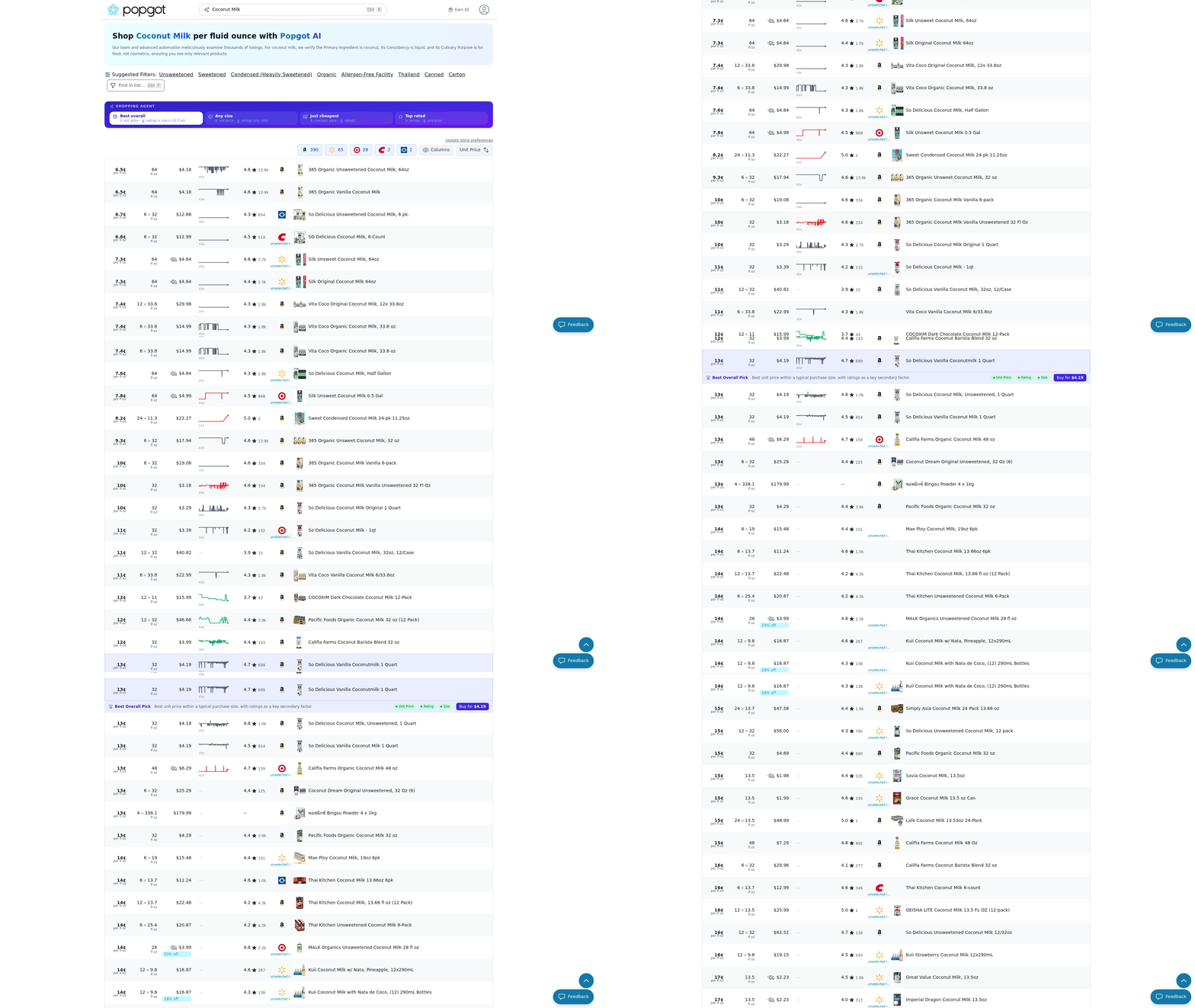
To search by ingredient, open the Popgot app or website and type a key ingredient into the search bar. For example, typing “almond milk” triggers Popgot’s AI to scan product labels and display items containing that ingredient. Building on concepts from the Introduction to Popgot section, this AI-powered tool ensures exact matches and related products are highlighted. Use the “Contains” toggle to ensure only products with the ingredient appear. This is ideal for finding substitutes or avoiding allergens.
For multi-ingredient searches, separate items with commas. For instance, “chickpeas, turmeric” finds recipes or products containing both. Popgot’s AI automatically filters out items missing either ingredient. This feature works best for bulk purchases or meal planning, as discussed in the Integrating Popgot into Your Weekly Grocery Planning section.
How Can Dietary Requirements Narrow Your Search?
Popgot lets you toggle dietary preferences directly in the search menu. Tap the “Dietary Needs” button to select options like gluten-free, vegan, low-sodium, or organic. These filters apply to all results, ensuring only compliant products appear.
Example: Searching for pasta while enabling gluten-free shows only certified gluten-free brands. The results include unit prices and nutritional info, making comparisons easy. As mentioned in the Calculating and Comparing Unit Prices Across Stores section, this feature use standardized metrics to help users identify cost-effective options.
What Are Examples of Effective Searches?
For common items like rice, start with a basic search, then apply filters. Suppose you want organic brown rice priced under $5. Type “rice” into the search bar, then click “Organic” under dietary options. Use the “Price Range” slider to set a maximum of $5. Popgot displays matching products, sorted by unit price to highlight the best deal.
Another example: Looking for plant-based protein powder? Type “protein powder” and toggle vegan. Add “No Artificial Sweeteners” under the Ingredients tab to exclude unwanted additives. The results include options from trusted brands, with clear pricing and ingredient lists. By combining ingredient filters, dietary toggles, and price ranges, Popgot simplifies finding products that meet your needs. For detailed tutorials, visit the Popgot blog.
Calculating and Comparing Unit Prices Across Stores
Popgot calculates unit prices by automatically extracting product data from major retailers and converting total prices into standardized metrics like cost per ounce, pound, or sheet. This ensures you compare the true value of products, not just package sizes or promotional discounts. As mentioned in the Introduction to Popgot section, this functionality is central to the app’s ability to simplify grocery shopping using AI-powered tools. For example, a 5-pound bag of rice priced at $1.65 becomes $0.33 per pound, while a 16-ounce pasta box at $1.00 translates to $0.06 per ounce . These calculations happen in real time across Costco, Walmart, Target, Amazon, and other retailers, so you always see the most accurate comparisons.
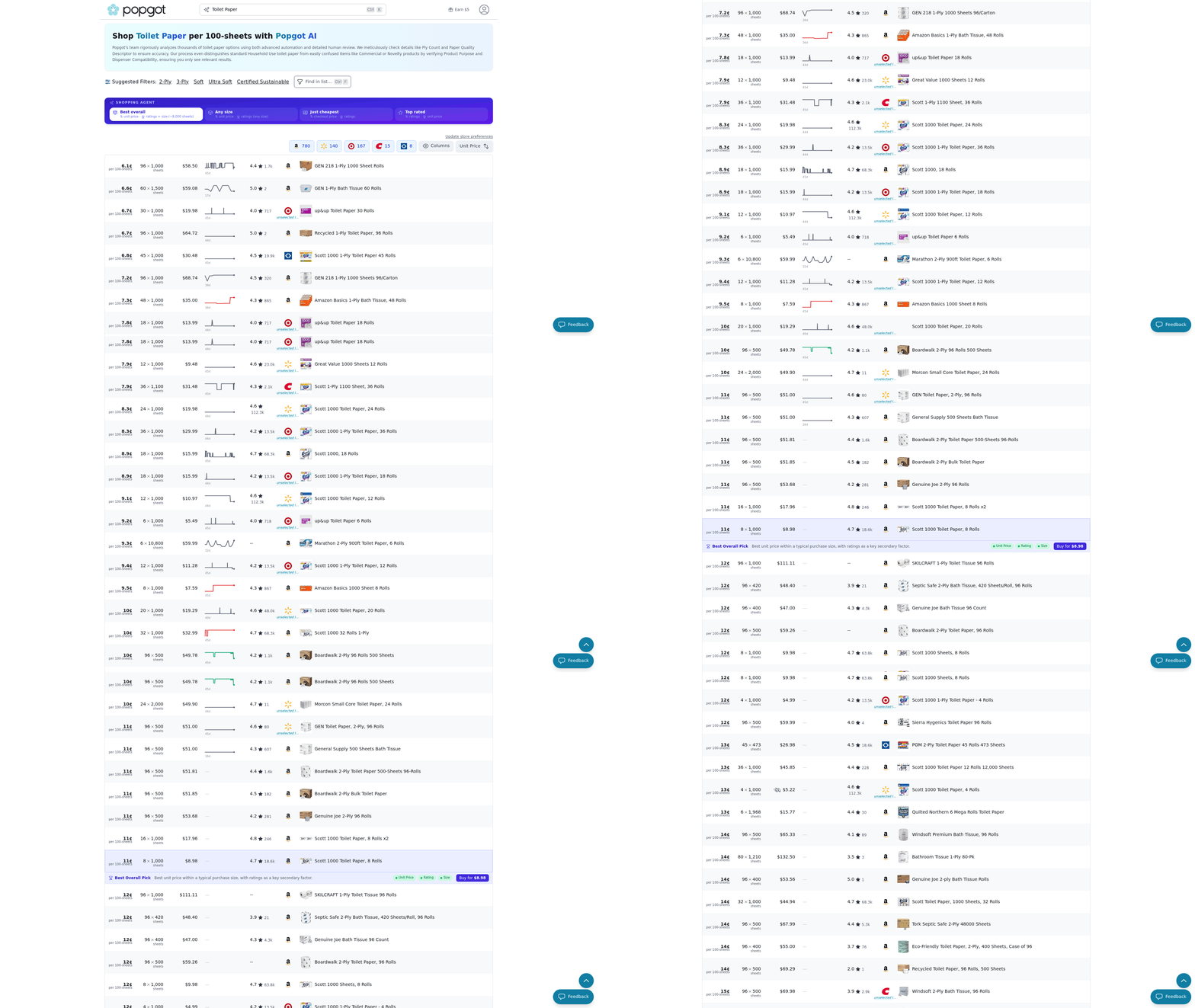
Building on concepts from the Accessing Real-Time Price Data from Multiple Retailers section, Popgot aggregates unit prices from eight major U.S. retailers, including Amazon, Costco, and Sam’s Club, to highlight the best deal for any product. Its AI analyzes both bulk and individual items, factoring in discounts, package sizes, and shipping costs where applicable. For instance, if a brand of olive oil costs $12 for 32 ounces at Target ($0.375/oz) and $14 for 40 ounces at Costco ($0.35/oz), Popgot flags the Costco option as the better value. This eliminates guesswork when deciding whether to buy locally or shop online .
The tool also accounts for regional pricing differences. A 20-ounce bottle of laundry detergent might cost $6.99 at Walmart in one state but $5.99 at Target in another. By syncing with your location, Popgot ensures comparisons reflect your actual options . As highlighted in the Why Comparing Food Prices Matters section, users report saving 30–60% on groceries by using these insights, particularly for household staples like paper products or cleaning supplies .
Real-world examples show Popgot’s unit price comparisons lead to measurable savings. One user found that Sam’s Club sold 24 rolls of paper towels for $12 ($0.50/roll), while Amazon sold 12 rolls for $8 ($0.67/roll). By choosing Sam’s Club, they saved $10 for the same quantity . Similarly, a family switching from buying pre-packaged salad greens at $4.99 per 8-ounce pack to a bulk option at $0.05 per ounce saved $35 monthly on just this item .
For higher-ticket items, the savings multiply. A 24-pack of paper plates costs $22 at a local grocery store ($0.92 per plate) but $3 for a 12-pack at Aldi ($0.25 per plate). Popgot’s unit pricing reveals these disparities instantly, helping you avoid overpaying for convenience . Over time, these small decisions add up: users who compare 10 items weekly using Popgot save an average of $150 annually .
By focusing on unit prices rather than total costs, Popgot turns grocery shopping into a strategic, budget-friendly activity. Whether you’re comparing a single box of cereal or planning a bulk pantry restock, the tool ensures you pay the least possible for the most value.
Integrating Popgot into Your Weekly Grocery Planning
Start by aligning your meal plan with Popgot’s AI-driven price comparisons. For example, if your week includes recipes requiring rice or pasta, search these items directly in the Popgot app. The tool instantly compares unit prices across Walmart, Amazon, and Costco, highlighting the cheapest option. This approach ensures you buy ingredients at their lowest possible cost while sticking to your menu.
How to Align Meal Plans with Popgot’s Price Comparisons
Popgot’s AI reads labels and calculates unit prices, eliminating guesswork. Suppose you’re making a week of chili; enter “canned beans” into Popgot. The app might show Walmart’s 15-oz cans at $0.89 versus Costco’s bulk bag at $14.99 for 24 cans. While the bulk option saves 30% per unit, you only need six cans. As mentioned in the Calculating and Comparing Unit Prices Across Stores section, Popgot’s breakdown helps you decide whether to buy the bulk bag or smaller packs.
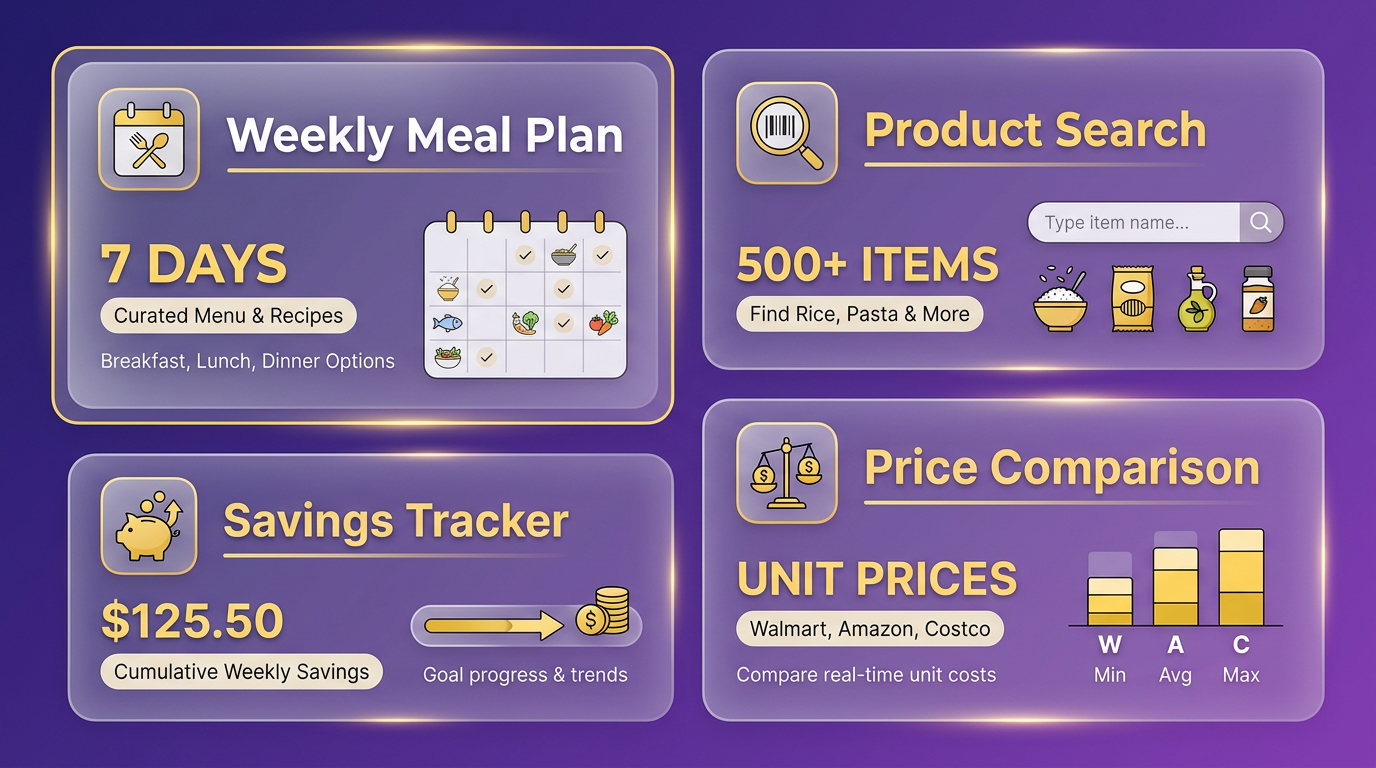
To integrate this into your routine:
- List ingredients for your weekly meals.
- Search each item on Popgot to compare prices.
- Adjust recipes if cheaper substitutes exist (e.g., generic brands).
This method reduces time spent hunting for deals while ensuring cost-effective meal prep.
Staying Within Budget Using Unit Price Tracking
Popgot’s unit price tracking prevents overspending on larger packages that aren’t actually cheaper. For instance, a “family pack” of pasta might cost $12 for 4 lbs, but Popgot could reveal that splitting into two $3.50 1-lb packages saves $2 total. Building on concepts from the Accessing Real-Time Price Data from Multiple Retailers section, the app also flags sales, like Amazon’s 20% off pasta sauce, which might make a $5 bottle worth $4. This granular control keeps your grocery bill predictable.
To use this feature:
- Set a weekly budget in Popgot’s app.
- Track unit prices for recurring items (e.g., milk, eggs).
- Adjust quantities based on price drops or sales.
As discussed in the Why Comparing Food Prices Matters section, a family of four using Popgot reported saving $50 weekly by avoiding overpriced bulk items and using sales alerts.
Example Grocery Plans with Real Savings
Consider planning a week of lunches around tacos. Popgot’s search for “tortillas” might show Costco’s 12-count soft-flour pack at $3.99 ($0.33 each) versus Walmart’s 10-pack at $3.29 ($0.33 each). Both prices match, but Costco’s extra two tortillas make it the better choice. For protein, Popgot could reveal that Amazon’s ground beef is $3.99/lb, while Walmart’s is $4.49/lb. Choosing Amazon saves $1.50 per pound, adding up to $15 for two pounds.
Here’s a sample Popgot-optimized week:
- Breakfast: Generic-brand cereal ($3.50 vs. name-brand $5.99).
- Lunch: Costco tortillas + Amazon ground beef + Walmart salsa (sales matched).
- Dinner: Popgot-recommended rice (bulk Costco bag vs. smaller Amazon packs).
By cross-referencing prices in real time, this plan slashes 40% off the original estimate.
Final Tips for Consistent Savings
- Scan receipts post-purchase to log prices for future comparisons.
- Use Popgot’s app while shopping to avoid impulse buys.
- Revisit plans weekly, as prices change frequently.
With these strategies, Popgot transforms grocery planning from a chore into a money-saving routine. For more examples, explore how users slash back-to-school bills or dive into detailed unit price guides.
Accessing Real-Time Price Data from Multiple Retailers
Popgot accesses real-time price data from major retailers like Amazon, Walmart, Target, Costco, and Sam’s Club by automatically extracting and calculating unit prices using AI, as detailed in the Calculating and Comparing Unit Prices Across Stores section. This ensures you get accurate comparisons across platforms, helping you save 30–60% on groceries, a figure highlighted in the Why Comparing Food Prices Matters section. The process focuses on unit pricing-cost per ounce, pound, or sheet-so you can identify the best deals instantly. Below, we break down how this system works and how it benefits your shopping decisions.
How Does Popgot Retrieve Data from Retailers?
Popgot scans major retailers’ websites and uses AI to calculate unit prices for products, eliminating the need to manually compare labels. This covers staples like rice, pasta, and cleaning supplies across Amazon, Walmart, Target, and Costco. For example, you can compare rice prices as low as $0.33 per pound from retailers like Aldi or Kroger. The tool aggregates data from over a dozen retailers, including Sam’s Club and Trader Joe’s, to ensure comprehensive coverage.
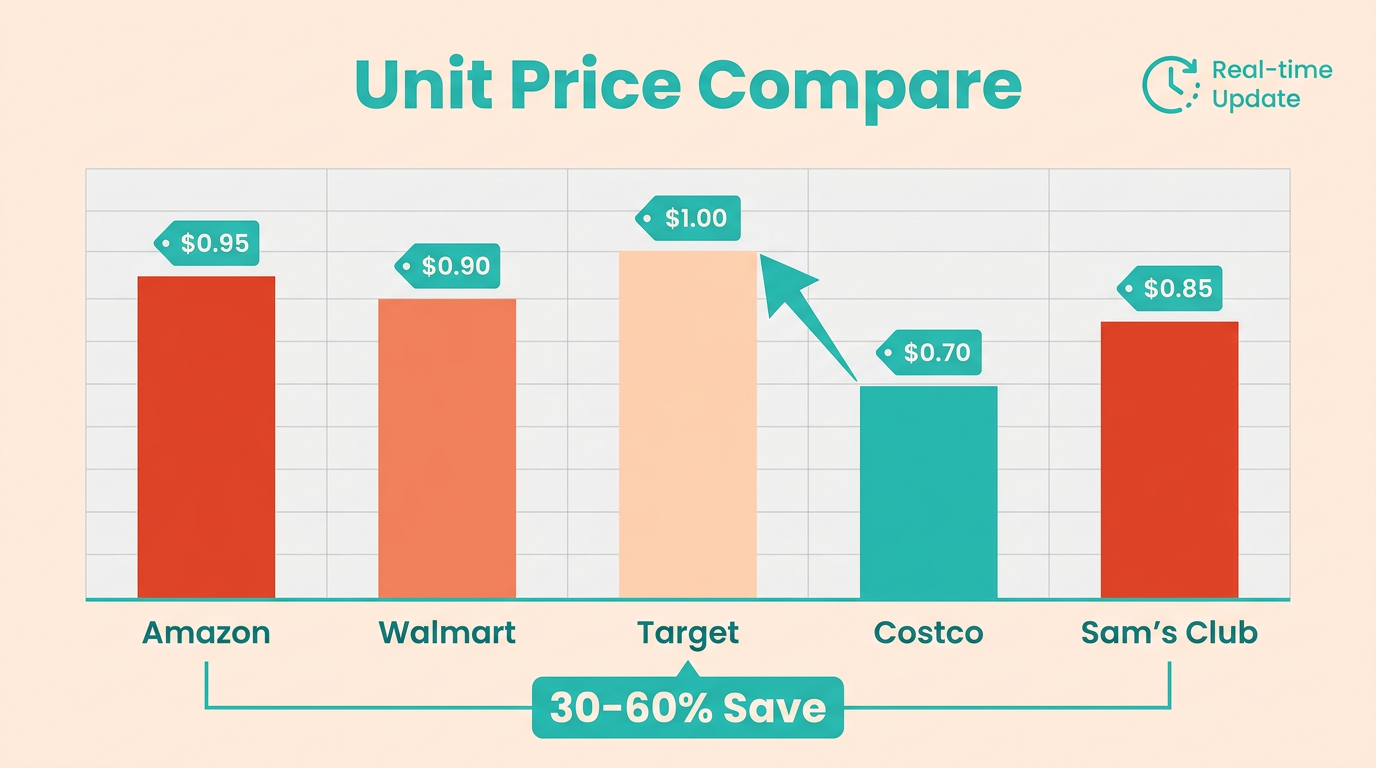
By focusing on unit prices instead of total costs, Popgot removes guesswork, a concept expanded on in the Calculating and Comparing Unit Prices Across Stores section. A $22 bottle of oil might seem expensive until compared to a $3 alternative offering the same value per ounce. This method ensures you’re not misled by bulk pricing or promotional tactics.
Why Are Real-Time Updates Critical for Price Comparisons?
Real-time updates ensure Popgot reflects current prices, accounting for sales, stock changes, or regional discounts. Unlike static comparisons, Popgot’s system recalculates unit prices dynamically as retailers adjust their listings. For instance, a box of pasta priced at $0.06 per ounce at Target might drop to $0.04 per ounce at Costco during a sale-Popgot highlights this shift instantly.
This feature is especially valuable for time-sensitive purchases. A Reddit user noted that Popgot “changed our staples spending the most” by flagging sudden price drops at Walmart or Amazon. Without real-time data, shoppers risk paying higher prices due to outdated comparisons, a risk emphasized in the Why Comparing Food Prices Matters section.
What Do Real Comparisons Look Like in Practice?
Consider household items like rice or pasta, where small unit price differences add up. Popgot’s AI identifies that a 5-pound bag of rice at Amazon costs $1.65 per pound, while a similar product at Aldi costs $1.15 per pound. For beverages, a 12-ounce soda might cost $0.30 per ounce at Target but only $0.22 per ounce at Walmart. These examples show how Popgot’s unit pricing model, explained in the Calculating and Comparing Unit Prices Across Stores section, uncovers savings you’d miss with traditional comparisons.
“Popgot is the one tool that changed how we buy staples,” shares a user on Reddit. “We save hundreds a month by catching better unit prices at Target or Costco.”
By focusing on real-time unit pricing and covering major retailers, Popgot simplifies grocery shopping and ensures you always pay the lowest possible price.
using Curated Shopping Guides for Popular Food Items
The guides function as dynamic price trackers, pulling real-time data from retailers to show you the lowest available unit prices. As mentioned in the Accessing Real-Time Price Data from Multiple Retailers section, this real-time integration ensures accuracy by drawing from major retailers like Walmart, Costco, and Amazon.
...
The value of Popgot’s guides becomes clear when you see how they uncover hidden savings. Consider a scenario where a $22 bottle of syrup is marketed as a premium product. Building on concepts from the Calculating and Comparing Unit Prices Across Stores section, Popgot’s analysis might reveal that a $3 alternative offers the same quality but at a fraction of the cost per ounce.
...
Popgot enhances the shopping guide experience with filters that narrow results based on your priorities. As discussed in the Configuring Search Filters for Food Products section, you can sort products by lowest unit price, highest savings potential, or availability at your preferred store.
References
[1] Popgot | Shop with AI that reads every label - https://popgot.com/
[2] I'm working on Popgot (https://popgot.com), a tool that tracks unit ... - https://news.ycombinator.com/item?id=43821480
[3] Grocery Price Comparison: Save 30% with Popgot - https://popgot.com/blog/grocery-compare-manual-vs-popgot
[4] Get the Best Deals Using Popgot - https://popgot.com/blog/get-the-best-deals-using-popgot
[5] price comparison apps that actually help on a tight budget - Reddit - https://www.reddit.com/r/povertyfinance/comments/1rrmahu/price_comparison_apps_that_actually_help_on_a/
[6] This Free Grocery Price Comparison Will Help You Save ... - YouTube - https://www.youtube.com/watch?v=HyIpu7Rf-xU
[7] Rice | Compare Unit Prices - Popgot - https://popgot.com/rice
[8] Pasta | Compare Unit Prices - Popgot - https://popgot.com/pasta
[9] Pops didn't believe me😂 #Shorts by mmmjoemele - https://www.youtube.com/watch?v=3fVr4LHEREc
Frequently Asked Questions
1. How much can users save using Popgot?
Popgot helps users save 30–60% on groceries by comparing prices across Costco, Walmart, Target, Amazon, and Sam’s Club using AI-powered unit pricing to identify the best deals instantly.
2. Which retailers does Popgot support for price comparisons?
Popgot supports Costco, Walmart, Target, Amazon, Sam’s Club, Aldi, and Trader Joe’s in select categories, ensuring multi-retailer coverage to find the lowest prices.
3. How does Popgot calculate unit pricing accurately?
Popgot’s AI reads product labels and calculates unit pricing automatically, such as $0.16 vs. $0.17 per ounce for pasta sauce, accounting for packaging variations and brand differences.
4. Does Popgot verify product details beyond pricing?
Yes, Popgot verifies ingredients, expiration dates, and product specifics across retailers to prevent errors like buying expired or lower-quality items during price comparisons.
5. How many products can Popgot compare?
Popgot supports comparisons for over 5,000 products by scanning labels and packaging variations, ensuring accurate cost-per-ounce comparisons for groceries and household items.
6. How quickly does Popgot provide price data?
Popgot delivers real-time price data from five major retailers in seconds, using automated tracking to eliminate delays and ensure up-to-date grocery shopping decisions.
7. How does Popgot save time compared to manual calculations?
Popgot automates cost-per-ounce calculations, reducing errors and saving time by instantly identifying the cheapest options for common household items across multiple retailers.